
Features
Front desk software: check-in, check-out and walk-ins
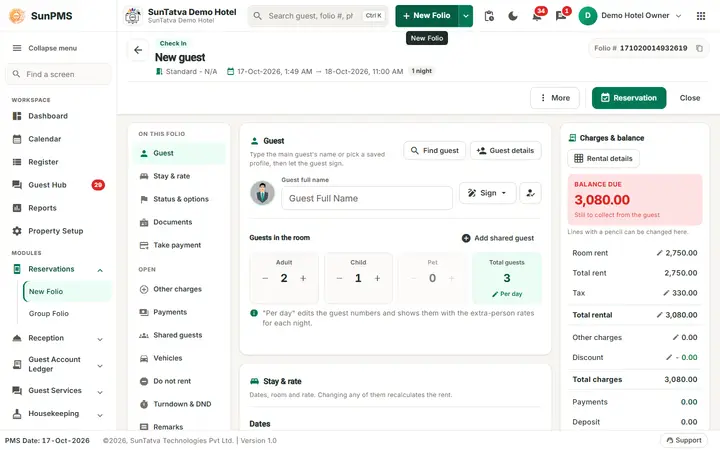
SunPMS gives the front desk one folio screen for a future reservation, a walk-in, an in-house stay and a checked-out stay. The title and the buttons change with the stage, so staff always know what they can do next.
What you can do
- Take a reservation or a walk-in on the same folio screen
- Check guests in with documents, ID and signature on file
- Change rooms, amend dates, extend a stay or give a late check-out
- Check out with an invoice that can be printed or e-mailed
- See the house at a glance in the dashboard, register and property calendar
- Find any guest or reservation with search and deep guest search
Watch
Guides for front desk and check-in
Every screen, field and message is explained in the Help Center.
New Folio - Reservation or Walk-in Check-in
Click New Folio (the green split button in the header; the arrow next to it opens a menu with New Folio and Group Folio;
Read the guide →Checking in a Reservation
Checking in a Reservation. Checking in a Reservation Part of the SunPMS Help Center.
Read the guide →Assigning and Changing a Room
Assigning and Changing a Room. Assigning and Changing a Room Part of the SunPMS Help Center.
Read the guide →Check-out, Settlement and Invoice Printing
The footer has Back, Close, Next and the primary Check Out. The same rules and messages as the folio button apply.
Read the guide →Dashboard
The Dashboard is the manager's and front desk's one-page view of the property today: what is arriving and leaving, what needs…
Read the guide →Search Reservation
Finds reservations by status, name, reservation ID, room, dates and channel, and lets you open, copy, cancel, re-activate or…
Read the guide →Late CheckOut
Late CheckOut lists in-house guests whose departure date has already passed but who have not been checked out.
Read the guide →Amending Dates and Extending a Stay
Guests change their plans: they arrive a day later, stay longer or leave early.
Read the guide →Main layout and header
After you sign in, every SunPMS screen has the same frame: a header across the top, a side menu on the left, the working area in…
Read the guide →Sidebar menu
The side menu is the full menu of SunPMS. On a desktop screen (wider than 900 pixels) it is always on the left, 234 pixels wide…
Read the guide →Footer (PMS date and Support)
The footer (status bar) is the 40 pixel bar fixed at the bottom of every screen; it does not scroll with the page.
Read the guide →Register
The Register is a table with one row per room for the selected date, grouped by room type.
Read the guide →Property Calendar
The Property Calendar (tape chart) shows rooms down the side and dates across the top. Each stay is a coloured bar.
Read the guide →Restriction View
The Restriction screen (heading Restriction, small caption "REVENUE STUDIO - RESTRICTIONS") decides which bookings are allowed…
Read the guide →Guest Ledger (tabbed view)
One screen with five tabs showing today's guests: In House Guests, Guests To Check Out, Guests Checked Out, Reservations and…
Read the guide →User profile (Account Details)
Shows and edits your own sign-in account (stored centrally in SunAuth, so changes apply to every property you can access) and…
Read the guide →Shift Details (start and end shift)
When Shift Operation is turned on (Feature Setting), every user must open a shift before working and close it when leaving.
Read the guide →Phone and tablet layout
SunPMS adapts to the width of your screen. The same screens, rules and privileges apply on a desktop, a tablet and a phone;
Read the guide →Frequently asked questions
Where did the Dashboard, Calendar, Register and Reports tabs go?
They are the Workspace group at the top of the side menu (and the tab bar on phones).
Where is the chat?
The chat button is next to the bell. If you do not see it, see Chat problems.
The Guest Hub entry is missing.
The property needs the Guest Interface licence. See the Licences screen.
The Pending Reservation button is missing.
The property is not connected to a CRS / channel manager.
Why did New Folio change its name?
The caption follows the New Folio title setting of the property.
Where is my User ID?
It is not shown in the account menu; quote your e-mail and Client Id to support.
See SunPMS with your own hotel in mind
Request a walkthrough and we will show the screens your team will use every day.