
Guest Ledger (tabbed view)
On this page
One screen with five tabs showing today's guests: In House Guests, Guests To Check Out, Guests Checked Out, Reservations and Guests To Change Room, each with a count. The menu now opens each tab as its own page, see Guest account ledger lists; this older tabbed page remains reachable and is used inside Night Audit (breadcrumb "Audit / Night Audit").
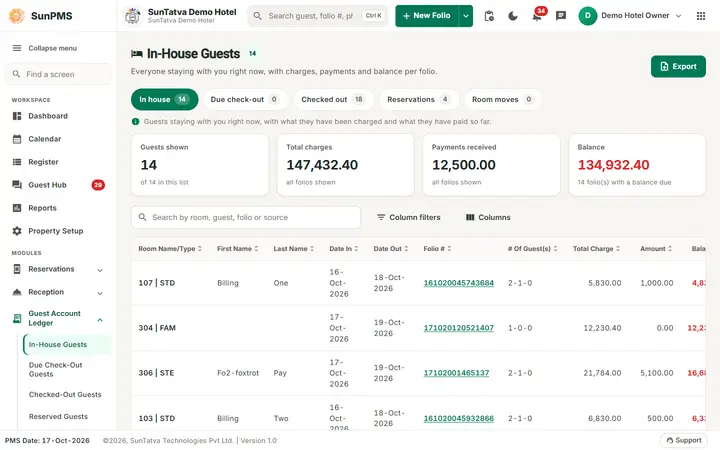
Screen layout
Heading with the list name and count (for example "In-House Guests 14"), a one-line description, and an Export button. Under it five tabs with counts: In house, Due check-out, Checked out, Reservations, Room moves. A short info line explains the active list.
Figure cards summarise the list: Guests shown ("n of m in this list"), Total charges, Payments received and Balance ("n folio(s) with a balance due"), each computed over the folios shown.
The toolbar has Search, Column filters (a filter box under every heading) and Columns (choose the visible columns). Rows:
| Column | Meaning |
|---|---|
| Room Name/Type (on Room moves shown as To Room, plus From Room) | Room and type. |
| First Name, Last Name | Guest. |
| Date In, Date Out | Stay dates. |
| Folio # | Folio number. |
| # Of Guest(s) | Adults-children-pets, for example 2-1-0. |
| Total Charge, Amount, Balance, ADR | Money fields. Amount = paid. |
| Sales & Channels | Where the booking came from. |
| Status | For example Balance due. |
| Actions | Open opens the folio. |
Column filters: text columns match the start of the value; number and date columns take an operator (=, > or <). On a phone each row is a card.
How to use
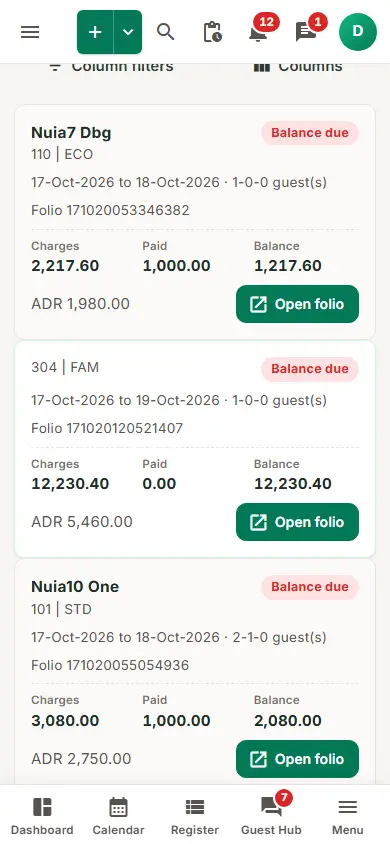
On a phone each folio is a card with Charges, Paid, Balance and an Open folio button.
- Click a tab.
- Filter or sort columns.
- Double-click a row, or click Open, to open the folio (past-dated stays need Access to Past Days: "Sorry, you do not have permission to access past dated transaction.").
- Export > PDF or Excel. Disabled when the tab is empty. Excel titles: "In-House Guests Ledger", "Due Check-Out Guests Ledger", "Checked-Out Guests Ledger", "Reservations Ledger", "Guests To Change Room Ledger".
What each tab includes (PMS date)
See the rules in Guest account ledger lists.
Messages you may see
| Message (exact text) | Why it appears | What to do |
|---|---|---|
| Sorry, you do not have permission to access past dated transaction. | You double-clicked a stay that is entirely before the PMS date without Access to Past Days. | Ask a manager for the privilege. |
| No record found! | The tab has no guests for the PMS date (Export is disabled then). | Nothing to do. |
Tips and FAQ
- Q: Why do the sidebar lists and this page not look the same? A: The sidebar opens each tab as its own page; this tabbed page is the older layout kept for Night Audit.
- Q: What does "Amount" mean? A: The amount already paid on the folio; Balance is charges minus payments.
- Q: Where is "Guests To Change Room" in the sidebar? A: It is called Room Move Requests there.