Phone and tablet layout
On this page
SunPMS adapts to the width of your screen. The same screens, rules and privileges apply on a desktop, a tablet and a phone; only the frame and the way lists are drawn change. All controls are at least 44 pixels high so they are easy to touch.
Before you start
- Nothing to switch on: the layout follows the width of the browser window. A narrow desktop window behaves like a tablet or phone.
- Housekeeping Mobile (
#/hk) and the guest portal have their own phone pages and are not described here.
Screen layout
| Width | Frame |
|---|---|
| Over 900 pixels (desktop, large tablet landscape) | Fixed header on top, side menu on the left (234 pixels, or a 68 pixel rail when collapsed), fixed status bar at the bottom. |
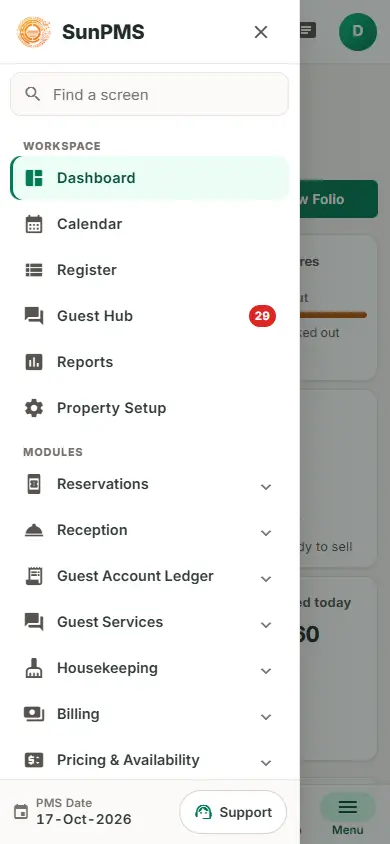
| 601 to 900 pixels (tablet) | Same header and status bar. The side menu becomes a drawer: the Menu button at the left of the header slides it in over the page with a dark backdrop. Pick a screen, or tap the backdrop or the x, to close it. |
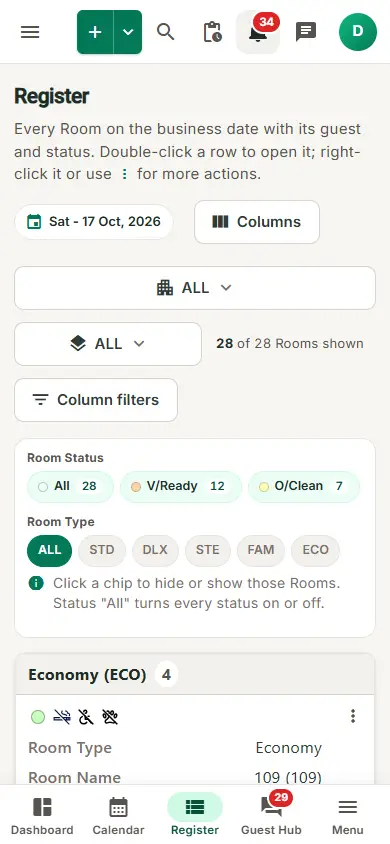
| 600 pixels or less (phone) | The status bar is replaced by a tab bar at the bottom. The drawer's foot shows the PMS Date and the Support button. Wide tables are drawn as cards. |
Tab bar (phones)
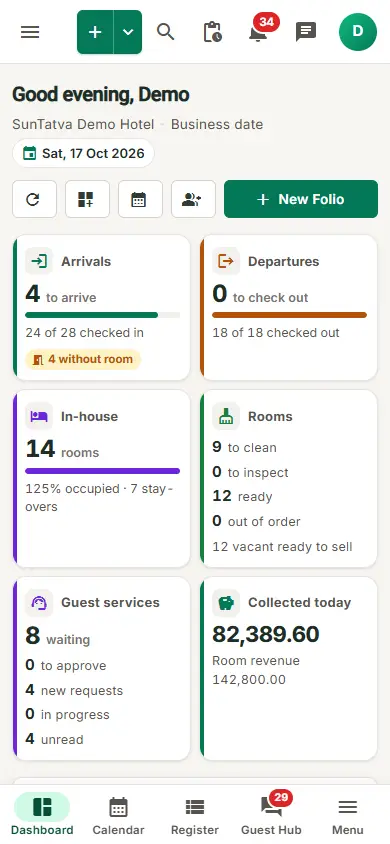
Five buttons along the bottom edge; the current one is highlighted.
| Tab | Opens | Rules |
|---|---|---|
| Dashboard | Dashboard | Needs the privilege Access to Dashboard; without it this tab is Reports. |
| Calendar | Property Calendar | Always. |
| Register | Register | Always. |
| Guest Hub | Guest Hub, with the unread count | Needs the Guest Interface licence; without it this tab is New (a new folio, captioned with your New Folio title). |
| Menu | Opens the side menu drawer | Always. |
Drawer foot (phones)
Under the menu entries: PMS Date with the business date, and Support, which opens the support panel (see Support widget); a red badge counts unread replies (9+ above nine).
Header on a phone
The header keeps the Menu button, the brand, the search field, New Folio (plus icon), the bell, Team chat and your account initial. Dark mode and Change property are in the account menu. See Main layout and header.
Lists as cards
On phones, about thirty wide tables are stacked as cards, one per row, with the same data and the same row actions: for example Find guest, Guest Database, rental tables, audit trail, split folio, invoices, imports and OTA reconciliation. Date grids such as the Property Calendar and the rate and availability screens keep sideways scrolling by design: swipe left and right.
How to use SunPMS on a phone
- Sign in as usual and open the property from the landing page.
- Use the tab bar for Dashboard, Calendar, Register and Guest Hub.
- Tap Menu for every other screen, or use Find a screen at the top of the drawer.
- Tap Search in the header to find a guest by name, folio number, phone or reservation ID. Result: the screen you chose opens and the drawer closes.
What happens behind the scenes
- The layout is decided by CSS media queries on the window width; nothing is saved on the server.
- Fields use 16 pixel text on touch screens so the browser does not zoom in when you tap a field.
Tips and FAQ
- Q: The tab bar shows Reports instead of Dashboard. A: Your role lacks Access to Dashboard.
- Q: The tab bar shows New instead of Guest Hub. A: The property has no Guest Interface licence.
- Q: Where is the PMS Date on a phone? A: At the foot of the menu drawer.
- Q: Can I rotate the tablet? A: Yes; above 900 pixels the side menu stays on screen.
Screenshots