Customize the dashboard and work the missed arrivals
On this page
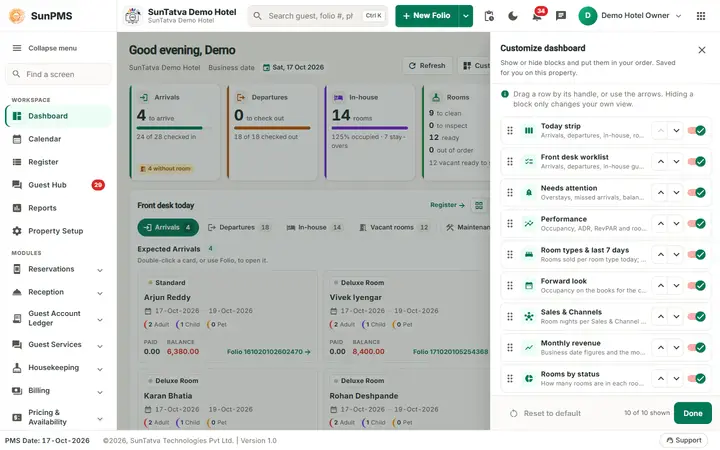
Two tools on the Dashboard work in a side panel that slides in from the right: Customize, which lets each user choose and order the dashboard blocks, and Missed arrivals, an action list for reservations whose arrival date has passed.
Before you start
- Customize is saved for you alone, per property. Hiding a block never changes data or anyone else's dashboard.
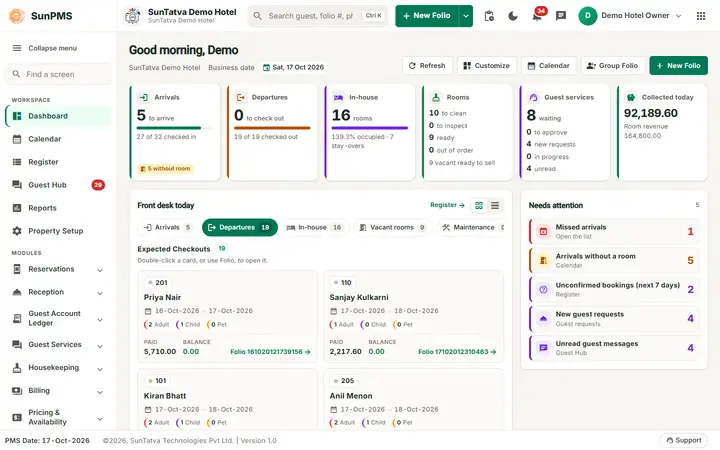
- The Missed arrivals count is in Needs attention and needs no setting. To cancel from the list you need Access to cancel reservation.
Screen layout
Customize dashboard
| Part | What it does |
|---|---|
| One row per block | Today strip, Front desk worklist, Needs attention, Performance, Room types & last 7 days, Forward look, Sales & Channels, Monthly revenue, Rooms by status, Housekeeping. Each row has a short description. |
| Handle (six dots) | Drag the row up or down to move the block. |
| Up / down arrows | Move the block one place without dragging (use these on touch screens or with the keyboard). |
| Switch | Show or hide the block. A hidden row is dimmed. |
| Reset to default | Restores the standard order and shows every block. Disabled while the layout is already the default. |
| "n of m shown" and Done | Closes the panel. |
Rooms by status and Housekeeping sit side by side in one column when both are shown.
Missed arrivals
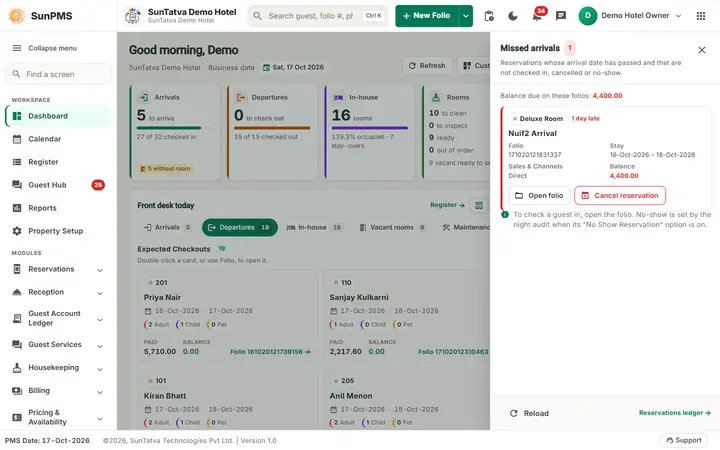
The panel title shows the count. A short note explains the list: reservations whose arrival date has passed and that are not checked in, cancelled or no-show. When any have a balance, "Balance due on these folios" gives the total. Each reservation shows the room (coloured by room type), how many days late, chips Unconfirmed and Non-refundable when they apply, the guest name, folio number (and CRS number), stay dates, Sales & Channels, group and balance (red when owed).
| Button | What it does |
|---|---|
| Open folio | Opens the reservation so you can check the guest in, change dates or take payment. |
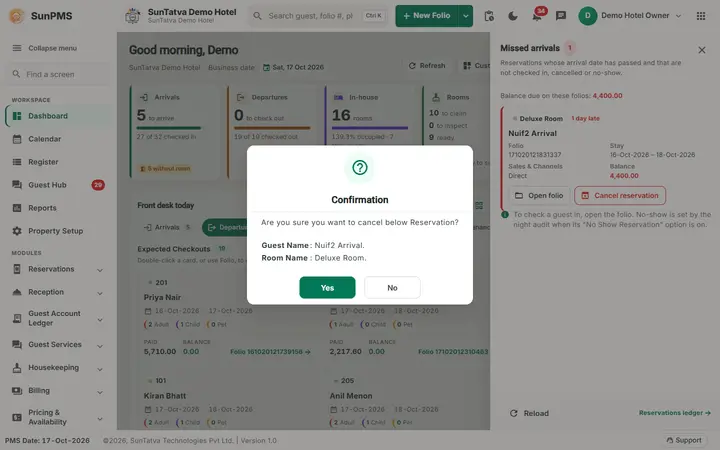
| Cancel reservation | Asks "Are you sure you want to cancel below Reservation?" with guest and room; Yes cancels it through the normal cancel flow (same as Cancel Reservation on the Register). Disabled, with the tooltip "No permission to cancel reservations", without the privilege. |
| Reload (foot) | Reloads the list. |
| Reservations ledger (foot) | Opens the Guest Ledger > Reserved list. |
How to customize the dashboard
- On the Dashboard click Customize.
- Switch off the blocks you do not need.
- Drag the rows (or use the arrows) into the order you want.
- Click Done. Result: the dashboard shows only the chosen blocks in your order, and the layout is remembered the next time you sign in. A dot on the Customize button shows that the layout is not the default. If you hide everything, the page says "Every block is hidden." with a Customize button.
How to go back to the standard layout
- Click Customize, then Reset to default, then Done.
How to work the missed arrivals
- In Needs attention click Missed arrivals (the count shows how many).
- Read each reservation. If the guest is still coming, click Open folio and handle it (check in, move the dates).
- If the guest will not come and the reservation should be cancelled, click Cancel reservation and confirm.
- Close the panel with x or Esc. Result: the list, the Needs attention count and the Sales & Channels figures refresh. Cancelling follows the same rules as everywhere else: cancellation charges, deposits and refunds are handled as on the Register.
What happens behind the scenes
- The layout is stored in the user's persona under the key
DashboardLayout(per user and property), so it follows you to another computer. - No-show is not set from here: the night audit marks reservations as no-show when its "No Show Reservation" option is on (see Night Audit).
Messages you may see
| Message (exact text) | Why it appears | What to do |
|---|---|---|
| No missed arrivals. | Nothing is overdue. | None. |
| The list is not available right now. | The server call failed. | Click Reload. |
| Are you sure you want to cancel below Reservation? | You clicked Cancel reservation. | Yes to cancel, No to keep. |
| Reservation cancelled. | The cancel went through. The panel then shows "No missed arrivals." when it was the last one. | Click OK. |
Tips and FAQ
- Q: I hid a block by mistake. A: Customize > switch it on, or Reset to default.
- Q: Does my colleague see my layout? A: No, it is per user.
- Q: The Cancel button is grey. A: Your role lacks Access to cancel reservation, or another action is in progress.
Screenshots