
Features
Reservation and folio billing software for hotels
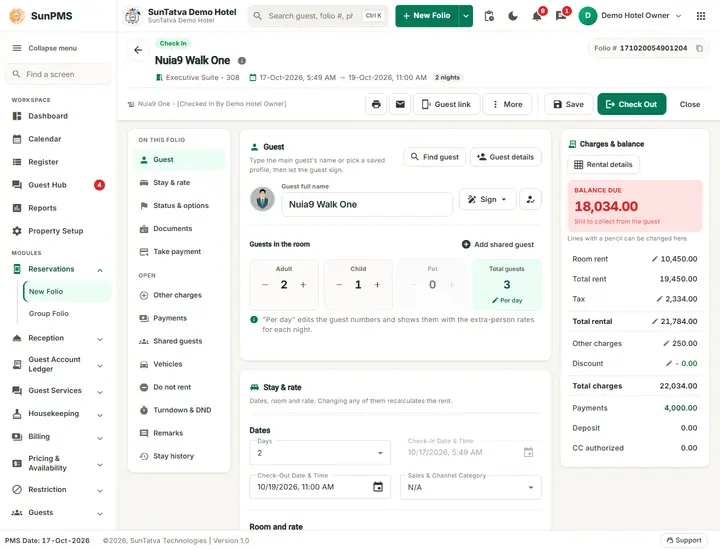
Everything about a booking lives on its folio: the guest, dates, room, rate, extra charges, payments, documents and remarks. The manual explains the balance formula, taxes, discounts and every payment case with worked examples.
What you can do
- Folio balance, rate and tax rules explained with worked examples
- Discounts, other charges, complimentary and house-use stays
- Payments, deposits, receipts, currencies and payment transfer
- Split a folio between guests or companies
- Group reservations and room blocks
- Cancel and no-show charges, undo check-in, locked and read-only copies
- Print or e-mail confirmations and invoices, and share by WhatsApp
Watch
Guides for reservations and folio billing
Every screen, field and message is explained in the Help Center.
Folio - How the Balance Due Is Calculated
The Charges & balance on the folio is the one place that shows what the guest owes.
Read the guide →Folio - Discount
The discount takes one amount off the bill of the whole stay. You choose which parts of the bill it is calculated on (rent…
Read the guide →Folio - Payments in Detail
Payments, advance, deposit and refund lists the fields and messages. This page follows real sessions in the demo hotel with the…
Read the guide →Split Folio
Split Folio copies part of the rent, other charges and payments of a stay onto a second, separate invoice for one guest.
Read the guide →Group Reservation and Group Check-In
A group ties many room folios to one group record (name, dates, rate, sales channel, group payments and charges).
Read the guide →Folio - Money When a Booking Is Cancelled or No-Show
This page follows the money of a cancelled booking. For the steps of cancelling and re-activating see Cancel and no-show.
Read the guide →Printing and E-mailing the Folio
The three icons in the header of a saved folio (next to Guest link and More) open the same list of documents for Print, WhatsApp…
Read the guide →Reservations and Folios - Overview
A folio is the single record of one guest stay in one room: the guest, dates, room, rate, extra charges, payments, documents and…
Read the guide →New Folio - Reservation or Walk-in Check-in
Click New Folio (the green split button in the header; the arrow next to it opens a menu with New Folio and Group Folio;
Read the guide →Folio - Stay and Rent Details
The folio is one page with three columns. The left list ON THIS FOLIO jumps to a section (Guest, Stay & rate, Status & options…
Read the guide →Folio - Guest Details and Documents
Folio - Guest Details and Documents. Folio - Guest Details and Documents Part of the SunPMS Help Center.
Read the guide →Folio - Other Charges
Other charges are anything billed besides room rent: laundry, minibar, extra bed, restaurant room charges.
Read the guide →Folio - Payments, Advance, Deposit and Refund
The Take payment section is the last section of the folio (click Take payment in the ON THIS FOLIO list).
Read the guide →Folio - Remarks, Turndown, History and Extra Info
Besides stay, guest, charges and payments, a folio keeps notes and small service settings: free-text remarks in six categories…
Read the guide →Folio - Saving and Confirming
Folio - Saving and Confirming. Folio - Saving and Confirming Part of the SunPMS Help Center.
Read the guide →Assigning and Changing a Room
Assigning and Changing a Room. Assigning and Changing a Room Part of the SunPMS Help Center.
Read the guide →Amending Dates and Extending a Stay
Guests change their plans: they arrive a day later, stay longer or leave early.
Read the guide →Cancelling a Reservation and No-Show
Cancelling a Reservation and No-Show. Cancelling a Reservation and No-Show Part of the SunPMS Help Center.
Read the guide →Frequently asked questions
Where do I find a booking?
Use Find Reservation (Reception menu), the Dashboard lists, the Register or the Calendar, then open the folio.
Why does the chip say "Reserved" and not "Check In"?
The stay has not been checked in. Use Check In on the day of arrival.
The old addresses #/folio and #/group-folio still work?
Yes, they redirect to #/folio and #/group-folio, so saved bookmarks keep working.
Why is Check In missing?
Date is in the future, or no room is selected.
Can I create a folio from the calendar?
Yes, selecting a cell of the Calendar opens New Folio with room and date preset.
How many characters can a remark have?
500 per category.
See SunPMS with your own hotel in mind
Request a walkthrough and we will show the screens your team will use every day.