Split Folio
On this page
Split Folio copies part of the rent, other charges and payments of a stay onto a second, separate invoice for one guest. Typical uses: a company pays the room and the guest pays the extras, or two guests in one room want separate bills. The original folio is not changed and keeps the full total; the split is only a second printable invoice.
Before you start
- The folio is saved (it has a folio number), and it is not an hourly stay.
- Your role has Access to split folio; otherwise the menu item is greyed out.
- The charges and payments you want to split are already posted on the folio.
Screen layout
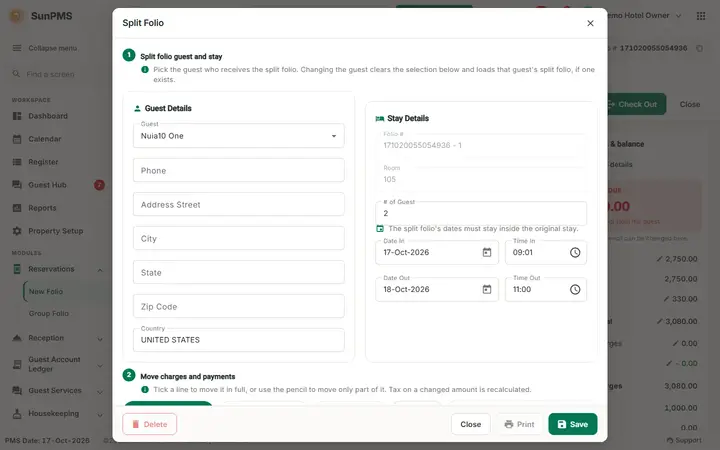
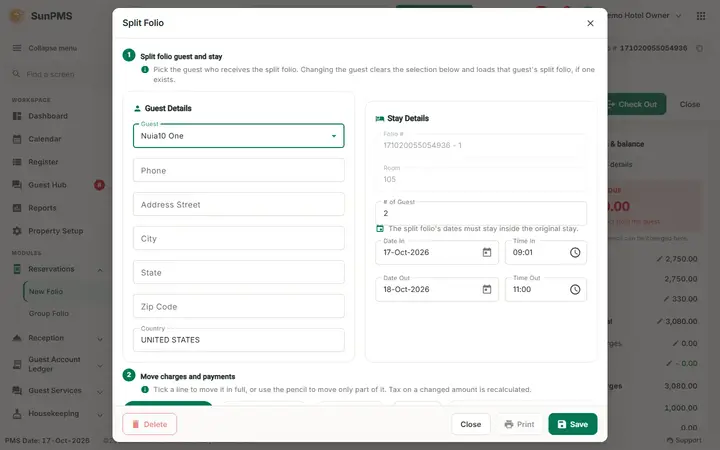
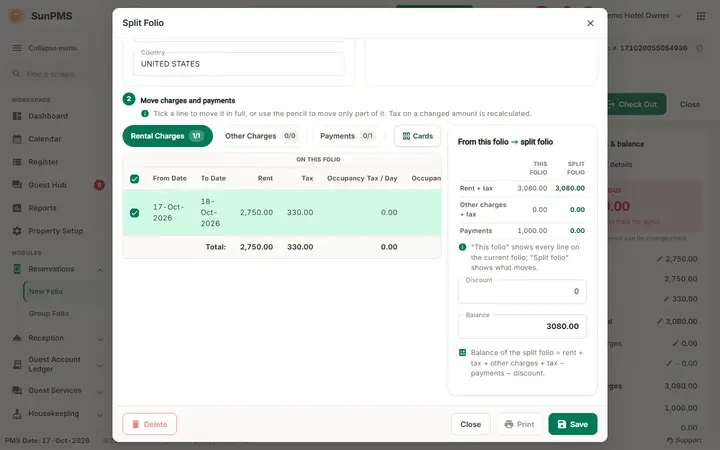
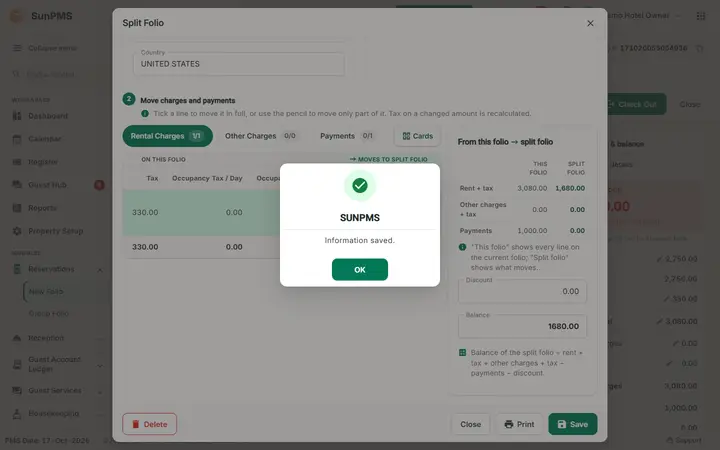
The window Split Folio has two numbered steps. Step 1 - Split folio guest and stay holds the cards Guest Details and Stay Details. Step 2 - Move charges and payments holds the tabs Rental Charges, Other Charges and Payments (each tab shows a count such as 2/5 of ticked lines) and, at the right, the card From this folio -> split folio with the totals, Discount and Balance.
Guest Details (step 1)
| Field | What it means | Rules |
|---|---|---|
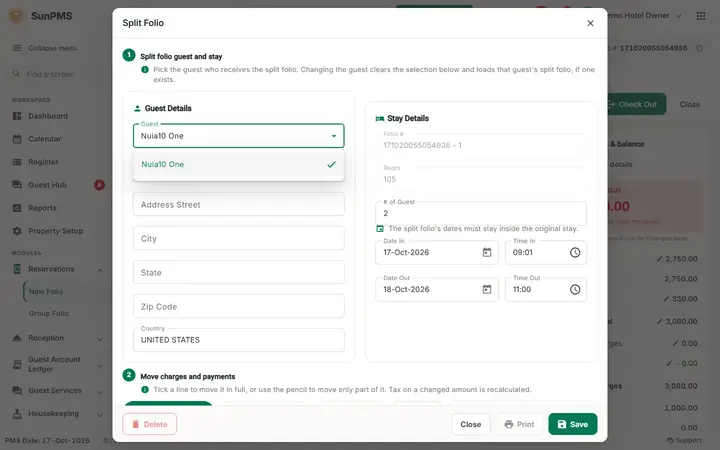
| Guest | The guest the second invoice is made for. | Choose one of the folio's guests; each guest can have one split folio. Choosing a guest fills the other fields. |
| Phone, ID Type, ID #, Address Street, ID State, ID Country, City, State, Zip Code, Country, Veh. Maker, Model & Year, License, Company | The guest data printed on the split invoice. | Editable, to suit the invoice (for example the company address). |
Stay Details
| Field | What it means | Rules |
|---|---|---|
| Folio #, Room | Read only. | |
| # of Guest | Number of guests shown on the split invoice. | Must be from 1 up to the number of adults on the folio. |
| Date In, Time In, Date Out, Time Out | Stay dates printed on the split invoice. | Date In and Date Out must not be the same date (see messages). |
Tabs (step 2) Rental Charges, Other Charges and Payments, with a small icon to switch between Table View and Grid View (cards).
| Tab | Columns | What you do |
|---|---|---|
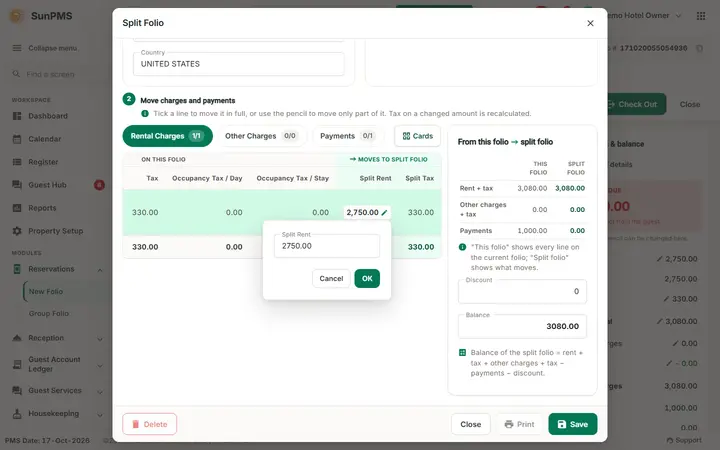
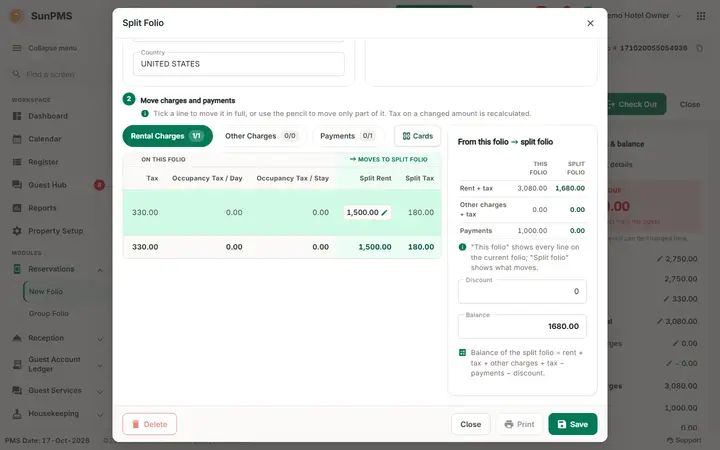
| Rental Charges | tick box, From Date, To Date, Rent, Tax, Occupancy Tax / Day, Occupancy Tax / Stay, Split Rent, Split Tax | Tick the nights to include. Click the pencil next to Split Rent to type a smaller amount, then confirm. The tax is recalculated. |
| Other Charges | tick box, Charges, Date And Time, Amount, Tax, Split Amount, Split Tax | Tick the charges and, if needed, click the pencil next to Split Amount, type the part that belongs on this invoice and click OK. The Split Tax of that charge is recalculated with its tax rules and the Balance is updated. Cancel (or a click outside) keeps the old amount. |
| Payments | tick box, Payment Type, Date And Time, Amount, Split Amount | Tick the payments to show on the split invoice. A payment taken in another room shows "Room:" and a refund shows " |
Each tab shows totals (for example Total Rent, Total Tax, Total Amount, Total Payment). At the bottom: Discount and Balance (read only). Balance = split rent + split rent tax + split charges + split charge tax - split payments.
Buttons:Delete (enabled once a split exists), Save, Print (enabled once saved), Close.
How to split a folio
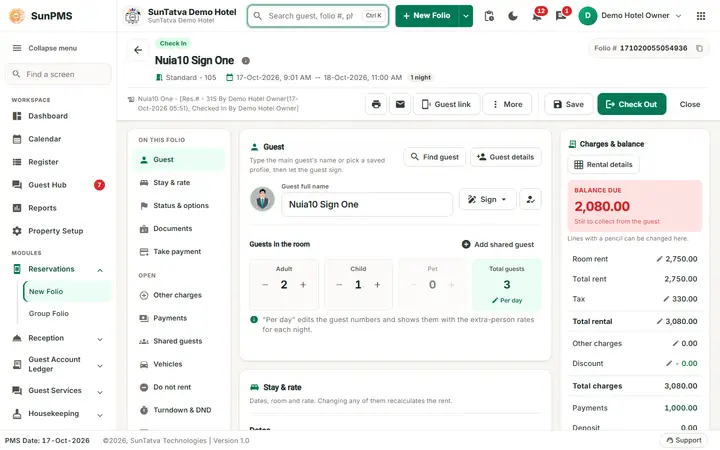
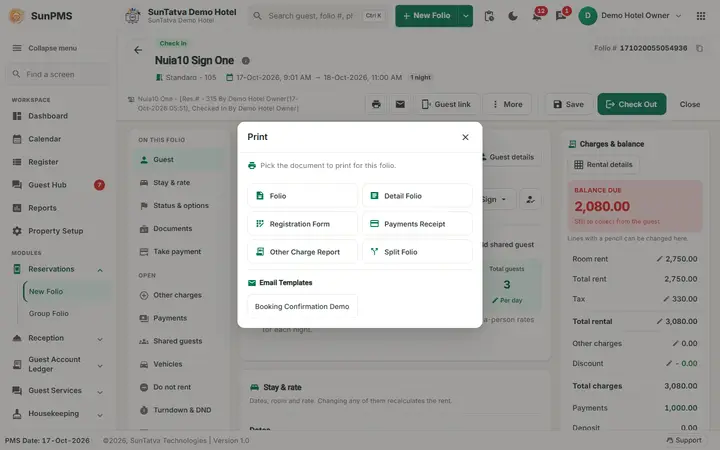
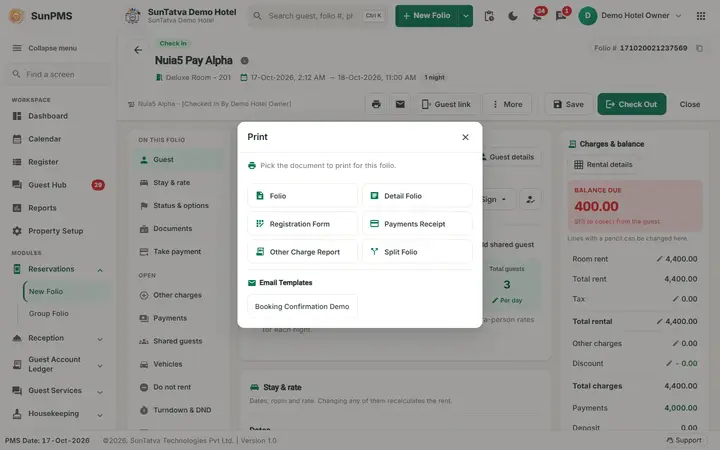
- Open the folio, click the Print icon and choose Split Folio.
- Choose the Guest the invoice is for and check or edit the guest and stay details.
- On Rental Charges tick the nights; to split a part of a night's rent click the pencil in Split Rent, type the amount and click the confirm button. The Split Tax updates.
- On Other Charges tick the charges. For only a part of a charge click the pencil in Split Amount, type the amount and click OK: the Split Tax of that same charge is recalculated and the Balance follows. On Payments tick the payments and edit the split amount if you need only a part.
- Check Discount and Balance.
- Click Save. Result: Information saved.
- Click Print to print the split invoice (a PDF opens in a new tab).
How to change or delete a split
- Open Split Folio again; the saved split is loaded for the chosen guest. Change the ticks and amounts and click Save.
- Click Delete to remove the split folio. Result: Delete successfully. The original folio is untouched.
What happens behind the scenes
- A split amount can never be more than the original line; if it is, the save is refused and the line is named in the message.
- Taxes on a part-rent or part-charge are recalculated with the folio's tax rules, for the line you edited, as soon as you confirm the new amount; Balance then includes the new tax.
- The split invoice is printed from the split data only. Check-out and the folio balance are not affected.
Messages you may see
| Message (exact text) | Why it appears | What to do |
|---|---|---|
| Please select atleast one record from Rental charges or Other charges or Payment. | Save with nothing ticked. | Tick at least one line. |
| Invalid No of Guest | # of Guest is 0 or more than the folio's adults. | Enter a valid number. |
| Number of Guests cannot exceed total Guest. | More guests than on the folio. | Reduce # of Guest. |
| The Date In and Date Out of the split folio cannot be the same. | Date In and Date Out on the split are the same date. (Before 2026-10-17 the text wrongly said the dates must match the check-in dates.) | Set a Date Out after the Date In. |
| Following rent is more than available rent. (with the rent amount and from-date) | A split rent above the original. | Lower the Split Rent. |
| Following charge is more than available charge. (with the charge amount and date) | A split charge above the original. | Lower the Split Amount. |
| Following payment is more than available payment. (with the amount and date) | A split payment above the original. | Lower the Split Amount. |
| Information saved. | Saved. | None. |
| Delete successfully. | Split deleted. | None. |
Tips and FAQ
- Q: Does the original folio change? A: No. Split Folio is a second printout; the original still shows everything.
- Q: Can two guests each have a split? A: Yes, one split per guest; choose the guest at the top.
- Q: Print is greyed out. A: Save first.
- Q: I changed a charge's split amount; which tax changes? A: Only the Split Tax of that charge. It is recalculated when you click OK in the small edit window, whether or not other charges are ticked.
- Q: I need a real second folio that is paid separately. A: Use payment transfer or a group master/member folio instead (Group reservation).
Screenshots