Folio - Stay and Rent Details
On this page
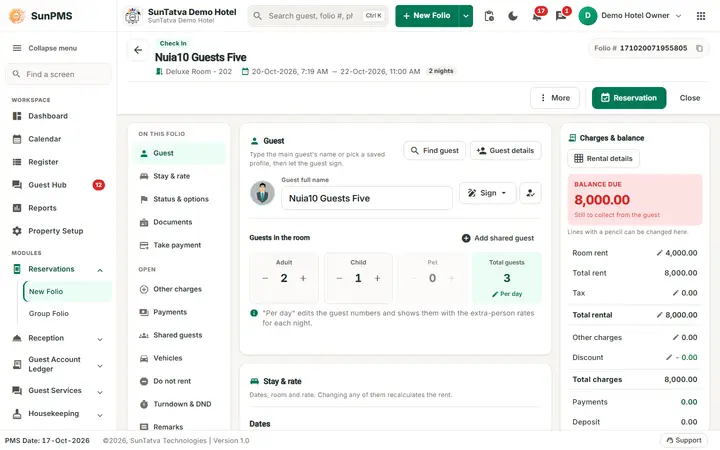
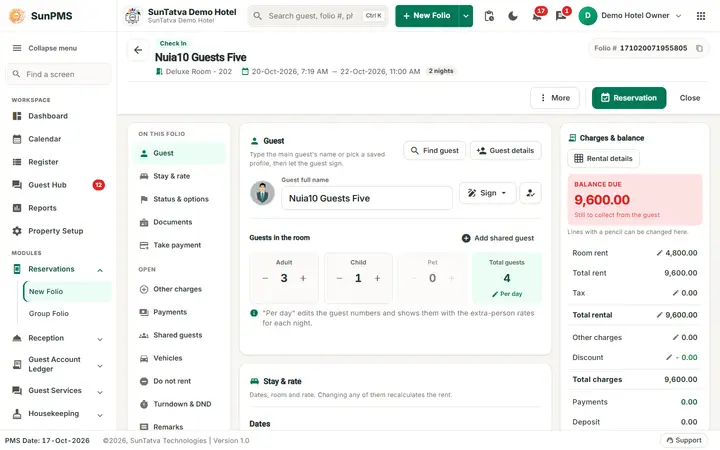
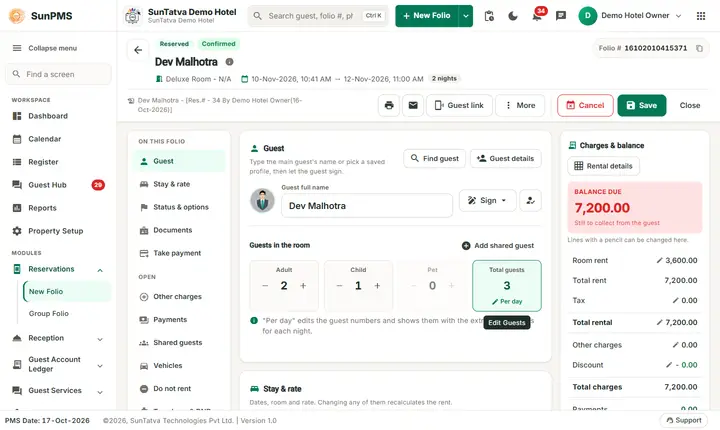
The folio is one page with three columns. The left list ON THIS FOLIO jumps to a section (Guest, Stay & rate, Status & options, Documents, Take payment) and the list OPEN opens a window (Other charges, Payments, Shared guests, Vehicles, Do not rent, Turndown & DND, Remarks, Stay history). The middle column holds the sections, the right column Charges & balance holds the money summary. On a phone the list becomes a row of chips and the balance a bar at the bottom.
With Folio Screen Layout on, the screen is the guided folio instead: the stay fields and the rent by night are in the Stay section. See Simplified Check-In / Reservation Screen.
Screen layout
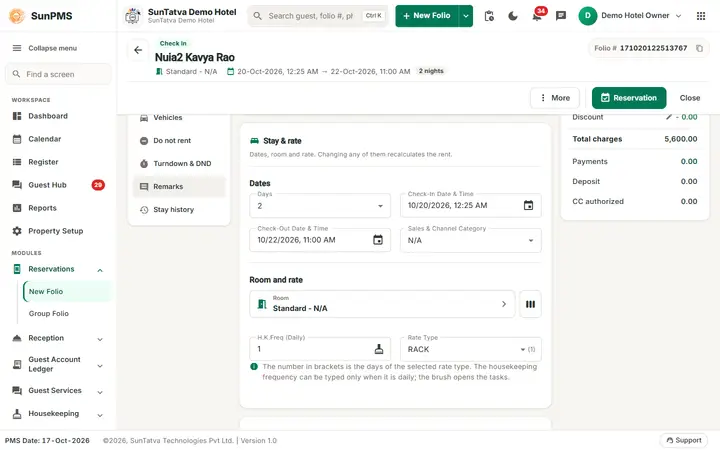
| Field / button | Meaning | Rules |
|---|---|---|
| Guest full name (section Guest) | Title, first, middle, last name, suffix in one box | First name required. Last name may be required by Guest Data Mandatory |
| Guest details button | Opens full guest details and documents | See Guest details |
| Find guest button | Search existing guests and their history | Pick row, Select Guest |
| Sign menu / person-tick icon (Show signature) | Capture the signature On Screen, or on a signature pad or tablet (Signature pad or tablet (SunHardware), needs the licence); the icon shows the saved signature | |
| Add shared guest | Adds a guest who shares the room | See Guest details |
| Days (or Hours for hourly) (section Stay & rate > Dates) | Number of nights | Changing it moves check-out. Reducing needs privilege |
| Check-In Date & Time | Arrival | Locked once checked in. Min date: see New folio |
| Check-Out Date & Time | Departure | Cannot be before check-in; locked after check-out. Max is the rate max date |
| Sales & Channel Category | Booking source (shown when Business source is enabled) | Choosing one opens the Sales & Channel Rate dialog (channel, prepaid, tax exempt, apply rate, commission) |
| Room button (shows "Room type - Room", under Room and rate) | Opens Room Selection: search, building and floor chips, room-type list, available rooms. Apply Default Rate, OK, Cancel. Clicking the room type that is already selected simply does nothing (it used to show "New RoomTypeID not changed so could not process this request." and block the window until OK) | Disabled while in-house; use Change Room |
| Columns icon next to the room button | Multiple Room Details (shown if Multiple room is enabled, not hourly, not checked out): room per date range | Edit only future dates |
| H.K.Freq (Daily/Weekly) | Housekeeping frequency; icon opens House Keeping Task | Number editable only for daily type |
| Rate Type (label from setting) + (n) | Rate plan; (n) = rate plan minimum days. The list offers active rate types only; a deactivated one already saved on the folio is still shown | Change recalculates rent |
| Hourly toggle | Switch to hourly rent for today when the room supports it | Cannot be changed after save. Message if no hourly rate: There is no any active Hourly Rate Type configured. |
Charges & balance (right column)
| Row | Meaning |
|---|---|
| Room rent (edit) | Nightly rate. Click row, type, OK (needs rate privilege). Applies to today's rental line |
| Total rent | Sum of rent for all nights |
| Tax (edit) | Occupancy tax. Opens Tax Exempt & Remark: tick a tax to exempt it; asked Full Stay or Partial Stay |
| Total rental (edit) | Rent + tax; typing a new total back-calculates the rate |
| Other Charges (edit) | Opens Other Charges pop-up |
| Discount (edit) | Opens Discount Options: tick Rent, Occupancy Tax, Other Charges, Other Charge Tax; choose Percentage or Amount. Total Discount updates live while you type the value (it used to stay 0.00 until you clicked OK) |
| Total charges, Payments, Deposit, CC authorized | Read-only totals |
| Balance due (big figure, red when money is still to collect, Settled when nothing is due) | Total charges minus payments |
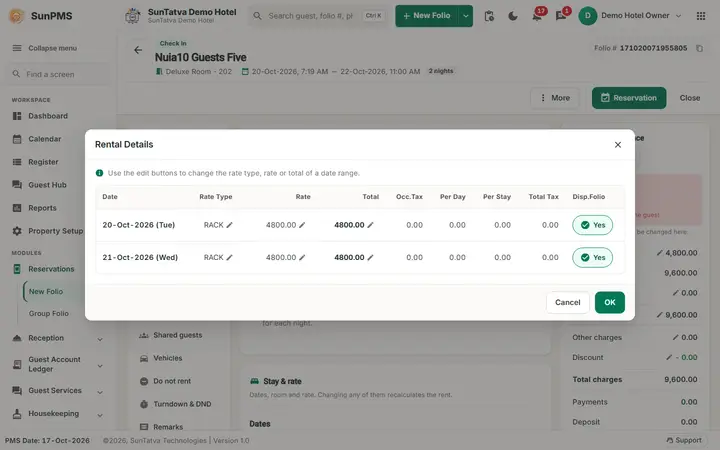
| Rental details button | Day-by-day cards: rate type, rate, total, taxes, Disp.Folio. Rental adjustment (saved in-house folios) posts a rate/tax adjustment for today: Rate & Tax, Rate Only, Tax Only |
Reservation status (section Status & options)
A row of buttons: Confirmed, Unconfirmed, Noshow (saved folios), Cancel (shown only when already cancelled), Transfer-Out (saved folios). Disabled once the guest is checked in or the folio is already No-Show / Cancelled / Transfer-Out.
Guests in the room (section Guest)
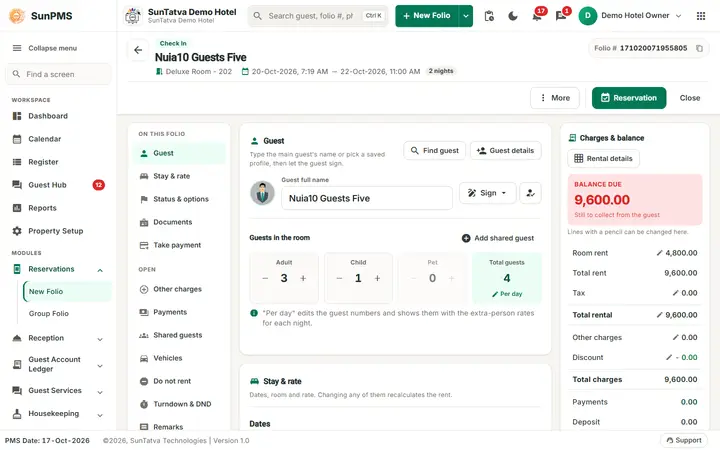
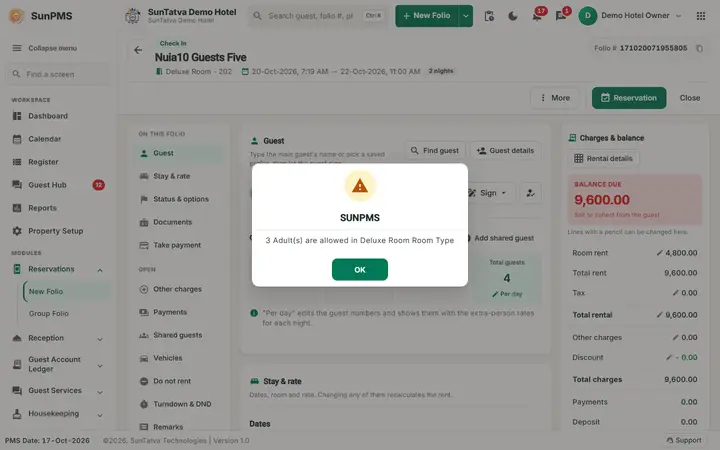
- Adult / Child / Pet steppers with + and -. Adults cannot go below 1. Maximum follows the room type (maximum adults/children); message: n Adult(s) are allowed in
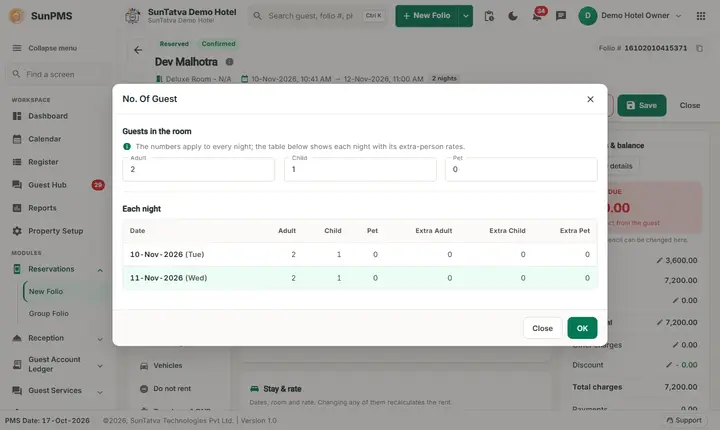
Room Type , and for children n Child(ren) are allowed inRoom Type . Pet buttons are disabled when the room does not allow pets. - Total guests > Per day opens No. Of Guest: per-date adult/child/pet counts and extra adult/child/pet rates. Extra-person charges are added automatically according to room-type base occupancy.
- Guest limit message: Guest limit exceeded. Room Type X allows up to (n) adults.
Folio options (section Status & options)
Three options with a check mark, each with a one-line help text.
| Option | Meaning |
|---|---|
| Lock | Prevent room / room-type change on a reservation. Needs privilege Lock reservation; reservation saved first. Message when changing: This Reservation is Locked. You Can not Change Room/Room Type for this reservation |
| Non-Refundable | Marks booking non-refundable; payments cannot be refunded; cancel warns to post payment. Locked for online bookings that are already non-refundable |
| Prepaid | Hides rates and charges on the printed folio (Display on folio off) |
OPEN windows (left list)
Other charges, Payments, Shared guests (count badge), Vehicles (with the SunParking licence the window has two tabs, Vehicles and Parking, it also has Link parking vehicle, and cars connected by SunParking carry a SunParking chip - see Parking notifications, vehicle linking and walk-in guests), Do not rent (Do Not Rent reasons, red badge with the count), Turndown & DND (room turndown time, Do Not Disturb with the Guest Interface licence), Remarks (remarks, plus Parking / Guest chat / Guest requests with those licences; check mark when there is a remark), Stay history (guest stay history, count badge).
Messages you may see
| Message | Why |
|---|---|
| Sorry, you do not have permission for reducing stay days | Days reduced without privilege |
| Invalid stay date selected. Member's check-in date should be equal or greater than group check-in date. | Group member outside group dates |
| Invalid stay date selected. Member's check-out date should be equal or less than group check-out date. | same |
| Room(s) not available. / Floor not available. | No room in that building/floor/type, or every room of the type is taken for those dates. A room whose guest has already checked out is vacant (dirty) and is offered again the same day (changed 20-Oct-2026: before, it stayed hidden until the next day, bug ). A room whose guest has not yet checked out is not offered. |
| Invalid DateOut time selected. | Check-out time not allowed |
| Please select a Sales & Channel. / No Sales & Channels available for this category. | Source dialog |
| Payment exist with Sales & Channel X. Note: Remove Sales & Channel payment to change Sales & Channel. | Cannot change the source |
| Discount Percentage must be less then or equal to 100. / Discount Amount must be less then or equal to N. | Discount limits |
| An adjustment already exists for this date. | Second rental adjustment same day |
| Rate will be changed. Do you want to continue with current rate or new rate of selected room type? (Current Rate / New Rate) | Room type change; depends on setting Rate change confirmation (1 keep, 2 apply system rate, else ask) |
Screenshots