SunParking: Parking Notifications, Vehicle Linking and Walk-in Guests
On this page
- Before you start
- 0. Parking in the notification bell
- 1. The Parking sub-section and the pop-up
- 2. Charges: posting, changes, voids
- What each notification opens
- 3. A guest's car is added automatically
- 4. Changes stay in step
- 4a. The Parking tab: one view in two windows
- 5. Walk-in guest: link the car at the desk
- 6. Check-out with parking open
- 7. Guest portal: Your vehicle
- Messages you may see
- Tips and FAQ
- Screenshots
When SunParking and the hotel are linked, the two apps stay in step on their own. The desk is told when parking is charged to a guest's room, a guest's car is added to the guest's vehicle list automatically, and a walk-in guest's car can be connected to the folio by the desk. This page explains all of it.
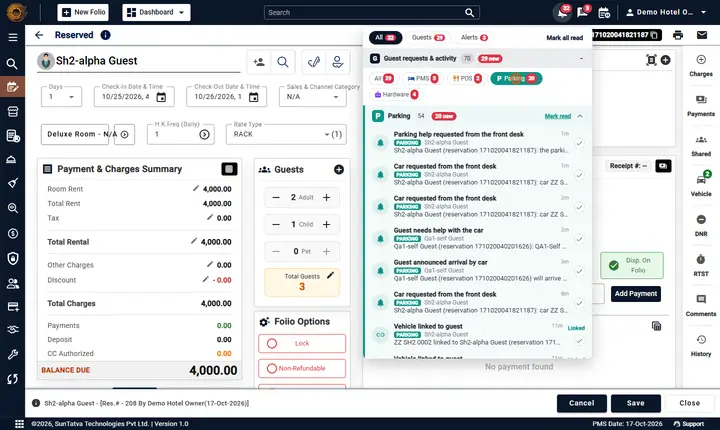
The new notification bell and chat are described in Communication; this page covers how parking events reach the desk: in the Parking sub-section of the notification bell.
Before you start
- The hotel is linked to a SunParking car park (Property Setup > Parking Setting) and has the licence SunParking Integration. See Parking setting.
- In SunParking (Setup > Integrations) the PMS charge used for parking is chosen; in Other Charges that charge is marked POS Charge.
- To link a vehicle yourself you need the privilege Link Parking Vehicle (owners and administrators have it).
0. Parking in the notification bell
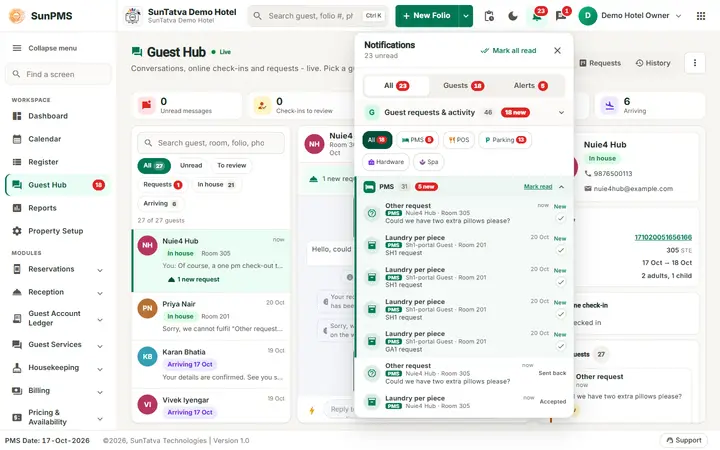
The separate P (parking) bell no longer exists: there is ONE bell in the header. Parking events that belong to a guest's stay (guest asked for the car, guest says a vehicle is theirs, vehicle linked or needing review, parking charge posted / updated / removed) appear in the Parking sub-section of Guest requests & activity in the notification bell and in Guest Hub > Requests, next to the guest's PMS, POS and Hardware activity. Older parking notifications stay readable there (nothing was lost). The pop-up appears once. Parking events that belong to no guest (for example a car park link problem) go to Alerts & system in the same bell. The property setting PARKING_NOTIFY_MODE (front desk, everyone, nobody) decides who sees parking items and pop-ups; you change it in Property Setup > Parking Setting, card Parking notifications, list Tell (the card text also names the notification bell, not a parking bell). A click opens the guest's folio on the Vehicle tab (vehicles, car requests) or Charges tab (parking charges). See Guest Hub.
1. The Parking sub-section and the pop-up
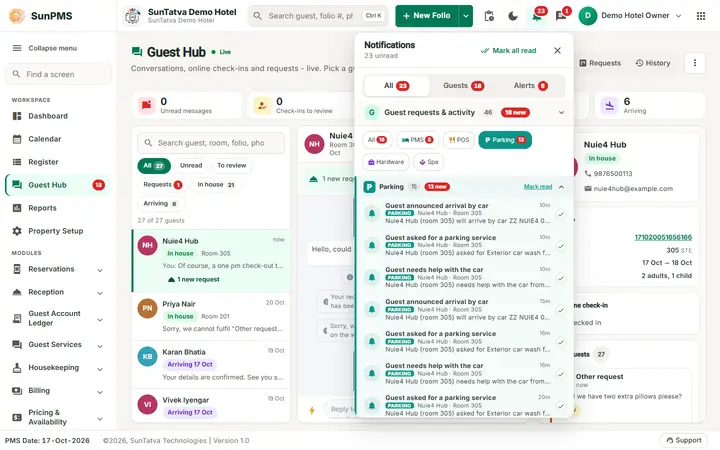
The bell with the Parking filter selected shows only the parking items.
| What SunParking did | Title in the bell | Example text |
|---|---|---|
| Put parking on a guest's room | Parking charge posted | 321.00 posted to room 207 (I1-alpha Inhouse, folio 1710...) - ticket T000459, plate ZZ01I10001, by Demo Hotel Owner |
| Changed the amount already on the folio | Parking charge updated | Now 152.00 on room 207... |
| Removed it (void, cancelled ticket) | Parking charge removed (orange) | Parking charge removed from room 207... |
| Added a car to a guest | Vehicle added to guest | ZZ01 I1 0001 added to I1-alpha Inhouse (room 207) from SunParking, ticket T000459 |
| The number of a linked car was changed in the PMS | Vehicle number changed in the PMS (orange) | see section 4 |
| A guest was checked out while parking was open | Checked out with parking open (orange) | with the reason typed |
| A guest wrote I parked my car on the guest portal | Guest says a vehicle is theirs | Gp1-delta Video (reservation...) says vehicle ZZ GP1 0008, Hyundai Creta, White is theirs. Its ticket T000468 in SunParking is marked as waiting for a stay. Link it from Check-in > Vehicle > Link parking vehicle. (section 7) |
| A guest pressed Request my car on the guest portal | Guest asked for the car |
- When something happens, a pop-up appears at the bottom right of any open screen, with the button Open folio.
- Click the notification bell and open the Parking sub-section to see the last 7 days of parking items. Unread ones are shaded blue.
- Click a notification to open that guest's folio (and mark it read), or Mark all read.
Who is told is set in Parking Setting > Parking notifications: Front desk (users who can open folios) (default), Everyone signed in to this property, or Nobody (charges are still posted, no notification).
2. Charges: posting, changes, voids
- Paying parking by room charge in SunParking puts one line on the guest's folio, with the invoice number property code/ticket number. Paying more, or adding a service, updates the same line, never adds a second one.
- If the parking desk voids a charge, cancels the ticket, or the total otherwise drops, the folio line is reduced or removed and the desk is told (Parking charge updated / removed).
- The line is attributed to the SunParking operator when that person also has a PMS login (same SunAuth user); otherwise to the system user.
- A folio that is already checked out (or cancelled) refuses the posting with a clear message; SunParking shows it to the operator and the payment is not saved as a room charge. Take another payment type, or reopen the folio.
- If SunPMS cannot be reached when a void is made, SunParking keeps the update and retries automatically (the ticket shows update(s) for SunPMS are waiting).
What each notification opens
Click an item in the bell list (or its pop-up) and SunPMS opens the thing it is about, marks the item read and closes the panel. It never sends you to the Dashboard unless the item has nothing to open.
| Notification | Opens |
|---|---|
| Restaurant (SunPOS) charge posted / updated / removed | The guest's folio, with the Other Charges window open |
| Parking charge posted / updated / removed, check-out override | The folio, with Other Charges open |
| Vehicle added / linked / needs review / claimed by guest, guest asked for the car | The folio, with Vehicle Information open |
| Chat or message notification | The chat window on that conversation |
| Parking item not tied to a guest | Property Setup > Parking Setting |
| An in-app link such as /setup/parking | That screen |
| No link (information only) | Nothing: it is marked read and you stay where you are |
If you are already on that folio, the page is left as it is. Older notifications that only carry a link like /checkin/6 open the folio too.
3. A guest's car is added automatically
| Situation | What happens |
|---|---|
| In-house guest parks (room number typed, or the stay found by name / reservation number) | The car is added to the guest's Vehicle list in the PMS within seconds, with make, model and colour from SunParking and the remark SunParking ticket T.... |
| Reserved guest (not yet arrived) parks early, or parking is booked with the reservation with a plate | The car is added to the guest already; it is there when the guest arrives. |
| Valet drop-off for a hotel guest | Same as above (the remark says valet). |
| The car's number, make, model or colour changes in SunParking (Change vehicle on the ticket) | A new number is added as a new vehicle (the guest keeps the old one); make / model / colour changes update the existing row. |
Each car that SunParking connected shows a blue SunParking chip on its card in Check-in > Vehicle (orange when its number was changed in the PMS). The guest's vehicle list is the same one used by the Guest Vehicle Detail report and the mandatory-vehicle rule, so nothing else changes.
A car is never linked by a guess: the room, the stay number or the reservation number decides. Searching by guest name only suggests stays in SunParking; the parking staff pick the right one.
4. Changes stay in step
- You edit a linked car in the PMS (colour, make, model): the change is passed to SunParking, and SunParking's later automatic updates never overwrite what you typed.
- You change the number of a linked car: SunParking keeps its own number (the camera / the valet verified it). The link is marked for review, the chip turns orange and you get Vehicle number changed in the PMS.
- You delete the vehicle from the guest's list: its link is closed.
- The guest changes room: SunParking's tickets for the guest follow the new room number.
- The car leaves SunParking: the link becomes history; the car stays on the guest's vehicle list.
4a. The Parking tab: one view in two windows
The same Parking tab is shown in two places, with the same layout, chips and buttons:
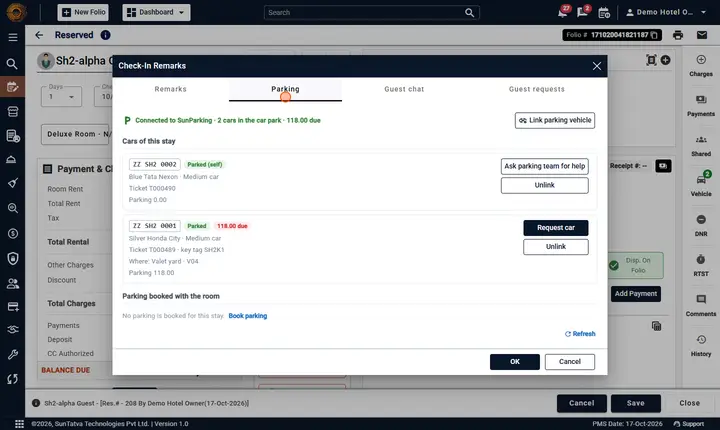
- Comments on the right strip: window Check-In Remarks, tab Parking.
- Vehicle on the right strip: window Guest Vehicle Information, tabs Vehicles and Parking.
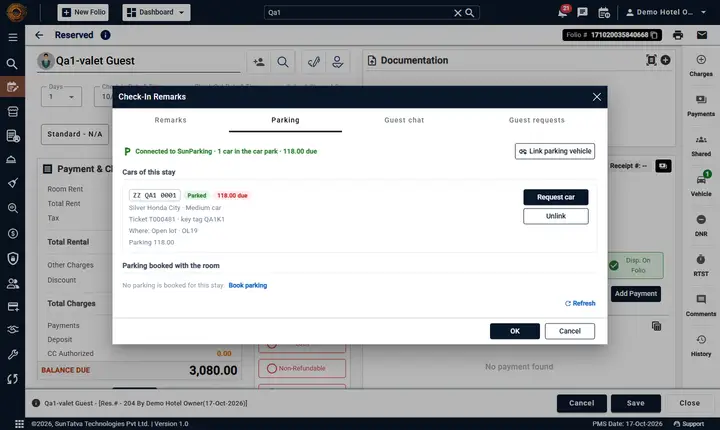
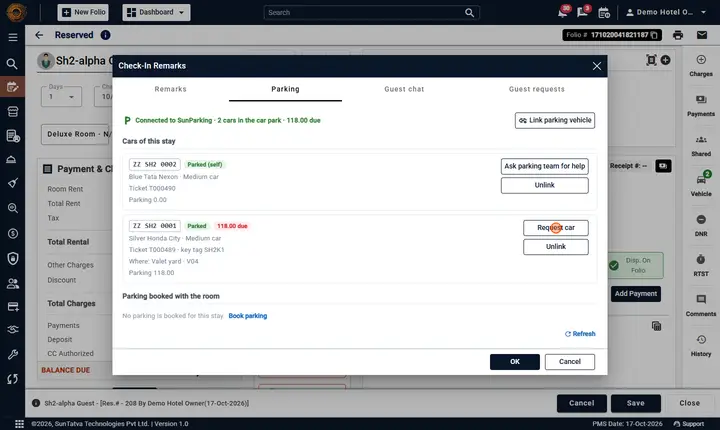
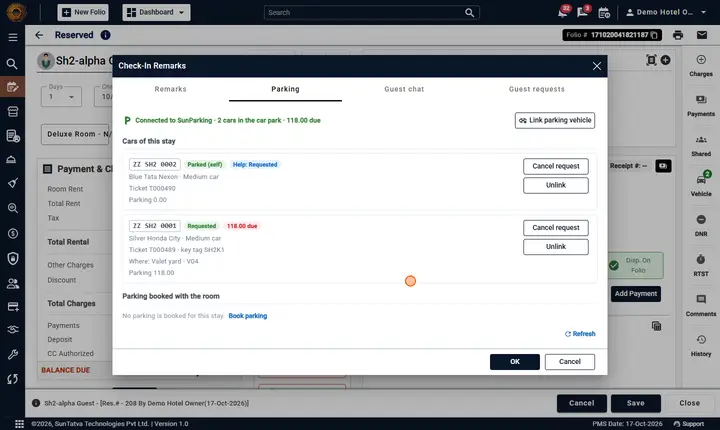
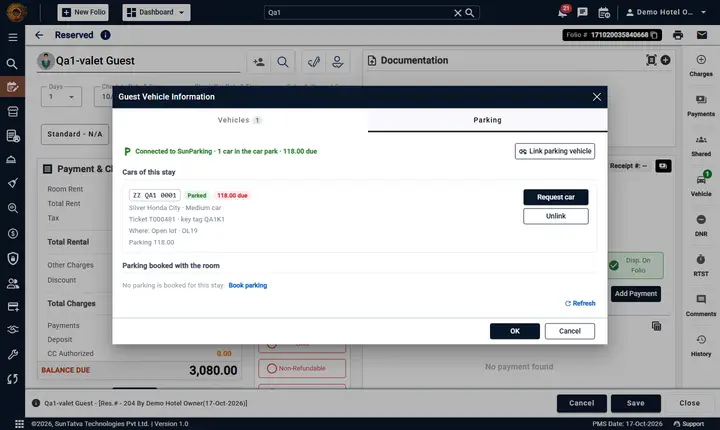
At the top a green line says Connected to SunParking and how many cars are in the car park (and the amount due, if any). Under Cars of this stay each car is a card: the number in a box, a state chip (Parked (self), Parked, Ready at porch, Left...), a red chip with the amount due, make / colour / size, ticket number (and key tag for valet), where it stands, and the parking charge. Unlink disconnects the car (you confirm first); Request car asks the valet to bring a valet car and Ask parking team for help asks for help with a self-parked car (see Request the car from the folio below). Parking booked with the room lists bookings with Cancel booking, and Book parking opens a small form (guest, mobile, vehicle number, size, from / to, area, valet, notes). Refresh reads SunParking again.
When no car is linked the tab says No parking linked to this stay with the buttons Link parking vehicle and Book parking. If SunParking cannot be reached a red line shows the reason with Try again. If the hotel has no SunParking link (Parking Setting disconnected) the tab says SunParking is not linked to this hotel and shows only the pointer to Parking Setting - no cars, bookings or buttons. The folio must be saved first.
In the Vehicle window each vehicle card that SunParking connected has a blue SunParking chip, the ticket number and, when its number was changed in the PMS, an orange Number changed - check chip. The small P button on such a card opens the Parking tab narrowed to that vehicle (This vehicle); All parking for this stay shows every car again.
Request the car from the folio
The desk can ask for a guest's car without leaving the folio, from either window (the same buttons are in both):
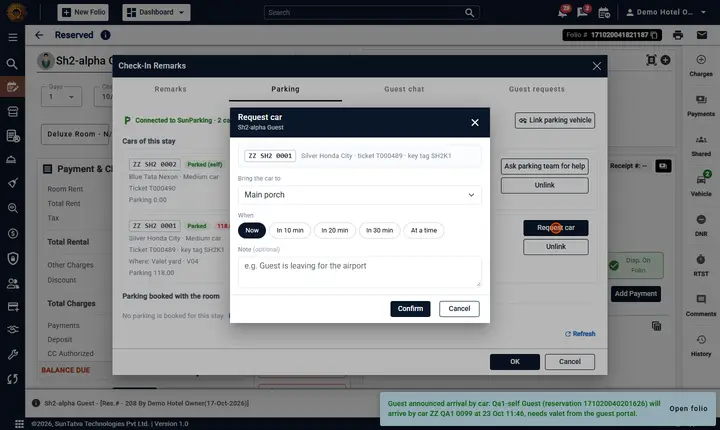
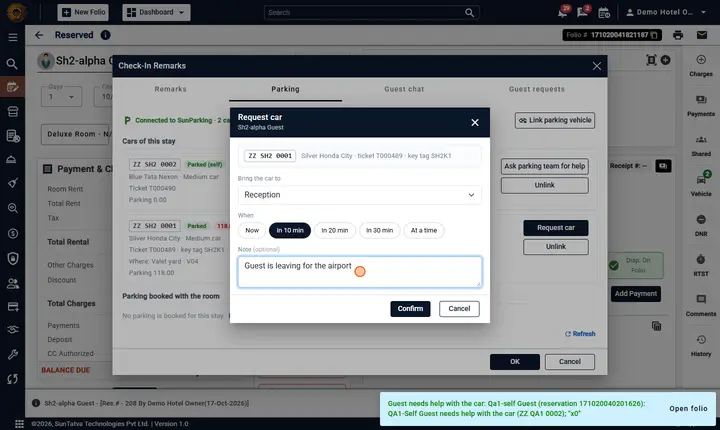
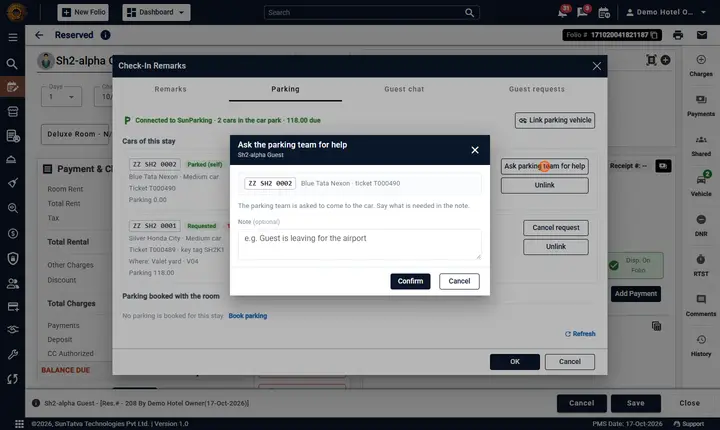
- A valet car that is parked shows Request car. A small window opens with the guest, room, number and ticket, Bring the car to (the pick-up points set in SunParking), When (Now, In 10 min, In 20 min, In 30 min or At a time) and an optional Note. Confirm sends it.
- A self-parked car shows Ask parking team for help: the same window without pick-up point and time; write what is needed in the note.
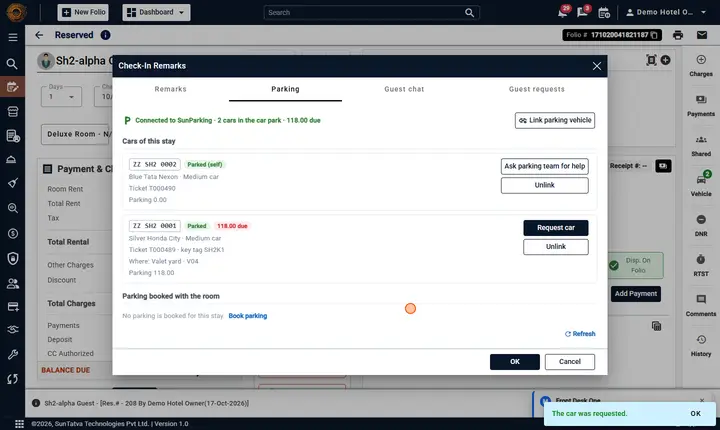
- Once sent, the card shows a status chip that follows the valet board (Requested, On the way, Ready at porch, Handed over; help requests show Help:...) and refreshes by itself every 15 seconds (the first chip can take several seconds to appear after Confirm, because the request travels PMS -> SunParking and back). When the car status itself already says Requested the second chip is left out. While the request is still Requested or Accepted the card has Cancel request.
- On the SunParking valet board the request card shows the source SunPMS front desk (and the same in the desk Guest requests list of SunParking, where the note starts with From the front desk), and the bell gets one item (Car requested from the front desk) under Guest requests & activity > Parking.
- It needs the privilege Link Parking Vehicle, the SunParking Valet licence for the car request, and the folio saved.
On a phone (up to 575 px wide) these windows, Link parking vehicle and the check-out window open full screen, with the title bar and the buttons fixed at top and bottom.
5. Walk-in guest: link the car at the desk
For a guest without a booking whose car was parked without a room (for example a valet drop-off at the porch before check-in).
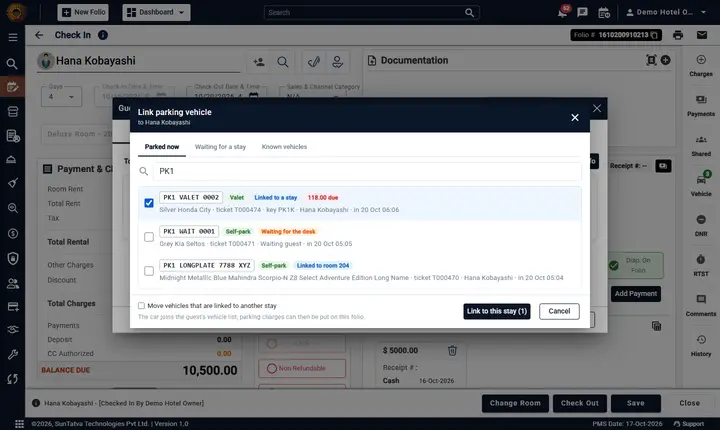
The window has a dark title bar (guest and room), the tabs, a search box, the list and a fixed bottom bar with Link to this stay and Cancel.
- Check the guest in (walk-in) and save, so the folio exists.
- In Check-in, click Vehicle on the right strip, then Link parking vehicle. (The same button is on Remarks > Parking > Cars of this stay.)
- In the window choose a tab: Parked now (cars in the car park), Waiting for a stay (cars the parking staff marked "the hotel desk will link this"), or Known vehicles (vehicles SunParking has seen before).
- Type part of the number (for example AB12), a ticket number, key tag or guest name. Results show the number, make and colour, ticket, valet or self-park, entry time and any amount due.
- Tick the car (several can be linked) and click Link to this stay.
Result: the pop-up 1 vehicle(s) linked; the car appears on the guest's Vehicle list with the SunParking chip, under Remarks > Parking, and parking charges can now be put on this folio. A car that is already linked to another stay is greyed out; a user with the privilege can tick Move vehicles that are linked to another stay.
To disconnect: Remarks > Parking, click Unlink on the car and confirm. The car stays on the guest's vehicle list (delete it there if wanted).
Parking Setting > Parked cars not linked to a stay lists the cars the parking staff flagged The guest is not checked in yet - the hotel desk will link this car.
6. Check-out with parking open
When you click Check Out and the guest still has a car in SunParking (or a parked car that looks like theirs is not linked), a window Parking is still open for
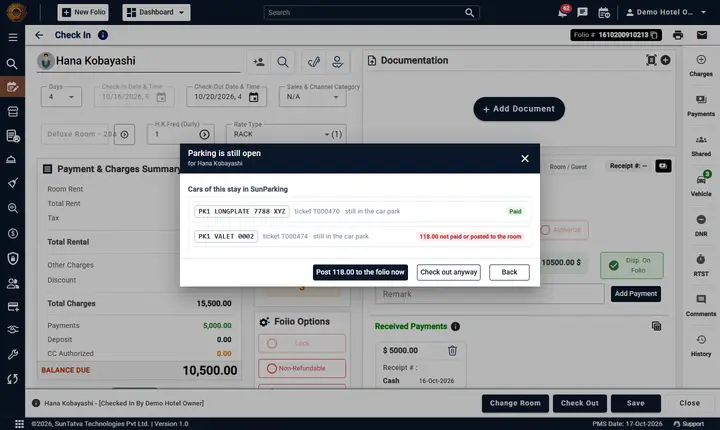
| Button | What it does |
|---|---|
| Link to this stay (beside a suggested car) | Connects a parked car with the guest's name to this stay. |
| Post |
Puts every unpaid ticket of the stay on the guest's room. Open the folio again to see the new balance, then check out. |
| Check out anyway | Asks for a reason and then continues. Needs the privilege Check Out With Pending Parking; the reason is kept as a notification (Checked out with parking open). |
| Back | Returns to the folio. |
The buttons are in the fixed bottom bar, main action first and Back last. A red chip beside a car shows the amount not yet paid or posted to the room; a green Paid chip means nothing is due.
The window never appears (and never blocks) when SunParking is not linked or cannot be reached.
Worked example (recorded 2026-10-29)
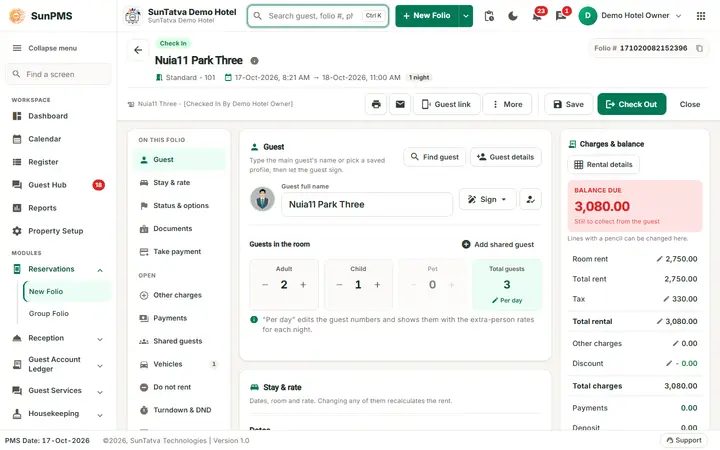
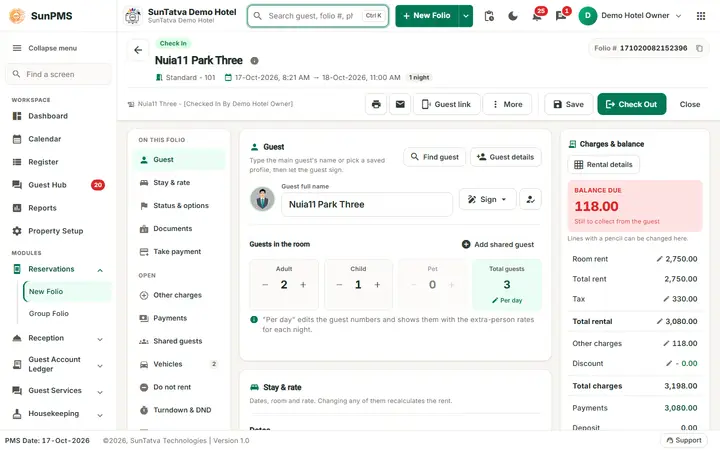
A walk-in guest in a Standard room left a valet car (ticket for 118.00 not yet paid) and has a second, self-parked car with the guest's name that nobody linked. The guest paid the room (3,080.00) and the folio was saved. Then:
- Check Out opens Parking is still open for the guest. The block Cars of this stay in SunParking shows the valet car with the red chip 118.00 not paid or posted to the room; the block Parked cars that may belong to this guest (not linked) shows the second car with Link to this stay.
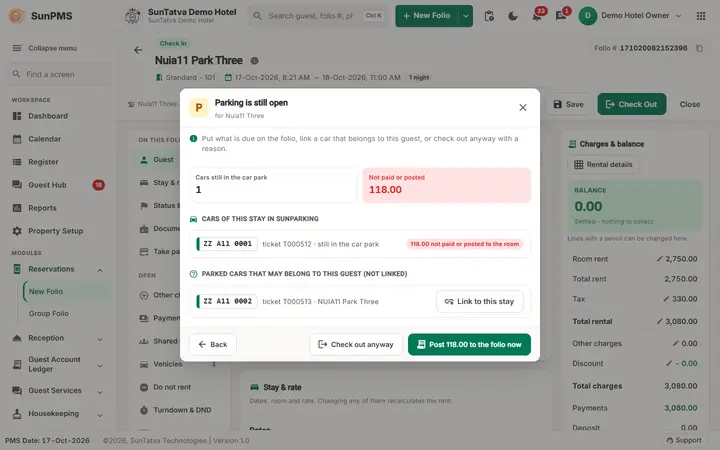
- Link to this stay: the car moves up to the first block (ZZ A11 0002 linked to this stay.), is added to the guest's vehicle list, and a notification Vehicle added to guest is written.
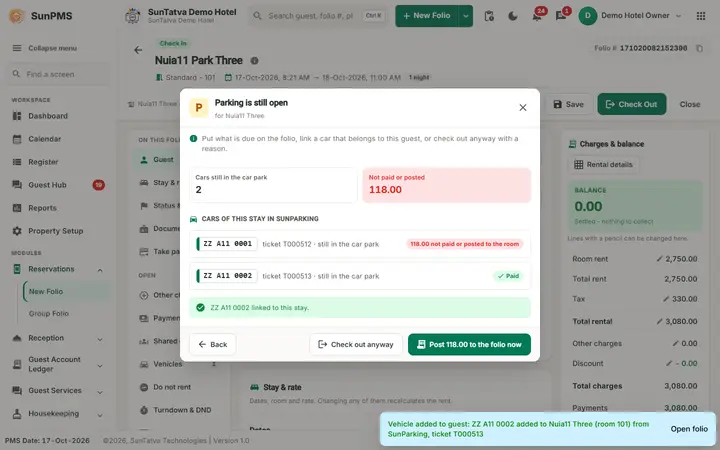
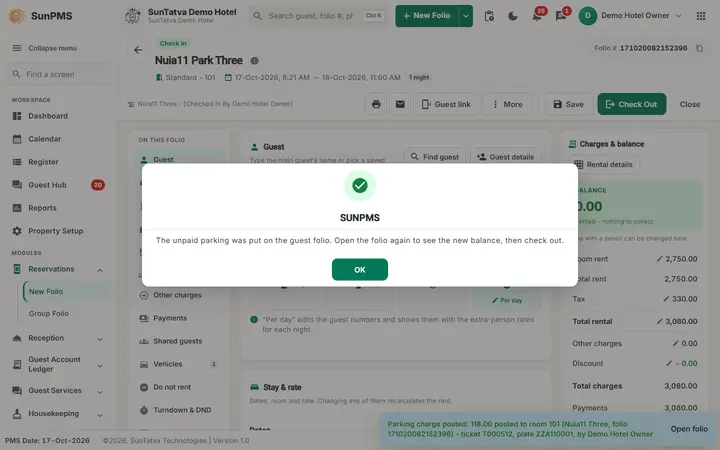
- Post 118.00 to the folio now: the message Parking charge posted: 118.00 posted to room... and The unpaid parking was put on the guest folio. Open the folio again to see the new balance, then check out. The window closes; the old folio screen is not refreshed, so open the folio again from In-House Guests: Other Charges now shows 118.00 and Balance Due is 118.00.
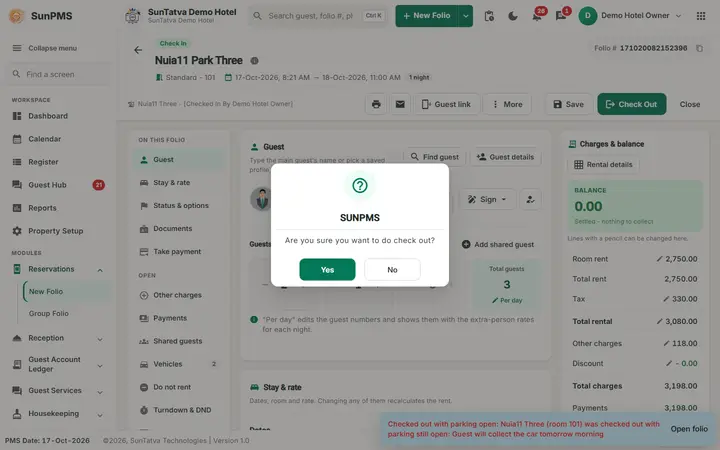
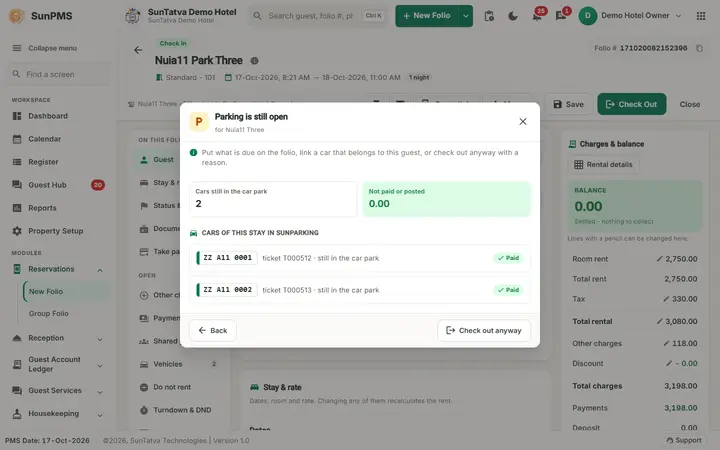
- Take the payment (Add Payment) and click Check Out again. Both cars now show the green Paid chip, but they are still in the car park, so the window opens again with only Check out anyway and Back (no Post button).
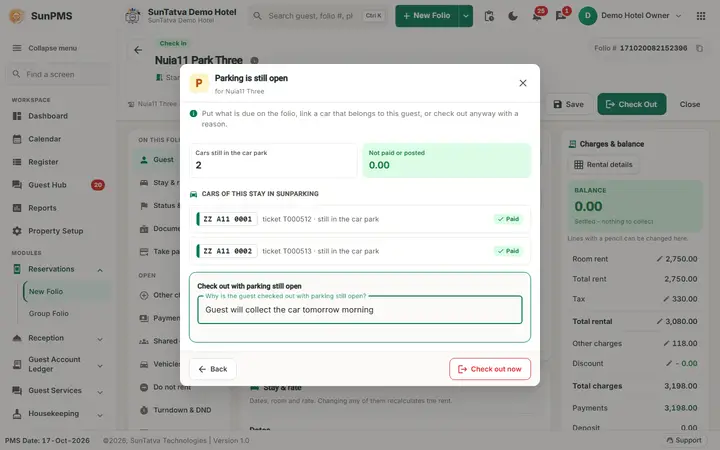
- Check out anyway asks Why is the guest checked out with parking still open? The reason is required. Check out now records the override and the normal confirmation follows (Are you sure you want to do check out? Yes, then Do you sure want to save changes? Yes and Information saved.).
- The notification bell, Guest requests & activity > Parking, now lists Checked out with parking open (guest, room and the reason), above Parking charge posted and Vehicle added to guest.
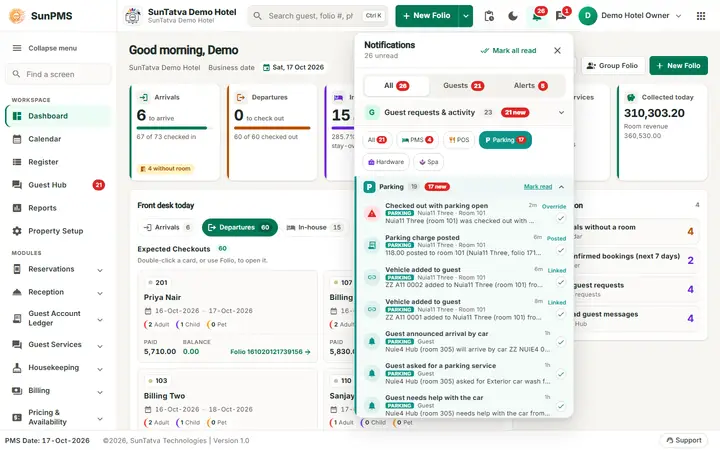
If you cannot see Check out anyway the role lacks privilege 271 (Check Out With Pending Parking): the window then says You need the right "Check Out With Pending Parking" to check out while parking is open. A car that should really leave: let the valet bring it and close the ticket in SunParking first, then check out without the window.
7. Guest portal: Your vehicle
The guest's own page (the personal link, see Guest portal, the guest's page) has a Your vehicle tab when the car park is linked and the licence SunParking Integration is on. Nothing is set up for it: when the link or the licence goes, the tab disappears from every guest page.
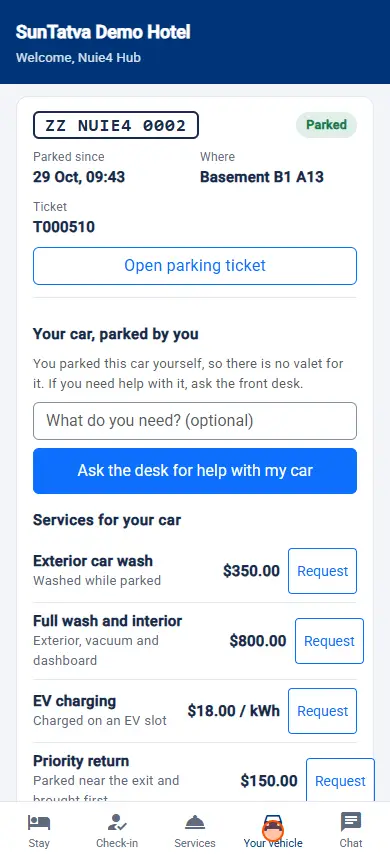
The guest sees, for the cars of their own reservation only: the plate and make / model / colour, the state (Parked, Car requested, Ready at the porch, Left the car park...), when it was parked, the ticket number, Open parking ticket (the car park's ticket page), parking booked with the room, and Parking charges on your bill (the parking lines SunParking posted to the folio, with a total).
| Guest does | What happens at the desk |
|---|---|
| Taps Request my car on a parked valet car | SunParking tells the valet to bring it; you get Guest asked for the car in the Parking sub-section of the bell. The button exists only for the guest's own parked valet cars (SunParking needs its Valet licence). |
| Taps I parked my car and sends a vehicle number (make and colour optional) | You get Guest says a vehicle is theirs in the Parking sub-section of the bell, with what SunParking found: Its ticket T... in SunParking is marked as waiting for a stay, There is no open ticket for it in SunParking yet, or SunParking has a ticket for it that belongs to another stay - check before linking. Nothing is linked yet; the guest sees Waiting for the front desk. |
Parking services requested by the guest. The guest portal and the car park's own ticket page send the same requests (a SunParking feature, see Guest portal, the guest's page). Each request puts one item in the Parking sub-section of the bell and on the Guest Hub board:
| Bell title | The guest asked for | Who processes it |
|---|---|---|
| Guest asked for the car | Get my car, now or at a time, with a pickup point and note | The valet team (SunParking valet board, or Guest requests). Needs the SunParking Valet licence |
| Guest asked for a parking service | A service from the car park's catalogue (wash, tyre check...) with its price | Guest requests: Done adds the charge to the ticket and to the room bill with it |
| Guest needs help with the car | Help with a car they parked themselves | Guest requests: Accept, Start, Done or Reject with a reason |
| Guest announced arrival by car | Vehicle, make, colour, ETA and whether valet is needed (before the car arrives) | The parking / valet team prepares; link the car when it arrives |
| Guest wants to extend parking | A new leaving time | Guest requests: confirm with the guest |
The desk answer (accepted, on the way, done, or the reason it is not possible) is shown to the guest on their page. Pickup points come from the SunParking setting Guest.PickupPoints.
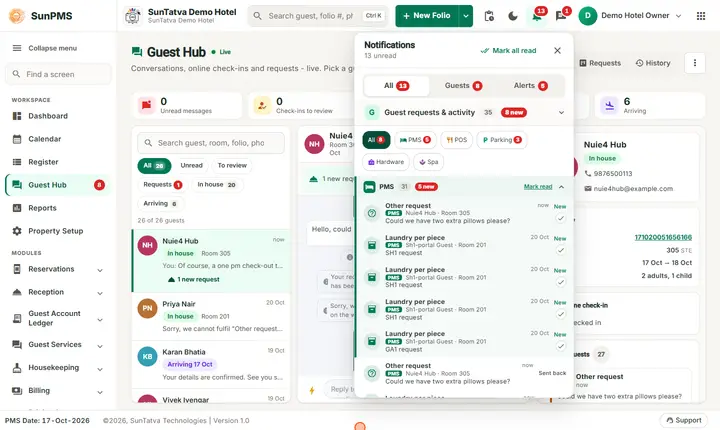
To confirm a claimed car:
- Click the notification in the Parking sub-section of the bell; the guest's reservation opens.
- Click Vehicle, then Link parking vehicle, open the tab Waiting for a stay (a number the guest sent that is already parked is flagged there) and search for the plate.
- Check the plate and car, tick it and click Link to this stay. If the car is not in the car park yet, link it when it arrives (Parked now tab).
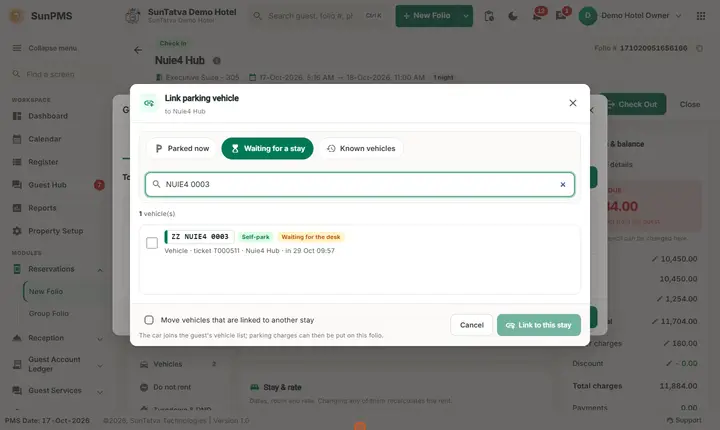
Result: the car is on the guest's Vehicle list with the SunParking chip, and the guest's page now shows it as a vehicle of the stay instead of Waiting for the front desk.
Safety rules built in: the guest can never link a car; the page never says what SunParking holds for a number that is not on the guest's stay (a car parked on another stay gives the same friendly answer); a guest can have 3 cars waiting at once and send 5 times an hour; and Request my car works only for cars SunParking itself lists under this reservation.
Messages you may see
| Message | Why | What to do |
|---|---|---|
| Guest says a vehicle is theirs | A guest sent I parked my car on the portal | Check the car and link it (section 7). |
| Guest asked for the car | A guest pressed Request my car | None; the valet has been told. |
| You do not have the right to link parking vehicles (Link Parking Vehicle). | Your role lacks privilege 270. | Ask an administrator to add Link Parking Vehicle to your role. |
| You do not have the right to check a guest out with parking still open (Check Out With Pending Parking). | Your role lacks privilege 271. | Ask an administrator, or settle the parking first. |
| The folio of... is already checked out. | SunParking tried to post to a closed folio. | Take another payment type, or reopen the folio. |
| ... is already linked to another stay. | The car belongs to another folio. | Unlink it there first, or use the move option if you may. |
| That stay checked out more than a day ago; the vehicle was not added. | The stay is too old to receive a car. | Link the car to the right stay. |
Tips and FAQ
- Q: I did not get a notification for a parking charge. A: Check Parking Setting > Parking notifications is not Nobody, you can open folios, and the P icon is visible (it needs the licence and a linked car park). The charge is on the folio even when notifications are off.
- Q: A car is on the guest's list but not marked SunParking. A: It was typed by the desk or came from online check-in; only cars connected by SunParking carry the chip.
- Q: Can the PMS change a car's number in SunParking? A: No. SunParking owns the number; a number edited in the PMS only flags the link for review.
- Q: The bell shows nothing for a linked hotel. A: Click the icon to refresh; notifications older than 7 days are not listed.
Screenshots