
Folio - How the Balance Due Is Calculated
On this page
The Charges & balance on the folio is the one place that shows what the guest owes. This page explains every line, the exact formula, and which payments count. Use it when a guest asks "why is my bill this amount?" or when the Balance Due is not what you expected.
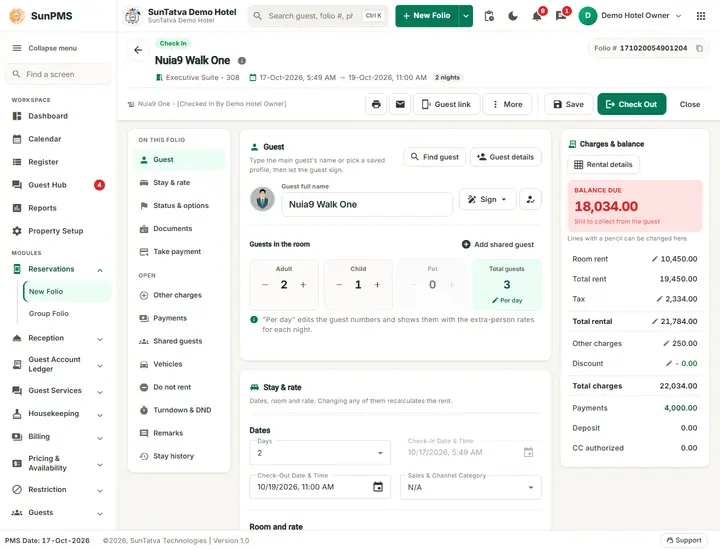
The lines of the summary
| Line | What it contains | Where the number comes from |
|---|---|---|
| Room rent | The rate of today's night (or of the first night for a future stay) | Rate type and rate calendar of the room type; editable with the privilege Ability to change rate (Rate and tax) |
| Total rent | Sum of the rate of every night | Rental Details cards |
| Tax | Occupancy tax of all nights (GST, city tax and so on, shown under the title Occupancy Tax) | Taxes linked to the room type; exempted taxes are left out |
| Total rental | Total Rent + Tax | |
| Other Charges | Charges added in the Charges window plus their tax | Other charges |
| Discount | One discount amount for the stay, shown with a minus sign | Discount |
| Total charges | Total Rental + Other Charges (with their tax) - Discount | |
| Payments | Money received: all saved and unsaved payment lines that are not deleted, not an authorization and not a deposit | Payments |
| Deposit | Deposit lines (when the Deposit feature is on) that are not yet linked to a charge | Held for the guest; not deducted |
| CC authorized | Card pre-authorizations | Held on the card; not deducted |
| Balance due | Total Charges - Payments | Shown large at the bottom of the card |
The formula
Total Rental   = Total Rent + Tax
Total Charges  = Total Rental + Other Charges (charge amounts + their tax) - Discount
Balance Due    = Total Charges - Payments
Deposit and CC Authorized never reduce the Balance Due. A deposit becomes a payment only when you refund it or post it against a charge at check-out (Deposits).
Worked example (real numbers from the demo hotel, 17 Oct 2026)
A walk-in guest, FO2-Alpha Money, Standard room 104, three nights 17 to 20 October, 2 adults and 1 child:
| Night | Rate | GST 12% |
|---|---|---|
| 17 Oct (Saturday) | 2,750.00 | 330.00 |
| 18 Oct | 2,500.00 | 300.00 |
| 19 Oct | 2,500.00 | 300.00 |
| Line | Amount |
|---|---|
| Room Rent (today) | 2,750.00 |
| Total Rent | 7,750.00 |
| Tax | 930.00 |
| Total Rental | 8,680.00 |
| Other Charges | 0.00 |
| Discount | 0.00 |
| Total Charges | 8,680.00 |
| Payments (cash advance at check-in) | 3,000.00 |
| Balance due | 5,680.00 |
The same number fills the Amount box of the Take payment section. So a guest who wants to settle in full only needs the payment type and Add Payment (Payments).
What changes the balance, and when
- Everything on the summary updates at once when you edit a line, but nothing is stored until you click Save, Check In or Check Out. Close the folio without saving and the changes are lost.
- A negative Balance Due means the guest has paid more than the charges (for example after reducing the stay). The hotel owes the guest; refund the difference (Refund) before check-out.
- Zero-balance check-out: when Permits only zero balance Check-Outs is on in Rental Setting, Check Out is refused unless the Balance Due is between From Balance and To Balance (both 0 in the demo hotel): You can not perform checkout operation on this guest. Reason: Balance is not zero. (Check-out).
- A payment taken in a foreign currency is converted to the base currency of the hotel first; the Balance Due is always in the base currency (Payments).
Messages you may see
| Message | Why | What to do |
|---|---|---|
| You can not perform checkout operation on this guest. Reason: Balance is not zero. | Balance Due outside the allowed range | Take the payment or refund the overpayment, then check out |
| Do you sure want to save changes? | You clicked Check Out or Close with unsaved changes | Yes saves the folio first |
Tips and FAQ
- Q: The deposit I took does not reduce the Balance Due. A: By design. A deposit is money held, not a payment. See Deposits.
- Q: The tax looks wrong after I changed the rate. A: Tax is recalculated per night from the rate of that night; open Rental details to see each night (Rate and tax).
- Q: Where is the credit note? A: The program has no credit-note document. See Deposits, invoice and credit note.