Folio - Rate per Night, Rate Change and Tax Exempt
On this page
The room charge of a stay is built night by night: for each night the program takes the rate of the chosen Rate Type for that date, then adds the taxes that are linked to the room type. This page shows how to read that build-up, how to change the rate (for one night, for tonight, or for the whole stay) and how to exempt a tax.
Watch: rate per night and tax exempt
- Watch on YouTube: https://www.youtube.com/watch?v=W2nP7IJXjhs
Before you start
- The room type has a rate for the dates (Rate Manager) and the tax is linked to the room type (Tax Configuration). In the demo hotel GST 12% is linked to Standard, Executive, Family and Economy rooms. Deluxe Room has no tax linked, so a Deluxe stay shows Tax 0.00.
- Your role has the privilege Ability to change rate to edit rates; otherwise the rate boxes are greyed out.
- On the folio the rate is always shown and stored before tax, and the tax is added on top. The Feature Setting Tax Inclusive only changes how Rate View and rate updates convert a quoted tax-included price into the room-type rate (Tax configuration, example 6); it does not change this screen. To enter a price that includes tax directly on a folio, use Total rental (below), which works backwards.
- Percentage taxes, fixed Per Day and Per Stay taxes (for example a city tax) and the Exempt After Days rule are set in Tax Configuration; the folio just shows the result per night.
The lines
| Line | Meaning | Rules |
|---|---|---|
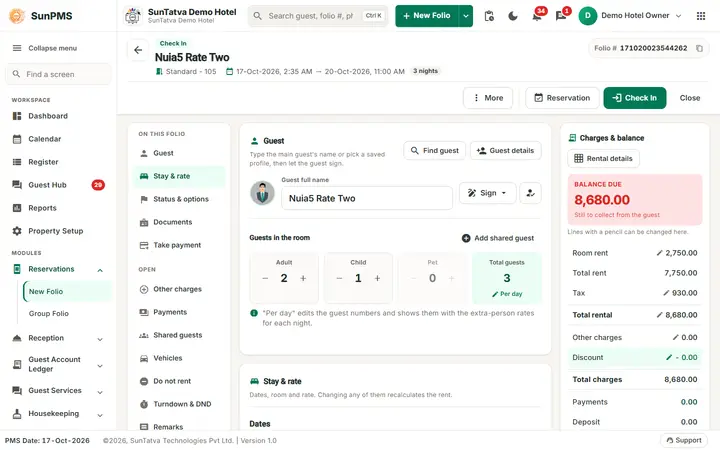
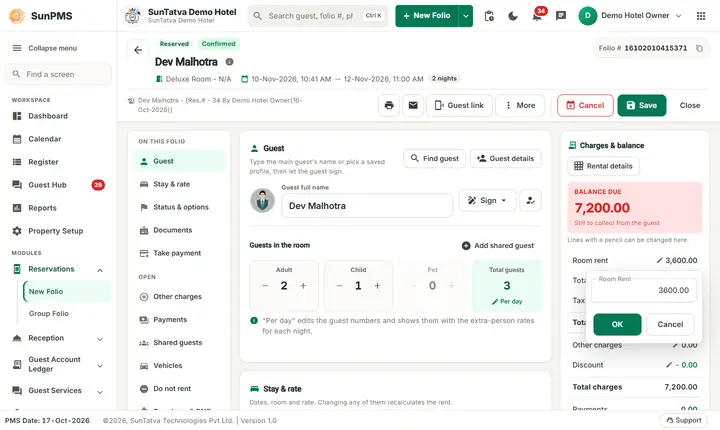
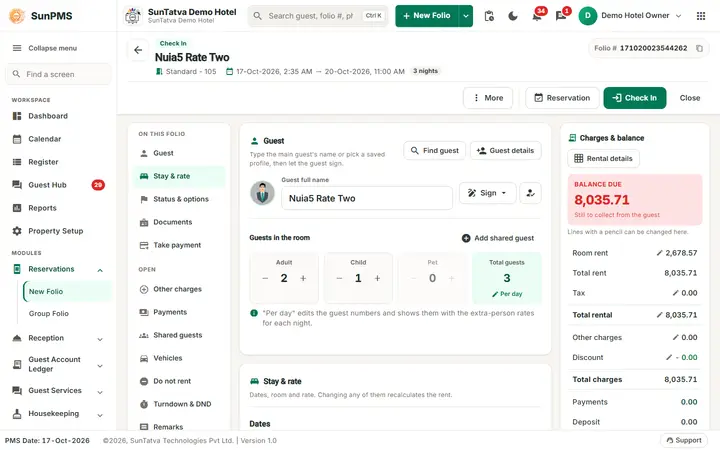
| Room rent (pencil) | Rate of today's night (for a future stay, of the first night) | Click the row, type the new rate, OK. Changes only that night |
| Total rent | Sum of all nights | Read only |
| Tax (pencil) | Occupancy tax of all nights | Opens Tax Exempt & Remark (needs Access to exempt tax) |
| Total rental (pencil) | Rent + tax | Click, type the agreed total, OK: the program calculates the rate |
| Rental details (button above the summary) | One card per night | See below |
Rental Details cards
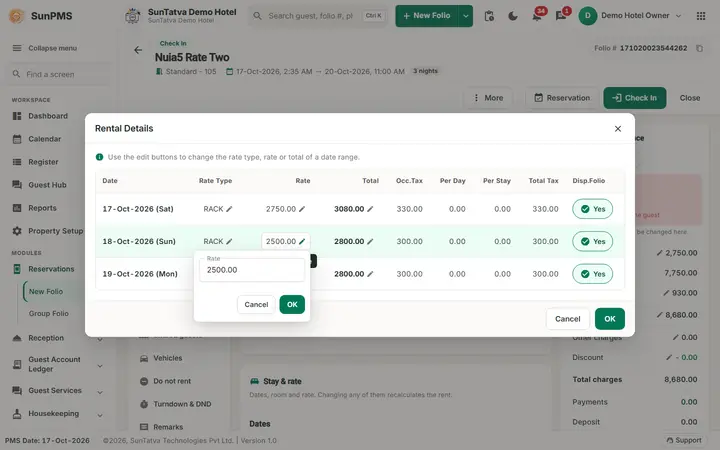
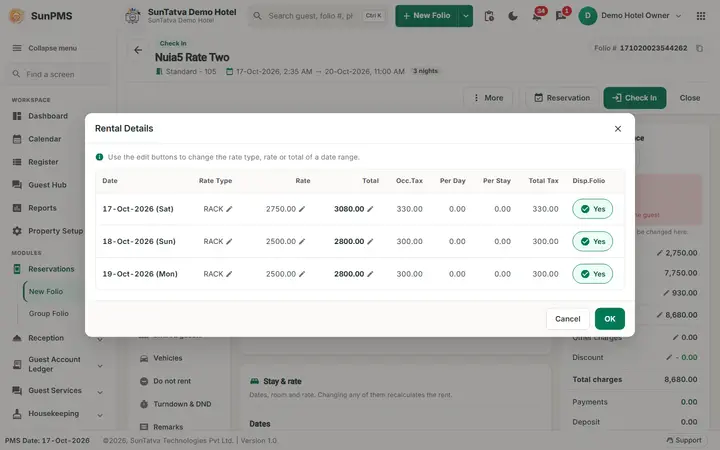
Each card shows the date and weekday, Total (rate plus tax) with a pencil, the Disp.Folio switch, the Rate Type (pencil: a different rate plan for that night), the Rate (pencil), Occ.Tax, Per Day, Per Stay and Total Tax. Per Day and Per Stay are flat taxes (a city tax per room per day, or once per stay) and are 0.00 when only percentage taxes are linked. OK closes the window; Cancel also closes it. The button Rental adjustment (saved, checked-in folios only) is described in Rental adjustment.
Worked example (real run, 17 Oct 2026, Standard room, 3 nights, RACK rate)
| Step | Room Rent | Total Rent | Tax | Total Rental |
|---|---|---|---|---|
| New folio, 3 nights | 2,750.00 | 7,750.00 | 930.00 | 8,680.00 |
| Rental Details shows | 17 Oct (Sat) 2,750.00 + tax 330.00; 18 Oct 2,500.00 + 300.00; 19 Oct 2,500.00 + 300.00 | |||
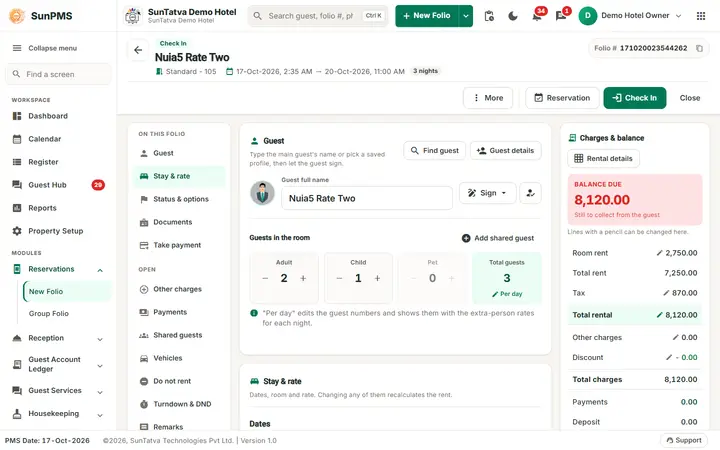
| Night 2 rate changed to 2,000.00 in Rental Details | 2,750.00 | 7,250.00 | 870.00 | 8,120.00 |
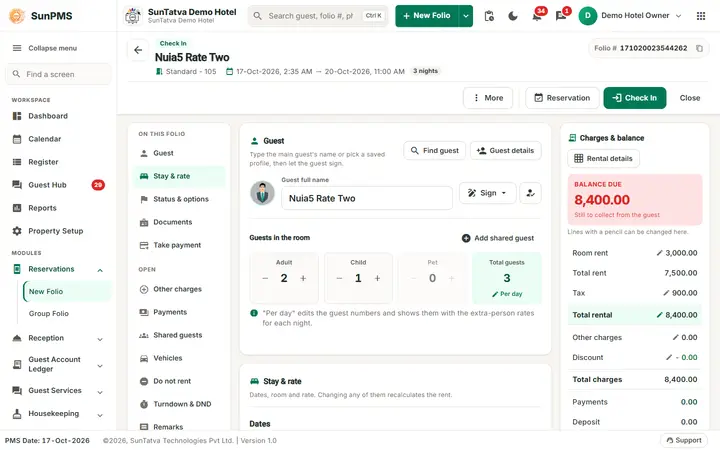
| Room rent changed to 3,000.00 | 3,000.00 | 7,500.00 | 900.00 | 8,400.00 |
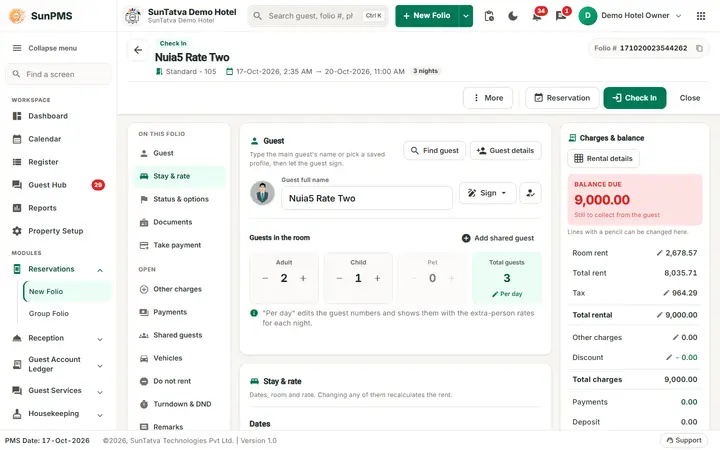
| Total rental typed as 9,000.00 | 2,678.57 | 8,035.71 | 964.29 | 9,000.00 |
| GST 12% exempted | 2,678.57 | 8,035.71 | 0.00 | 8,035.71 |
How to read it:
- Saturday costs 2,750 because the rate calendar of the room type has a different rate for that date. The other nights are 2,500.
- Changing the rate of one night (Rental Details) or Room rent (today's night) leaves the other nights untouched: 3,000 + 2,000 + 2,500 = 7,500.
- Typing a Total rental replaces the rate of every night by one equal rate: 9,000 / 1.12 = 8,035.71 rent, split in three equal nights of 2,678.57, plus 964.29 tax. Use it for a package or a price agreed "including tax".
How to change the rate
- Open the folio (a new folio, a reservation or an in-house stay).
- For one night: click Rental details, click the pencil beside Rate on that night's card, type the rate, OK, then OK again.
- For today's night: click the Room rent row, type the rate, OK.
- For a total price: click the Total rental row, type the total, OK.
- Check the summary, then Save (or Check In). Nothing is stored before that. Result: Total Rent, Tax, Total Charges and Balance Due follow at once. The audit trail records the change (Audit trail).
A change that has to be recorded for today only, on a guest who is already in house, is better done as a Rental adjustment.
How to exempt tax
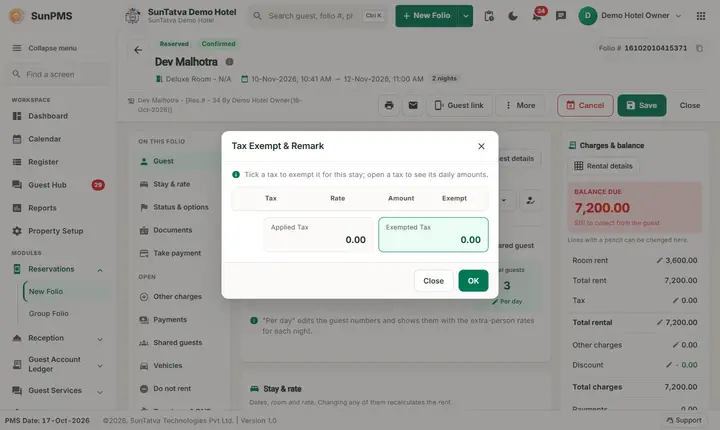
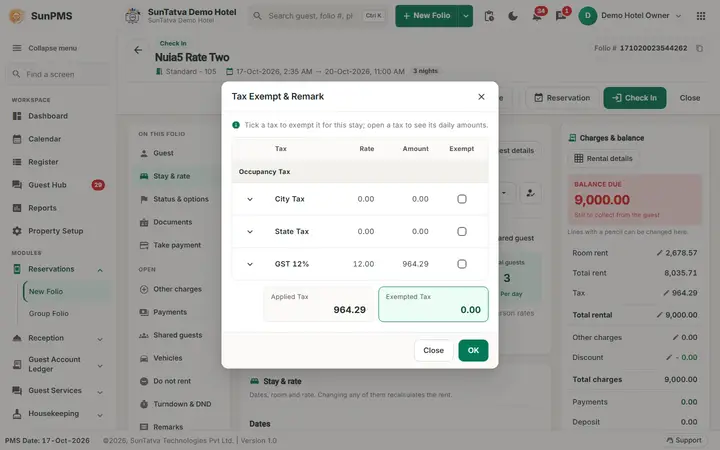
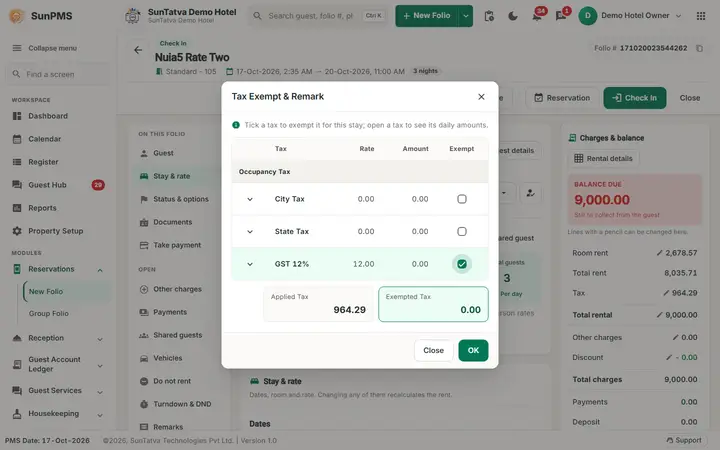
- Click the Tax row. The window Tax Exempt & Remark lists each tax group (Occupancy Tax) with the taxes City Tax, State Tax and GST 12% (12.00), the amount of each, and a tick box.
- Tick the tax to exempt (for example GST 12%). The arrow beside the name shows the amount night by night.
- Applied Tax and Exempted Tax at the bottom show the totals. Click OK. Result: the tax of that line falls to 0.00 and Total charges equal Total rent (see the last row of the example).
Rules:
- If the check-in date is today the whole stay is exempted at once.
- If the stay started earlier you are asked Do you want to apply tax exempt for full stay or partial stay? with the buttons Full Stay and Partial Stay. Partial Stay exempts from today onward only. The same question is asked when you remove the exemption (Do you want to remove tax exempt full stay or partial stay?).
- When the setting Do not allow to change audited transaction is on, only nights from today onward can be changed.
- Without the privilege Tax exempt after date in the tick boxes are disabled once the check-in date has passed.
- The Sales & Channel Rate window (opened when you choose a Sales & Channel Category) has its own Tax exempt switch for the whole booking.
- Tax on other charges is exempted separately in the Charges window (Other charges).
What happens behind the scenes
- Every change calls the rental calculation of the server (
checkInRentalAndStayData), which returns the new nights, taxes and totals. If it refuses, the old value comes back. - The rate of each night, its taxes and the exemption flag are stored per night; night audit posts each night's rent to the revenue reports.
- A folio with a different rate type per night is allowed; the pencil beside Rate Type on a card changes it.
Messages you may see
| Message | Why | What to do |
|---|---|---|
| Do you want to apply tax exempt for full stay or partial stay? | Stay already started | Full Stay or Partial Stay |
| Do you want to remove tax exempt full stay or partial stay? | Removing an exemption | Same |
| Rate will be changed. Do you want to continue with current rate or new rate of selected room type? | Room type changed | Current Rate keeps your rate, New Rate takes the rate of the new type |
Tips and FAQ
- Q: Why does Room Rent show only one night's rate? A: It is today's night. See Total rent for the stay.
- Q: The guest was promised 9,000 for the stay including tax. A: Type 9,000 in Total rental.
- Q: I changed the rate and closed the folio, the old rate is back. A: Changes are stored only when you click Save, Check In or Check Out.
- Q: Can I show the rate with tax included on the bill? A: The printed folio lists rent and tax; the rate itself is stored without tax.
Screenshots