
Features
Housekeeping software with a mobile app for attendants
The desk moves rooms between cleaning states one by one or in bulk, assigns rooms to housekeeping groups and tracks maintenance and do-not-rent rooms. Room attendants get a phone-friendly module that shows only their rooms and nothing else of the PMS.
What you can do
- Change room status in bulk with the allowed Occupied and Vacant Clean, Dirty and Ready transitions
- Assign rooms to housekeeping groups and members
- Housekeeping report and room maintenance with do-not-rent (DNR) rooms
- Housekeeping Mobile: attendants see their rooms, time the cleaning and mark rooms clean
- Attendants report damage and other problems with photos; supervisors follow them up
Guides for housekeeping and mobile housekeeping
Every screen, field and message is explained in the Help Center.
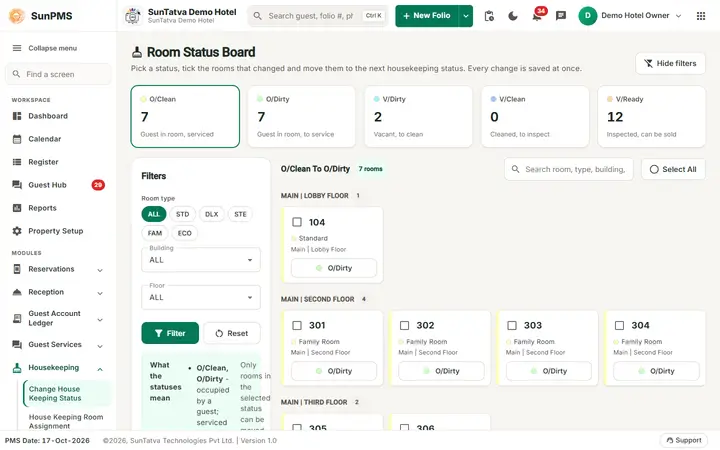
Change House Keeping Status
Moves rooms between the cleaning states one by one or in bulk. The screen heading is Room Status Board.
Read the guide →House Keeping Room Assignment
Shares the day's rooms among the housekeepers of a housekeeping group. Housekeeping groups and their members are set up in…
Read the guide →Room Maintenance (Block-Unblock)
Takes rooms out of sale for maintenance for a date range and lists the blocks that exist.
Read the guide →Housekeeping Mobile - overview and setup
Housekeeping Mobile is a phone-friendly part of SunPMS for room attendants.
Read the guide →Housekeeping Mobile - Room detail
Everything about one room for the person standing in it: the status, big buttons for what can be done next, the cleaning timer…
Read the guide →HouseKeeping Task
A housekeeping task is one cleaning duty (Bathroom, Towels, Bed Sheets, Drapes, Vacuum, Dusting).
Read the guide →House Keeping Group
A housekeeping group is a team of housekeepers (for example "Morning shift" or "Tower A").
Read the guide →Housekeeping - overview
Housekeeping in SunPMS covers the room status (dirty, clean, ready), assigning rooms to housekeeping groups, the housekeeping…
Read the guide →Housekeeping Report
Prints (PDF) or exports (Excel) the cleaning sheet of each housekeeper in a group: rooms, status, tasks to do, remarks, and…
Read the guide →Housekeeping Mobile - Rooms (My rooms)
The home screen of the housekeeper. It lists today's rooms with colour, status and what is happening in the room, so the…
Read the guide →Housekeeping Mobile - Report an issue
The form a housekeeper uses to tell the right person about damage or any other problem, with photos, from the room itself.
Read the guide →Housekeeping Mobile - My reports
Shows the reports the housekeeper sent (or that are assigned to them) with their status, and lets them follow the answer.
Read the guide →Housekeeping Mobile - Supervisor view
Supervisors see every report of the hotel, act on it from the phone and watch it through to the end.
Read the guide →Housekeeping Mobile - Chat and Report to supervisor
The Chat tab is the normal SunComm team chat on the phone: your conversations, the Housekeeping channel, direct messages with…
Read the guide →Housekeeping Mobile - Alerts (notifications)
The Alerts tab is the same notification list as the bell of the desk. A red number on the tab counts unread alerts.
Read the guide →Housekeeping Mobile - Me (profile and settings)
Shows who is signed in, which hotel and date the app works on, what the account may do, and the personal settings.
Read the guide →Housekeeping Mobile - troubleshooting
Housekeeping Mobile - troubleshooting. Housekeeping Mobile - troubleshooting Part of the SunPMS Help Center.
Read the guide →Frequently asked questions
Where do I create housekeeping groups and members?
In Property Setup (Housekeeping Groups, Housekeeping Group Members); the assignment screen only uses existing active groups.
A room is missing from the status screen.
Rooms under maintenance are not listed there; use Room Maintenance.
Does the housekeeper on the phone need a licence?
No, Housekeeping Mobile needs none; the Chat tab needs the Team Chat licence.
How do I create a phone-only housekeeper?
Give the user the role Housekeeper (Mobile): how to.
Why is a room missing?
Rooms under maintenance or blocked are not listed here; use Room maintenance.
Where is the history?
The card shows the last update time and user.
See SunPMS with your own hotel in mind
Request a walkthrough and we will show the screens your team will use every day.