| "Assigned to you: "</td>
<td>The person a report is assigned to</td>
</tr>
<tr>
<td>"<title> is now Resolved" (and every other status) with the note</td>
<td>The reporter and the assignee</td>
</tr>
<tr>
<td>"<name>: <comment>"</td>
<td>The reporter, the assignee and the people involved, except the author</td>
</tr>
<tr>
<td>"Room <number> ready for inspection"</td>
<td>Supervisors, when inspection is required</td>
</tr>
</tbody></table></div>
<h2 id="how-to-use-it">How to use it</h2>
<ol>
<li>Tap <strong>Alerts</strong>. New alerts are highlighted.</li>
<li>Tap an alert to open the report or room it is about. Tap the cross to dismiss it. <strong>Mark all read</strong> clears the highlights. <strong>Load more</strong> shows older alerts.</li>
</ol>
<h2 id="what-an-alert-looks-like">What an alert looks like</h2>
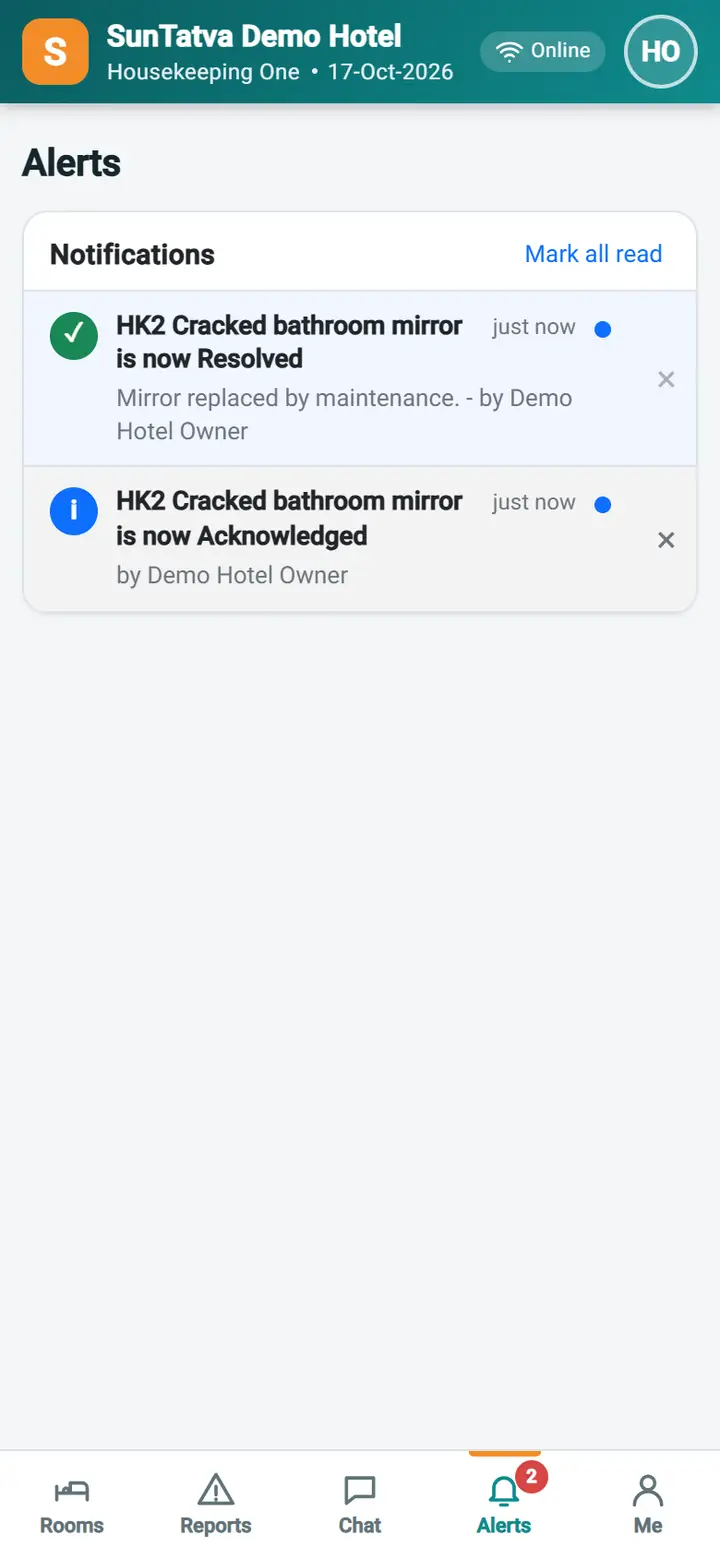
<p>Each alert has a title (for example "Assigned to you: Cracked mirror"), a short line of detail such as who reported it and how serious it is, and the time. Unread alerts are highlighted, and the red number on the <strong>Alerts</strong> tab and on the bell shows how many are unread.</p>
<h2 id="how-an-alert-opens">How an alert opens</h2>
<p>Tapping an alert opens the report it is about, or the room for "Room <number> ready for inspection", and marks that alert as read. You do not need to search for the report afterwards.</p>
<h2 id="mark-read-dismiss-and-older-alerts">Mark read, dismiss and older alerts</h2>
<ul>
<li><strong>Mark all read</strong> removes the highlight from every alert at once; the alerts stay in the list.</li>
<li>The cross on one alert dismisses only that alert.</li>
<li><strong>Load more</strong> shows older alerts. The list starts with the most recent ones.</li>
</ul>
<h2 id="limits">Limits</h2>
<p>Alerts arrive while the app is open (live). They are not pushed to a closed browser or to a locked phone, so open the app to see what you missed; the list is filled when you open it. You only receive alerts about your own reports, reports assigned to you and, for supervisors, new reports and rooms waiting for inspection.</p>
<h2 id="messages-you-may-see">Messages you may see</h2>
<div class="tbl"><table>
<thead>
<tr>
<th>Message</th>
<th>Why</th>
<th>What to do</th>
</tr>
</thead>
<tbody><tr>
<td>No notifications</td>
<td>Nothing yet</td>
<td>None</td>
</tr>
</tbody></table></div>
<h2 id="screenshots">Screenshots</h2><figure><img src="/img/23-housekeeping-mobile/hkm-14b-alerts-supervisor-720.webp" width="720" height="1558" alt="Housekeeping Mobile - Alerts (notifications): hkm 14b alerts supervisor" loading="lazy" decoding="async"><figcaption>Housekeeping Mobile - Alerts (notifications): hkm 14b alerts supervisor</figcaption></figure><nav class="related" aria-labelledby="rel-h"><h2 id="rel-h">Related guides</h2><ul><li><a href="/help/housekeeping-mobile/my-reports/">Housekeeping Mobile - My reports</a></li><li><a href="/help/housekeeping-mobile/supervisor-view/">Housekeeping Mobile - Supervisor view</a></li><li><a href="/help/communication/notifications-bell/">Notifications bell</a></li><li>Feature overview: <a href="/features/housekeeping/">Housekeeping and mobile housekeeping</a></li></ul></nav><nav class="pager" aria-label="More in Housekeeping mobile"><a href="/help/housekeeping-mobile/chat-and-report-to-supervisor/">← Housekeeping Mobile - Chat and Report to supervisor</a><a href="/help/housekeeping-mobile/profile-and-settings/">Housekeeping Mobile - Me (profile and settings) →</a></nav></article><aside class="toc" aria-label="On this page"><div class="box"><h2>On this page</h2><ol><li><a href="#what-you-will-be-told">What you will be told</a></li><li><a href="#how-to-use-it">How to use it</a></li><li><a href="#what-an-alert-looks-like">What an alert looks like</a></li><li><a href="#how-an-alert-opens">How an alert opens</a></li><li><a href="#mark-read-dismiss-and-older-alerts">Mark read, dismiss and older alerts</a></li><li><a href="#limits">Limits</a></li><li><a href="#messages-you-may-see">Messages you may see</a></li><li><a href="#screenshots">Screenshots</a></li></ol><p>Part of <a href="/features/housekeeping/">Housekeeping and mobile housekeeping</a></p><p><a href="/help/">Help Center</a></p><p><a class="btn pri" href="/contact/">Request a demo</a></p></div></aside></div></div></main>
<footer class="site"><div class="wrap"><div class="fgrid">
<div><h2>SunPMS</h2><p>Hotel property management software by SunTatva Technologies.</p><p><a class="btn pri" href="/contact/">Request a demo</a></p></div>
<div><h2>Product</h2><ul><li><a href="/features/">Features</a></li><li><a href="/solutions/">Solutions</a></li><li><a href="/integrations/">Integrations</a></li><li><a href="/reports/">Reports catalogue</a></li><li><a href="https://app.sunpms.com/" rel="nofollow">Sign in</a></li></ul></div>
<div><h2>Learn</h2><ul><li><a href="/help/">Help Center</a></li><li><a href="/how-to/">How-to guides</a></li><li><a href="/faq/">FAQ</a></li><li><a href="/glossary/">Glossary</a></li><li><a href="/videos/">Video tutorials</a></li><li><a href="/whats-new/">What's new</a></li></ul></div>
<div><h2>Company</h2><ul><li><a href="/about/">About</a></li><li><a href="/contact/">Contact</a></li><li><a href="/privacy/">Privacy</a></li><li><a href="/terms/">Terms</a></li><li><a href="/feed.xml">RSS feed</a></li></ul></div>
</div><div class="legal"><span>© 2026 SunTatva Technologies. SunPMS, SunPOS, SunParking and SunHardware are products of SunTatva Technologies.</span><span><a href="/sitemap.xml">Sitemap</a></span></div></div></footer>
<script src="/assets/site.aec57d50.js" defer></script>
</body></html> |