
How do I create a Housekeeping Mobile user (a housekeeper who works on the phone)?
Short answer
Make sure the property has the Housekeeping Mobile licence (Property Setup > Licences; it is a chargeable add-on), then add a user with the role Housekeeper (Mobile), put the person in a housekeeping group with rooms assigned, and give them their user name and password. They sign in on the phone and go straight to their rooms.
Steps
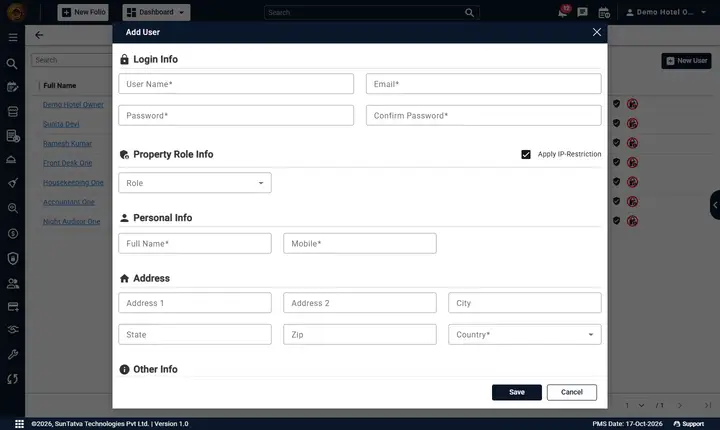
- Open Property Setup > User & Access > User and click New User.
- Fill User Name, Email, Password, Confirm Password.
- In Property Access tick the property and choose Housekeeper (Mobile). For a floor supervisor choose Housekeeping Supervisor (Mobile). Do not add another role: with any desk role the person sees the full SunPMS.
- Fill Full Name, Mobile, Country (Personal Info) and click Save.
- Put the user in a housekeeping group: open Property Setup > HouseKeeping Setup > House Keeping Group (details), click Create HouseKeeping Group, type the Group Name and tick the user in the HK User Name list, then Save. (An existing group can be edited the same way.)
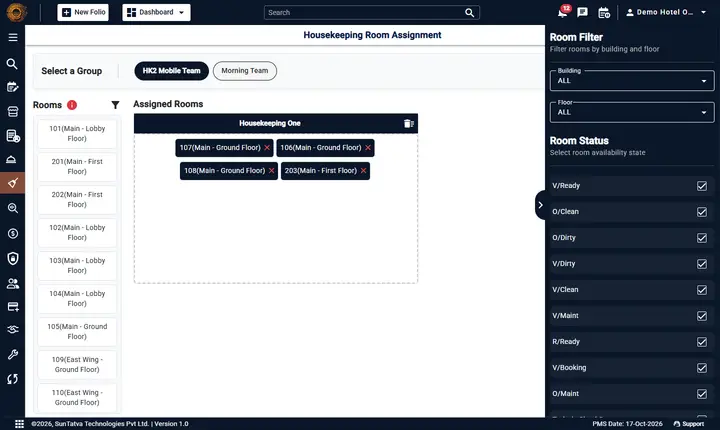
- Open Housekeeping > Room Assignment, choose the group and drag the rooms onto the user's card; changes save at once. The My rooms list shows these rooms.
- Give the housekeeper the sign-in address and the user name. On first use the browser's menu offers Add to Home screen.
Check the result
Sign in as the new user on a phone: the first screen is Rooms with the assigned rooms and a bottom bar with Rooms, Reports, Chat (when licensed), Alerts and Me. Typing another SunPMS address returns to Housekeeping.
Common problems
- Login shows "Your IP is not allowed to access this property": the property uses an IP whitelist. Either add the housekeeper's network address to the whitelist or untick Apply IP-Restriction for that user (the Add User form has it ticked by default).
- Housekeeper sees the whole PMS: they have a second role. Remove it.
- My rooms is empty: no rooms are assigned in a housekeeping group.
- No Chat tab: the role has no Access to Communication (the supervisor role has it) or the Team Chat licence is off.
- More: Housekeeping Mobile troubleshooting.