
Features
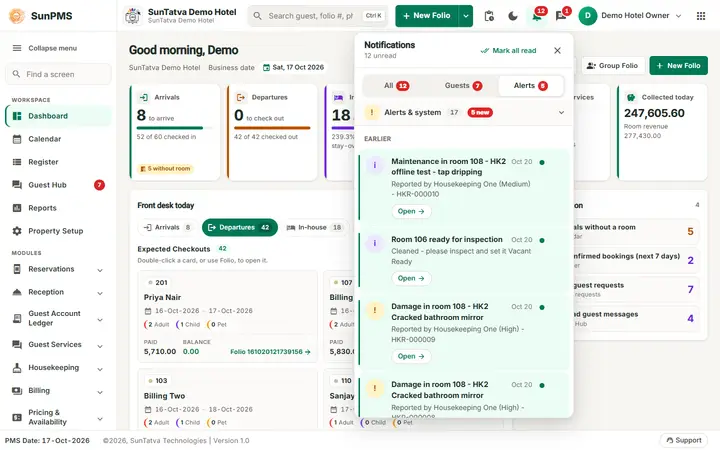
Hotel team chat and notifications built into the PMS
SunPMS has a built-in messenger so staff can talk without leaving the screen they work on: a notification bell, direct chats, groups and channels, and chat with the staff of a linked SunPOS restaurant or SunParking car park.
What you can do
Guides for team chat and notifications
Every screen, field and message is explained in the Help Center.
Notifications bell
The bell in the header is the ONE place that collects everything that wants your attention, so you do not have to look for it…
Read the guide →Team chat: open the chat window and start a direct chat
The chat window is a large panel (up to about 1120 pixels wide) that opens under the header at the right, with the conversation…
Read the guide →Team chat: messages, reply, edit, delete and attachments
This page explains everything you can do with a single message once a chat is open: write it, answer a particular message…
Read the guide →Linked apps and cross-app chat
When your hotel is linked to a SunParking car park or a SunPOS restaurant, the front desk can chat with the valet desk or the…
Read the guide →Communication: notifications, team chat and cross-app chat
SunPMS has a small built-in messenger so staff can talk to each other without leaving the screen they are working on.
Read the guide →Team chat: group chats
A group is a named chat you start yourself for three or more people, for example everybody working a wedding, a big arrival or a…
Read the guide →Team chat: channels
A channel is a standing room for a whole team, such as the front desk, housekeeping or the night shift.
Read the guide →Team chat: search, mute, status, typing and read receipts
Five small features that keep chat useful on a busy desk: finding an old message, silencing a noisy chat, telling colleagues you…
Read the guide →Chat settings, privileges and message retention
An administrator decides who may chat, who manages channels, how long messages are kept and how big a file can be.
Read the guide →Licences for chat
Two licence modules control chat. Team Chat (code COMMUNICATION) switches on the chat window inside your property.
Read the guide →Linked apps (cross-app chat administration)
This screen is for the chat administrator. It lets you switch chat with linked apps on or off for the whole property, see…
Read the guide →Frequently asked questions
I see the bell but no chat button.
The property lacks the Team Chat licence, your role lacks the chat privilege, the property switch is off, or you signed in with a PIN. See Chat problems.
Is chat private?
Direct chats and groups are visible only to their members. An administrator can delete a message or remove a member but cannot read chats they are not in.
Can guests use it?
No. This chat is for staff. Guests chat with the desk through the guest portal (Guest services).
Does it work on a phone or tablet?
Yes. On a narrow screen the chat window fills the screen: list first, then the conversation, with a back arrow.
I did not get an alert for a restaurant charge.
Charges are sent to the whole property. Check the restaurant is linked to the hotel (see SunPOS room charges) and click the bell to refresh.
What is the difference between the bell and the chat button?
The bell shows system alerts. The chat button is for messages written by people.
See SunPMS with your own hotel in mind
Request a walkthrough and we will show the screens your team will use every day.