Linked apps (cross-app chat administration)
On this page
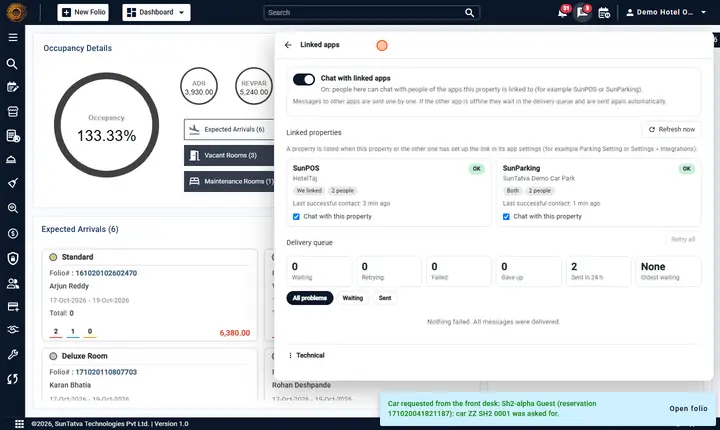
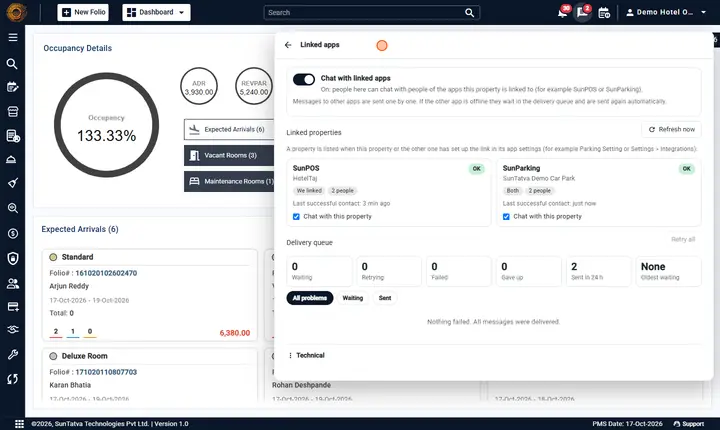
This screen is for the chat administrator. It lets you switch chat with linked apps on or off for the whole property, see whether each linked property is reachable, and handle messages that could not be delivered.
Before you start
- The property has Team Chat and Cross-app Chat and you have Communication Administration.
- Open the chat window and click the link icon (tooltip Linked apps). The back arrow returns to the list.
Screen layout
| Block | Item | What it means |
|---|---|---|
| Switch | Chat with linked apps | Master switch for this property. On: people here can chat with the apps this property is linked to. Off: chat stays inside this property. |
| Chat with linked apps is on for this property, but it is not available to you yet. Check the licence and the privilege for linked-app chat. | The switch is on but the licence or your privilege is missing. | |
| Linked properties | Refresh now | Reads the link settings again and asks the other apps to confirm. Use it after you changed Parking Setting or a POS link. |
| A card per property: app name, property name and city | ||
| Status chip: OK, Unreachable, Refused | OK = the other app answered. Unreachable = it did not answer (down, network). Refused = it answered and refuses us (link not declared there, licence or switch off there, different owner). | |
| Tags: We linked, They linked, Both; |
Who declared the link; how many chat-enabled people the other side has; messages waiting or failed. | |
| Last successful contact:... and a red error line | When it last worked, and the last reason it did not. | |
| Chat with this property (checkbox) | Turns chat with this one property on or off without affecting the others. | |
| Delivery queue | Counters Waiting, Retrying, Failed, Gave up, Sent in 24 h, Oldest waiting | A quick health view. Failed and Gave up are shown red when above zero. |
| Retry all | Queues every failed item again. | |
| Filters All problems, Waiting, Sent | What the list below shows. | |
| A row: status (Waiting, Sent, Failed, Gave up), kind (Message, Edit, Delete, Chat change, Left chat, Read receipt, Delivery receipt), "to |
The message text is never shown here. | |
| Retry / Discard on a row | Retry sends it again; Discard removes it from the queue (the sender keeps the message with a red warning). | |
| Technical | Received in 24 h, counters, recent errors | For support. |
How to switch cross-app chat on or off
- Click the switch Chat with linked apps. Result: Chat with linked apps is on. or Chat with linked apps is off. The Linked apps tab in New chat appears or disappears for everyone after a moment.
How to check a link and fix a problem
- Look at the chip of the property: OK is healthy.
- Unreachable: the other app or the network is down. Messages wait and are delivered when it returns; there is nothing to fix on your side unless it lasts long.
- Refused: read the red error line. Typical causes: the link is not set on the other app, its Chat with linked apps switch is off, it lacks the licence, or the two properties belong to different owners.
- After fixing, click Refresh now. The chip should become OK.
- Look at Delivery queue. If Failed or Gave up is above zero, click Retry all (or Retry on single rows). Result: Queued again. or All failed items are queued again. The counters go to zero as the messages are delivered.
How to discard a message that can never be delivered
- In Delivery queue choose All problems.
- On the row click Discard. Result: Removed from the queue. The sender's message keeps its red warning; it is not delivered.
What happens behind the scenes
- Links are read at startup, every 15 minutes, and whenever a link setting is saved. A link declared by only one side appears on the other side as soon as the first message or Refresh now reaches it.
- A message waits and is retried at 5 s, 30 s, 2 min, 10 min and then hourly; after 24 hours it is Gave up. A refusal by the other app (link removed, licence or switch off, unknown person) is Failed at once.
- A restarted app gets its waiting messages within seconds, because the other side notices it is back.
- Messages and receipts are applied once, in order; a retry never duplicates.
- Switching a single property off here stops both sending to it and receiving from it.
Messages you may see
| Message (exact text) | Why it appears | What to do |
|---|---|---|
| Only administrators can change how this property chats with linked apps. | You lack Communication Administration. | Ask an administrator. |
| Chat with linked apps is on. / Chat with linked apps is off. | Switch changed. | None. |
| Linked apps refreshed. | Refresh now finished. | None. |
| Queued again. | Retry accepted. | None. |
| All failed items are queued again. | Retry all accepted. | None. |
| Removed from the queue. | Discard done. | None. |
| Nothing failed. All messages were delivered. | No problem rows. | None. |
| Nothing is waiting. / Nothing sent yet. | Empty filter. | None. |
| No linked apps yet - link this property in the app settings (e.g. Parking Setting / Property Setup > Integrations). | No link exists. | Create it. |
| Could not load. / Could not read the delivery queue. / Could not refresh. | The server could not answer. | Retry later. |
| None | Value of Oldest waiting when nothing waits. | None. |
Tips and FAQ
- Q: A property says Refused but we both configured the link. A: Check the owner. SunAuth issues the chat token only when both groups belong to the same owner. Then check the other side's switch and licence.
- Q: Can I read the failed message? A: No, for privacy only the type, sender, conversation name and error are shown.
- Q: The queue shows Oldest waiting with hours. A: The other app has been down for that long; it will be retried hourly until 24 hours, then Gave up (use Retry all after it is back).
Screenshots