
Guest Services Overview
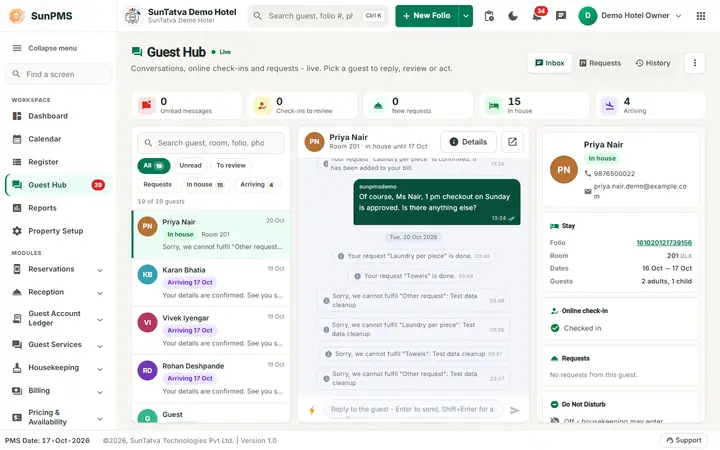
Guest Services lets your guests handle their stay from their own phone, and gives your front desk one place to answer them. Each reservation gets a personal link. The guest opens it (no app, no login) and can check in online, see their stay and bill, ask for housekeeping or amenities, order room service from your restaurant, and chat with the front desk.
The two licences
| Licence code | What it unlocks |
|---|---|
| ONLINE_CHECKIN | Online check-in: Arrival List and Pending Approvals; Guest Hub and Guest Conversations. |
| GUEST_MODULE | In-stay features: Guest Requests, Do Not Disturb, requests in the Guest Hub; Guest Hub and Guest Conversations. |
Guest Hub and Guest Conversations need at least one of the two. Guest Portal Setting appears in Property Setup when you have either. Without a licence the menu items are hidden. Licences are bought or requested in Property Setup > Licences. WhatsApp chat additionally needs the WHATSAPP licence.
How the pieces fit
- Set up. An owner or administrator turns the portal on and chooses what guests may request (Guest Portal Setting).
- Invite. The desk sends each arriving guest a link by e-mail and text message (Arrival List or the reservation screen).
- Guest checks in online. The guest confirms details, adds ID photos, a card and signature, and accepts the terms (guest side).
- Desk reviews. The submission waits in Pending Approvals. Nothing reaches the reservation until the desk approves.
- During the stay the guest sends requests and chat messages. The desk answers in the Guest Hub, Guest Conversations and Guest Requests.
Key ideas
- Link. One active link per reservation. Sending again creates a new link and the old one stops working. Owners and Administrators can see the link, copy it, Disable link or Enable link. Disabled links stop working at once.
- Approval. Only the fields the guest changed are applied, on top of the reservation as it is at approval time. If the desk edited the reservation after the guest submitted, the review shows a warning on that field.
- Chat. One conversation per stay. Messages arrive live. When the guest is away from the page, the guest gets a push notification, a WhatsApp message (if connected), an e-mail or text with a link.
- Requests. Housekeeping tasks, amenities and chargeable items, room service and free text. Accepting a chargeable item posts it to the guest folio with the property's tax. Room service orders go to the linked SunPOS restaurant and reach the folio when the restaurant settles them to the room.
- Card. A card added online is tokenised by the payment gateway and stored on the guest profile for the desk to authorise; the number never reaches SunPMS and it is not charged automatically.
Live alerts
The notification bell in the page header holds a section Guest requests & activity, ONE feed of everything guests are waiting on, from every connected app: PMS requests, messages and check-ins to review; POS room-service orders and restaurant charges; Parking car requests, vehicles and parking charges; Hardware ID scans and signatures. Items are grouped in one sub-section per app with the app name and icon, and the chips All / PMS / POS / Parking / Hardware filter them. The red number on the bell counts every unread item of the whole feed plus the alerts. Click an item to open the right place (chat, review dialog, Guest Hub, or the guest's folio on the Charges / Vehicle tab); the tick marks one item read and Mark all read clears the lot. It has optional Sound and Desktop alerts. There is only one bell and one pop-up per event: the separate guest bell and parking bell were removed. Staff-level alerts are in the section Alerts & system of the same popup (see The notification bell). Chats you open from any list dock at the bottom of the page so you can keep working.
Tips and FAQ
- Q: The guest says the link does not work. A: Check Guest link on the list. If it says Disabled, enable it; if the link was re-sent, the guest is using an old one. Send again.
- Q: Can a guest check in without the desk approving? A: No. Approving is always a desk action.
- Q: Where do I see the guest's chat on the reservation? A: On the reservation screen the Comments pop-up has Remarks, Guest chat and Guest requests tabs.
- Q: The menu has no Guest Services group. A: Neither licence is active for the property. Ask the owner to request one in Licences.