
Features
Guest portal and online check-in for hotels
Each reservation gets a personal link. The guest opens it with no app and no login, checks in online, sees the stay and bill, asks for housekeeping or amenities, orders room service and chats with the front desk. Nothing reaches the reservation until the desk approves.
What you can do
- Online check-in: guest details, ID photos, card and signature, terms
- Pending approvals: the desk reviews only what the guest changed
- Guest requests for housekeeping, amenities, chargeable items and free text
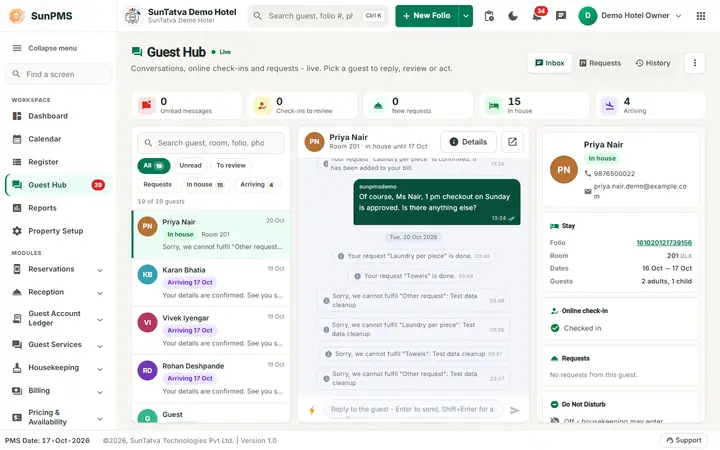
- Guest hub and conversations for the front desk
- Room service orders go to the linked SunPOS restaurant
Guides for guest portal and online check-in
Every screen, field and message is explained in the Help Center.
Guest Portal (the guest's page)
This is what your guest sees on their phone. Staff need to know it to help guests who call the desk. The page works in a browser;
Read the guide →Pending Approvals
Lists the online check-ins that guests have submitted and that wait for you.
Read the guide →Guest Requests
Shows what guests ask for during their stay from their portal page: housekeeping tasks, amenities and chargeable items…
Read the guide →Guest Hub
The front desk's control room for guest communication. It shows live counts, an inbox of every in-house guest and arriving…
Read the guide →Guest Portal Setting
Switch the guest portal on or off, choose which housekeeping tasks and chargeable items guests may request during their stay…
Read the guide →Guest Services Overview
Guest Services lets your guests handle their stay from their own phone, and gives your front desk one place to answer them.
Read the guide →Arrival List
Lists the guests arriving on a chosen date and lets you send them the personal online check-in link by e-mail and text message.
Read the guide →Guest Conversations
A list of every guest who has a portal link for a current or upcoming stay.
Read the guide →Frequently asked questions
The guest says the link does not work.
Check Guest link on the list. If it says Disabled, enable it; if the link was re-sent, the guest is using an old one. Send again.
Can a guest check in without the desk approving?
No. Approving is always a desk action.
Where do I see the guest's chat on the reservation?
On the reservation screen the Comments pop-up has Remarks, Guest chat and Guest requests tabs.
The menu has no Guest Services group.
Neither licence is active for the property. Ask the owner to request one in Licences.
How do I message a guest who has no link?
Select them and click Start conversation; use Send link so they can open the page.
The WhatsApp item is missing in the menu.
Licence WHATSAPP is not active.
See SunPMS with your own hotel in mind
Request a walkthrough and we will show the screens your team will use every day.