
Features
Night audit software and hotel billing
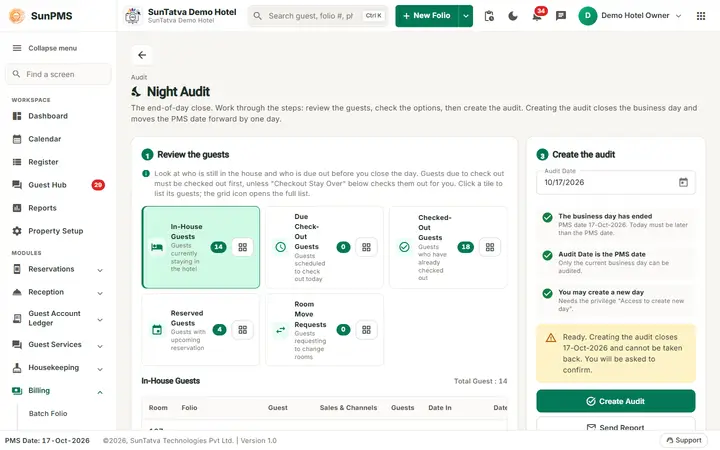
Night Audit closes the current business day (the PMS date) and opens the next one. It posts room charges and taxes, handles no-shows and cancellations and can send the accounting totals to your FAS system.
What you can do
Guides for billing and night audit
Every screen, field and message is explained in the Help Center.
Night Audit
Night Audit closes the current business day (the PMS date) and opens the next one.
Read the guide →Noshow/Cancel Revenue Posting
When a guest does not arrive (No-Show) or cancels, the hotel may keep part or all of the advance payment.
Read the guide →Credit Card Reservation Authorization (grid page)
This is the current Billing menu page for charging or holding the card that is stored on arriving reservations, for many…
Read the guide →Extra Income and Extra Expense
Record money that comes in or goes out of the hotel but is not a guest folio payment: for example selling scrap, receiving a…
Read the guide →Shift Details, Shift End and Payment Denomination
When shifts are enabled, each desk user starts a shift after login and ends it when signing out.
Read the guide →FAS Integration and FAS Settings
FAS (Financial Accounting System) is the accounting package that receives your daily hotel figures.
Read the guide →Credit Card Authorization
This screen charges or holds money on cards stored on reservations (for example OTA or virtual cards) and releases holds after…
Read the guide →Credit Card Release Authorization (grid page)
When a guest's card is held (authorized) and the guest then checks out without the hold being converted into a payment, the…
Read the guide →Batch Folio
Prints registration forms, folios or detailed folios for many guests in one PDF.
Read the guide →FAS Interface
FAS is the financial accounting system integration. This screen previews the day's accounting entries (debits and credits) that…
Read the guide →Shift End Details
When a property uses shifts, signing out is not instant. The dialog Shift Details first shows what you collected during your…
Read the guide →Payment Denomination
The Denomination window is a small change calculator. After you record a cash payment it shows the amount the guest gave you and…
Read the guide →Frequently asked questions
The Create Audit button is grey.
Either the PMS date is already today, you lack the privilege, or the Audit Date field was changed (it must equal the PMS date).
Does the audit post room rent?
No. Rent is already on the folio; the audit only rolls the date.
After the audit a group has fewer blocked rooms.
The group has a release rule; the audit released the unsold block nights whose release day had come. Members keep their rooms. See Group block rooms.
Can I undo a night audit?
No. Transactions of past days can be viewed but the date cannot be rolled back.
A guest arrives after midnight but before I have run the night audit. Which day is the arrival?
The PMS date, not the clock, decides. Until you run the audit the PMS date is still the old business day, so a check-in or payment made at 1 am is booked on that old day. Run the audit only when all of that business day's arrivals, departures and payments are entered; the guests who come later belong to the new business day.
Should I wait for the last late arrival before auditing?
Only if the guest is expected soon and you want them on the old day. Otherwise run the audit at your normal time; a guest who arrives afterwards is checked in on the new PMS date.
See SunPMS with your own hotel in mind
Request a walkthrough and we will show the screens your team will use every day.