
Sync and Channel Manager Overview
On this page
SunPMS does not sell your rooms on Booking.com, Expedia or your website by itself. A connected system does that: a CRS (Central Reservation System) or channel manager. This chapter explains how SunPMS talks to that system and which screens you use to check or repair the connection.
The connection in plain words
- Bookings come in. When a guest books on an online travel agency (OTA) or your booking engine, the CRS sends the reservation to SunPMS. It appears in your reservation list with a CRS folio number.
- Availability, rates and restrictions go out. Whenever you change a rate, close a room type, change a restriction, or a room is sold, SunPMS sends the new numbers to the CRS. The CRS passes them on to the OTAs. This normally happens automatically in the background.
- Statistics and reservations can be pushed out too. For revenue-management and reporting partners SunPMS can send daily revenue/rooms-sold statistics and folio (reservation) data through interfaces (webhooks).
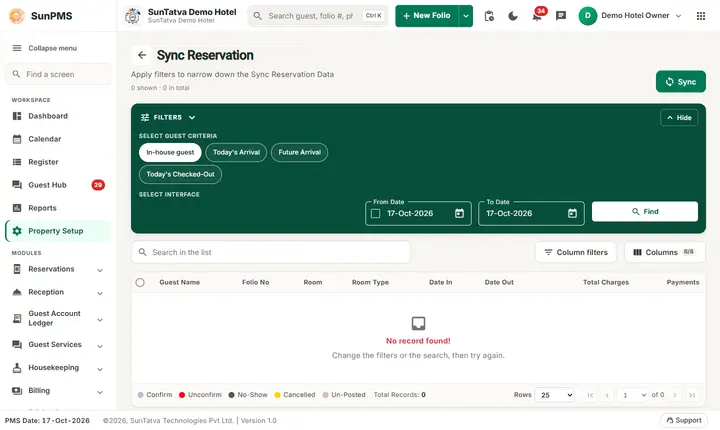
- Sync screens are for repair and first-time loading. If an OTA shows wrong availability, or a partner system missed data, you push the data again with one of the sync screens.
All pushes are queued. When you click Sync, the screen only confirms that the request was queued. The actual delivery is done a few moments later by a background service, and the partner may take longer to show the change.
Two families of screens
| Family | Where | What it pushes | Who receives it |
|---|---|---|---|
| Interface sync (webhook) | Left menu Sync: Sync Reservation, Sync Statistics, Sync Inventory | Folios, daily statistics, inventory for a chosen interface | A partner interface configured in WebHook settings (see Webhook settings) |
| CRS bulk sync | Property Setup > CRS Settings: Bulk Inventory Update / Bulk Restrictions Update / Bulk Rate Update (and the history list CRS Bulk Update, #/setup/channel-sync) |
Inventory, restrictions or rates for a date range | The CRS / channel manager of the property |
Related audit screen: OTA Reconciliation compares your folios with what the OTA holds and reports differences back to the OTA.
When is CRS available?
- The CRS Settings group in Property Setup (CRS Tax Exempt and the three bulk updates) appears only when the property is flagged as connected to a CRS (set up by SunTatva support when your channel manager is activated). The history list CRS Bulk Update and OTA Reconciliation have no item in the left menu in this version: open them by their address (
#/setup/channel-sync,#/ota-reconciliation) or from the Sync button / links your administrator gives you. - The interface sync screens list only interfaces already created in Property Setup > Integrations > WebHook. With no interface the Interface list is empty.
Which screen should I use?
| Situation | Screen |
|---|---|
| A partner system missed or mis-recorded a booking | Sync Reservation |
| Partner revenue or rooms-sold figures are wrong | Sync Statistics |
| Partner shows wrong rooms available | Sync Inventory |
| You just connected the CRS and need to load all availability | Bulk Inventory / Restrictions / Rate Update |
| You want to see whether earlier CRS pushes worked | CRS Bulk Update (history list) |
| OTA payouts or stays do not match your folios | OTA Reconciliation |
What happens behind the scenes
- CRS pushes are logged as event-log records with status: Sent To Queue Success, Received By Consumer, Processed Successfully, Processing Failed. You can read them in CRS Bulk Update.
- Reservations arriving from the CRS are created by the CRS reservation endpoint, which authenticates with an API key (not a user login).
Tips and FAQ
- Q: I clicked Sync and saw a success message but the OTA did not change. A: The message means "queued". Wait a few minutes, then check the history in CRS Bulk Update. If the status is Processing Failed, open CRS Result for the reason.
- Q: I cannot see the CRS Settings group in Property Setup. A: They appear only when the property is connected to a CRS. Contact SunTatva support to activate it.
- Q: Is it safe to sync twice? A: Yes. A sync sends the current values again; it does not add or remove rooms.