
OTA Reconciliation
On this page
Compares the reservations you hold in SunPMS with what the OTA (through the CRS) holds for the same period and lists every difference: dates, status, amounts. You can then tell the OTA what really happened (cancel, no-show, changed stay) by posting the correction from the same screen. Use it monthly before checking OTA invoices and commissions.
Before you start
- The property is connected to a CRS and has at least one CRS/OTA engine.
- Run it for completed periods. It can only report stays whose departure falls in the current reporting month (see the pop-up note).
Screen layout
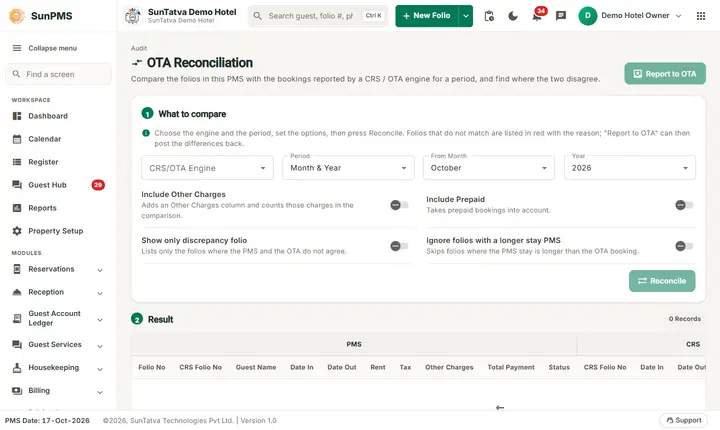
The page has the title OTA Reconciliation ("Compare the folios in this PMS with the bookings reported by a CRS / OTA engine for a period, and find where the two disagree."), the button Report to OTA at the top right and two numbered cards. Card 1 What to compare ("Choose the engine and the period, set the options, then press Reconcile. Folios that do not match are listed in red with the reason; Report to OTA can then post the differences back.") holds the fields below, each with a one-line help text. Card 2 Result shows "n Records" and the grid; before the first run it says "Nothing to show yet. Choose an engine and a period, then press Reconcile."
| Field / button | What it means | Rules |
|---|---|---|
| Include Other Charges (check box) | Adds an Other Charges column and includes them in the comparison | Off by default. |
| Include Prepaid | Include prepaid amounts | |
| Show only discrepancy folio | List only folios that differ | |
| CRS/OTA Engine | Which OTA to compare (first engine is preselected) | Reconcile stays disabled until an engine is chosen. |
| Period (Month & Year, Date Ranges or a weekly range) | Month & Year, Date Ranges, or weekly ranges of the current month such as October - Week 1 (1 to 7) | Weekly ranges end at today's day, or the end of last month during the first 4 days of a month. |
| From Month, Year | Shown with Month & Year | Months list ends at last completed month (this month only after day 4). Years: this year back 10 years. |
| From Date, To Date | Shown with Date Ranges | Cannot be later than the PMS date. |
| Ignore folios with a longer stay PMS | Skip folios where the PMS stay is longer than the OTA stay | |
| Reconcile | Runs the comparison | |
| Report to OTA | Opens the posting pop-up | Enabled only when at least one row has a description (a discrepancy). |
Result grid has two header groups: PMS (Folio No, CRS Folio No, Guest Name, Date In, Date Out, Rent, Tax, Other Charges (optional), Total Payment, Status) and CRS (CRS Folio No, Date In, Date Out, Total Charges, Status), then Description of the difference. Rows with a difference are shown in red. Footer shows "N Records".
How to reconcile
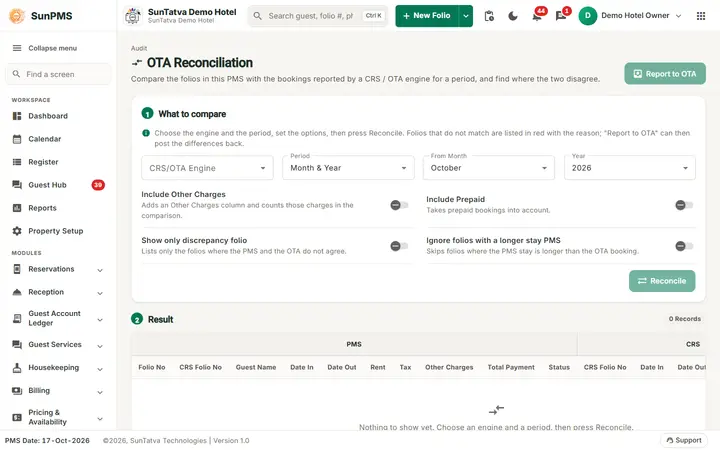
Step 1 sets what to compare, step 2 shows the result after you press Reconcile.
- Open
#/ota-reconciliation. - Choose the CRS/OTA Engine.
- Tick the options you need.
- Pick Month & Year (and choose month and year) or Date Ranges (and the dates), or one of the weekly ranges.
- Click Reconcile. Result: the grid lists the folios, sorted by PMS check-in date.
How to report discrepancies to the OTA
- After reconciling, click Report to OTA. The pop-up Report To OTA(Folio with discrepancy) opens.
- Columns: select box, Folio No, CRS Folio No, Guest Name, Date In, Date Out, Rent, Tax, Total Payment, Status (PMS and CRS) and Request; a Grand Total row sums rent, tax and payment.
- Tick the folios to post. Only rows eligible for posting have a check box; the note cannot post Past OTA Data. explains that stays whose departure is outside the current reporting month cannot be posted.
- Click Post and confirm Are you sure you want to post reservation(s) to OTA? with Yes. Result: Data posted Successfully.
What the Request text means:
| Request text | What SunPMS will tell the OTA |
|---|---|
| Stay change in PMS (OTA status blank) | update booking |
| PMS will report Cancel status (Amount Collected:...) | guest requested cancel |
| PMS will report NoShow status (Amount Collected:...) | no show |
| PMS Stay Duration: n nights, OTA Stay Duration: m nights. PMS will report n nights. | update booking to the PMS nights |
| PMS DateIn / DateOut..., OTA... | update booking dates |
| PMS will report Book status (Amount Collected:...) | cancelled by traveler is reversed (PMS shows checked-in, checked-out or reserved while the OTA says cancel) |
What happens behind the scenes
For a pickup comparison of your own bookings between two dates see the Booking Comparison Report.
The comparison reads the CRS reservation copies against your folios. Posting sends a request per CRS folio to the engine (Expedia or Booking.com). The OTA then adjusts its own record (for example to pay you a no-show fee).
Messages you may see
| Message (exact text) | Why | What to do |
|---|---|---|
| From Date should not be greater than To Date. | Invalid range | Fix dates. |
| No data found. | Nothing to compare | Widen the range or untick Show only discrepancy folio. |
| Please select at least one reservation to post. | Post with nothing ticked | Tick a row. |
| Are you sure you want to post reservation(s) to OTA? | Confirmation | Yes/No. |
| Data posted Successfully. | Posted | Check OTA extranet later. |
Tips and FAQ
- Q: Report to OTA is greyed out. A: Reconcile first, and there must be at least one discrepancy.
- Q: A discrepancy row has no check box. A: Its departure date is outside the current reporting month; handle it with the OTA directly.
- Q: Which engines can I post to? A: The screen sends Expedia for engine 2 and Booking.com for all other engines.