
Sync Reservation
On this page
Use this screen to push reservation (folio) data again to a partner system connected through a WebHook interface, such as a CRM, revenue system or guest app. Typical use: the partner was offline for a day, or you linked a new interface and want existing in-house or future guests sent to it.
Before you start
- Create the interface in Property Setup > Integrations > WebHook (Webhook settings). The Select Interface list is filled from those interfaces; duplicates are shown once.
- The sync is sent only for the property you are logged in to.
Screen layout
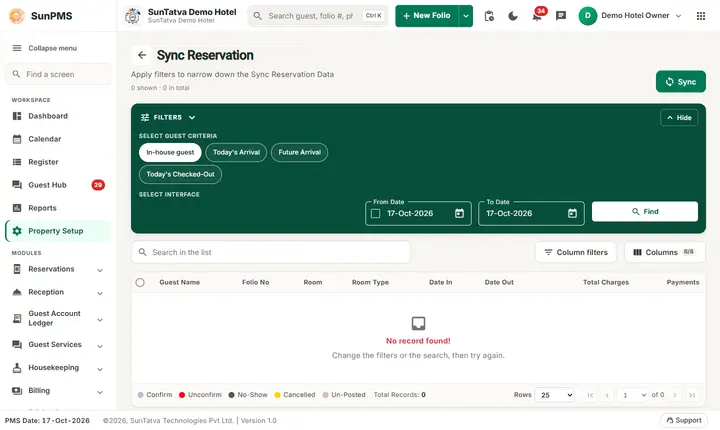
The screen has a title with the line "Apply filters to narrow down the... Data" and a count ("n shown · n in total"), a Sync button at the top right, and a green Filters band (fold it with Hide). Below it are a search box ("Search in the list"), Column filters, Columns (for example 8/8), the grid with row selection, a status-colour legend and the footer with Total Records, Rows (25, 50, 100) and the pager. Without data the grid says "No record found! Change the filters or the search, then try again."
| Field / column / button | What it means | Rules |
|---|---|---|
| Select Guest Criteria (chips) | Which guests to list and sync: In-house guest, Today's Arrival, Future Arrival, Today's Checked-Out | One chip is selected; default is In-house guest. |
| Select Interface (chips) | The partner interface to send to | Required before Sync. |
| From Date (with check box) | Start of a date range | Disabled until the check box in front of it is ticked. Cannot be earlier than the minimum date allowed by the property. |
| To Date | End of the date range | Enabled by the same check box as From Date. |
| Find | Lists the reservations that match the chosen guest criteria | Fills the grid. |
| Sync | Sends the data to the chosen interface | Asks for confirmation first. |
| Grid columns | Guest Name, Folio No, Room, Room Type, Date In, Date Out, Total Charges, Payments | Search box and column filters narrow the rows. |
| Colour legend (under the grid) | Row colour: Confirm (grey-blue), Unconfirm (red), No-Show (black), Cancelled (yellow), Un-Posted (beige) | Shows the reservation status. |
Note: Find lists only by guest criteria. The date range is used by Sync, not by Find.
How to sync reservations
- Open the Sync group in the left menu and click Sync Reservation.
- In the Filters band, under Select Guest Criteria, pick who to send.
- Under Select Interface pick the partner.
- Optional: tick the check box in From Date, then pick From Date and To Date to send every folio in that date range. If left unticked, the guest criteria alone decide what is sent.
- Click Find to preview the folios.
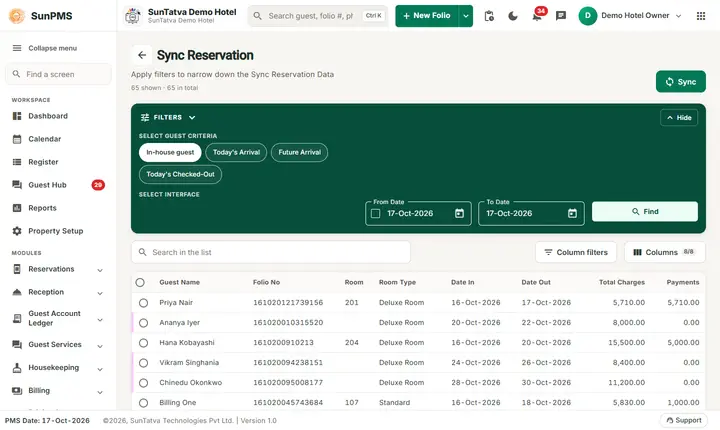
After Find the grid lists the folios that Sync will send. 6. Click Sync. 7. Read the question Are you sure you want to sync reservations? and confirm.
Result: Reservation sync successfully. appears. The request is queued; the partner receives the folios shortly after.
How to search the list
Type in the Search in the list box, or use Column filters. Click a row to highlight it.
What happens behind the scenes
- A webhook event of type folio with event sync is queued with the PMS date and time, the dates and the criteria. The background consumer builds one message per folio and delivers it to the interface.
- The date-range check box is sent as "sync type" 1 (dates used) or 2 (criteria only).
- Nothing in SunPMS changes: no folio, rate or status is edited.
Messages you may see
| Message (exact text) | Why it appears | What to do |
|---|---|---|
| Please select webhook interface type. | Sync clicked with no interface chip selected | Select an interface and click Sync again. |
| Are you sure you want to sync reservations? | Confirmation | Yes to continue. |
| Reservation sync successfully. | Request was queued | Wait for the partner to refresh. |
| Error while sync reservation. | The server rejected the request | Try again; if it repeats, tell support. |
| Something went wrong. | Find could not load the list | Retry, check your connection. |
Tips and FAQ
- Q: The partner shows duplicates after I synced. A: SunPMS resends full folio data; the partner should update by folio number. Ask the partner to match on folio no.
- Q: Does Sync change my reservations? A: No. It only sends a copy.
- Q: Why is the interface list empty? A: No interface exists yet. Add one in WebHook settings.