Daily Reports - summaries and statistics
On this page
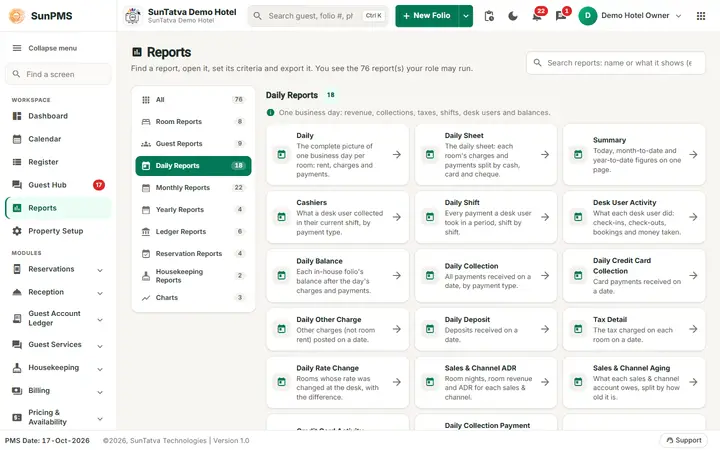
Nine reports for one business day: what happened, what it earned and what is owed. Payment-focused daily reports are in 04-daily-collection-reports. Report date = the From Date picker (single date, starts on the PMS date).
Before you start
- Run end-of-day reports after night audit for final figures.
- Occupancy, ADR and RevPAR are defined once here and reused in other chapters (see "Key formulas").
Key formulas
- Rooms sold = room-nights sold on the date (checked-in stays plus reservations; no-show/cancel revenue is separate).
- Available rooms = active rooms that count towards occupancy and are not in V/Maint (vacant maintenance) status that day.
- Occupancy % = rooms sold ÷ available rooms × 100.
- ADR = room rent (before tax) ÷ rooms sold.
- RevPAR = room rent ÷ available rooms.
- MTD / YTD = 1st of the month / 1 January of the report date up to the report date; MTD and YTD occupancy divide total rooms sold by total available room-nights in the period.
Daily
Screen title: Daily Report. Filter: From Date. Purpose: every folio that moved on the day, grouped as Reservation, Cancel Reservation, No-Show Reservation, Check In, Stayover, Check Out, then Sales & Channel, Miscellaneous Income, Miscellaneous Expense and a Total. Columns: Guest Name, Room Name, Date In, Date Out, Rent, tax, tax Exempt, Other Charge, other-charge tax, Discount, Payment, Direct Billing, Payment Transfer, Total Payment, Deposit, Auth Payment, Other Payment. Use: the night auditor's reconciliation sheet. Rent is the rate for that night, not the whole stay.
Daily Sheet
Screen title: Daily Sheet Report. Same single date and grouping as Daily but payments are split by type: Cash, Check, Card, Other Payment, Total Payment, Direct Billing, Deposit, Payment Transfer, and each tax of your property appears as its own column (plus "Exempt" columns). The headings are not clickable for sorting. Use it when the accountant needs tax-by-tax and cash/card columns.
Summary
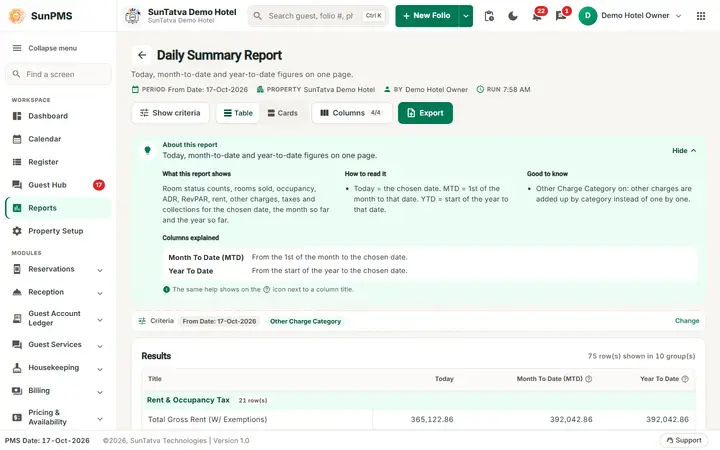
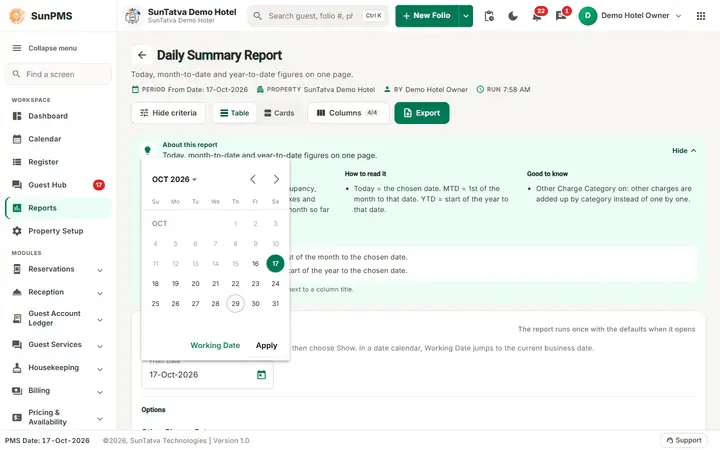
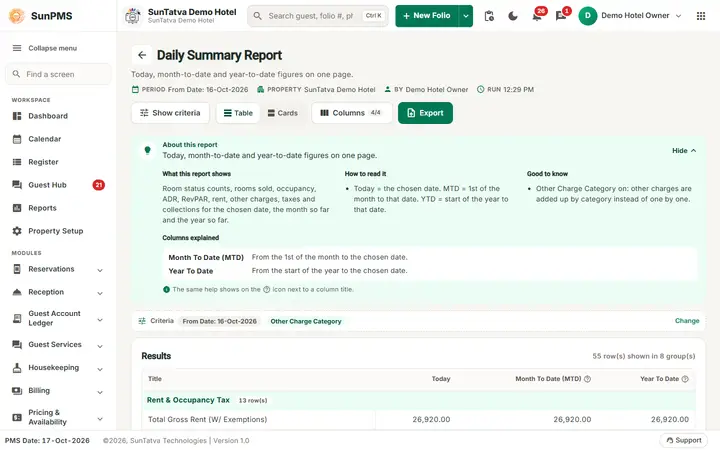
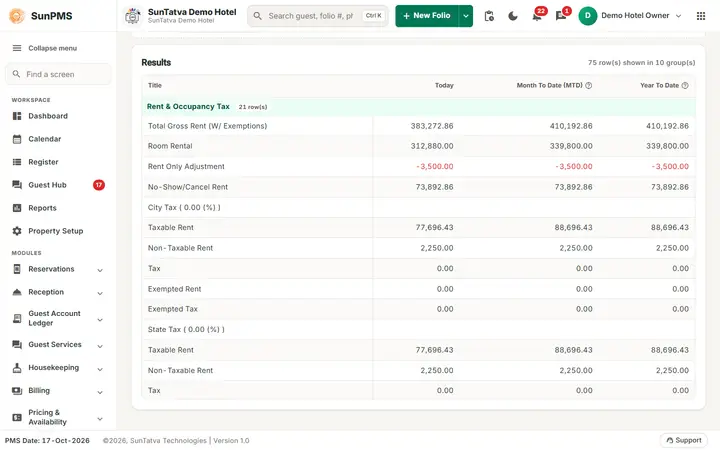
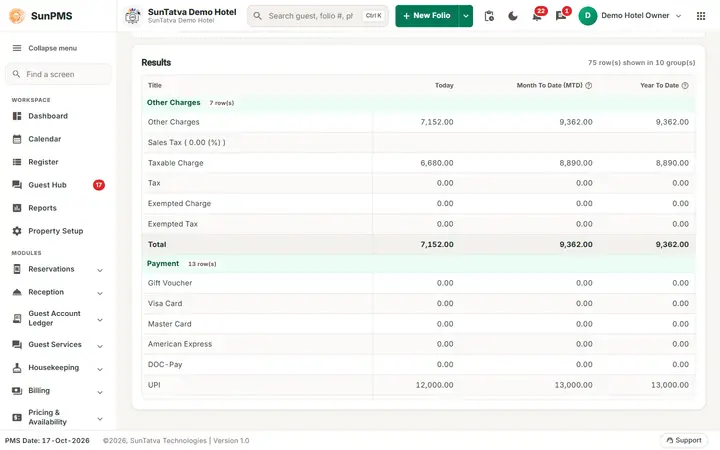
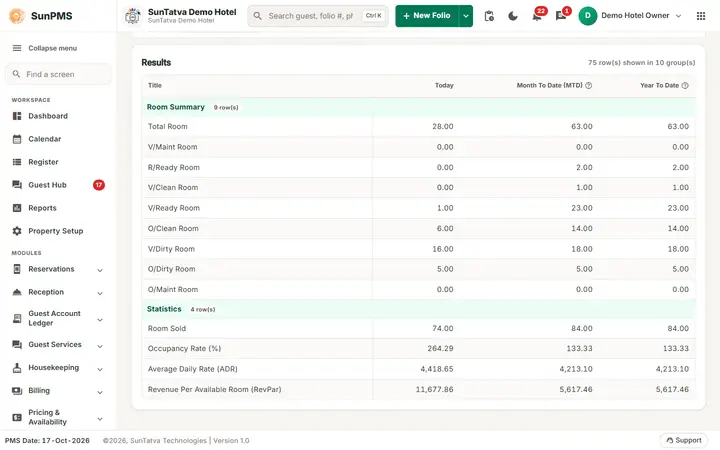
Screen title: Daily Summary Report. Filter: From Date; toggle Other Charge Category (on = other charges listed per charge, otherwise one line). The Card Type toggle that used to appear here did nothing and was hidden on 2026-10-18; use the daily collection reports for card splits. The stray letter "c" that sat in this filter panel was removed. Columns: Title, Today, Month To Date (MTD), Year To Date. Checked on the demo hotel after the night audit (2026-10-18): for the closed day 16-Oct-2026 the Daily Summary showed Room Rental 26,920.00, Other Charges 6,360.00, payments 40,730.00 (Cash 39,730.00, UPI 1,000.00), Discount 1,000.00, Miscellaneous Income 3,500.00 and Expense 1,300.00, Room Sold 10, Occupancy Rate 35.71 %, ADR 2,692.00 and RevPAR 961.43 (rent / 28 rooms). For 17-Oct the line No-Show/Cancel Rent showed 2,000.00: the no-show revenue posted that day (it is booked on the posting date, not the no-show date). To open a past day click the calendar of From Date, pick the date, click Apply and then Show; the report takes several seconds to build. Video: Reading the Daily Summary after the night audit.
Sections (in order): Rent & Occupancy Tax (gross rent, room rental, adjustments, no-show/cancel rent, then each tax with taxable/exempt amounts), Other Charges (by charge, with taxes), Payment (cash, bank, card types and Total), Others (non-cash types such as direct billing, and Discount), Miscellaneous Income, Miscellaneous Expense, Total Collection, Sales & Channel Payment, Sales & Channel Analysis (by category and source), Room Summary (total rooms, V/Maint, R/Ready, V/Clean, V/Ready, O/Clean, V/Dirty, O/Dirty, O/Maint counts), Statistics (Rooms Sold, Occupancy Rate (%), Average Daily Rate (ADR), Revenue Per Available Room (RevPar)). This is the report most owners read. Mismatches: payments are by payment date, rent by stay night; deposits are not rent; YTD is calendar year.
Daily Balance
Filters: From Date, Include Deposit Payment. Purpose: what each in-house folio owes at the end of the day. Columns: Room Name, Guest Name, Date In, Date Out, Prev. Balance, Today's Rent, tax, Other Charges, Total Charges, Total Payment, Discount, Direct Billing, Balance. Calculation: Balance = Prev. Balance + Total Charges - (Total Payment + Direct Billing + Discount). Prev. Balance is the same sum for all earlier days. Payments to a Sales & Channel count as Direct Billing, not Total Payment. A Total row closes the table.
Tax Detail
Filter: From Date. Columns: Guest Name, Room Name, Rate, Total Tax. Per-guest tax on that day's rent. Use for tax return checks; the monthly equivalent is Monthly Tax Detail.
Daily Rate Change
Filters: From Date, To Date. Purpose: nights where the charged rate differs from the room-type rate card (discounts or manual overrides). Columns: Date, Room Type, Room, Guest Name, Rate Offered, Actual Rate, Rate Type, Variation, Desk User, Last Updated By, Check Out By. Variation = difference between the two rates. Use it to catch unauthorised discounting.
Hourly CheckIn
Filter: From Date. Purpose: hourly (short-stay) check-ins. Columns: Guest Name, Status, Folio Number, Date In, Date Out, Duration (Hours), Room Name, Room Type, Total Charges, Total Payment, Balance. Email (PDF) now sends the mail.
Sales & Channel ADR
Filters: From Date, To Date, Sales & Channel Category, Sales & Channels. Columns: Sales & Channel, Room Rent ADR (A), # of Day(s) (B), ADR (C=A/B), Room Rent, tax, Room Rent (%), Other Charge, Other Charge Tax, Other Charge (%), Total Rent, Total Rent (%). Grouped by category with subtotals and a grand total. Shows which channels give the best average rate.
Sales & Channel Aging
Filter: From Date. Purpose: receivables per direct-bill source by age. Columns: Sales & Channel, balance at the latest PMS date and at the report date, then Charges and Payment for 30 Days, 60 Days, 90 Days and > 90 Days (ages counted back from the PMS date). Use for collection follow-up.
Messages you may see
No record found! when no folios exist for the date.
Tips and FAQ
- Q: Daily Summary and Daily Report totals differ. A: Summary adds no-show/cancel revenue and misc income by posting date; Daily lists folios.
- Q: Occupancy on Summary does not equal Rooms Sold ÷ Total Rooms. A: The divisor excludes rooms in V/Maint status and rooms not counted for occupancy.
- Q: Why is Daily Balance different from the Guest Ledger? A: Daily Balance includes only the selected day's in-house guests; the ledger report lists all unsettled folios and ignores balances under 0.50.
- Q: Where is the Card Type toggle on the Daily Summary? A: It was removed from the screen on 2026-10-18 because the report has no card-type breakdown. Use the daily collection reports.
One page per report
Every report of this chapter has its own page with the filters, every column and how it is calculated, a worked example and troubleshooting:
- Daily
- Daily Sheet
- Summary (Daily Summary)
- Daily Balance
- Tax Detail
- Daily Rate Change
- Hourly CheckIn
- Sales & Channel ADR
- Sales & Channel Aging
Screenshots