
Features
Hotel reports: 75 reports from room to revenue
SunPMS has about 75 reports grouped in Room, Guest, Daily, Monthly, Yearly, Ledger, Reservation, Housekeeping and Charts. They open in one common report screen with a filter panel and a table, and can be exported to Excel or PDF or e-mailed.
What you can do
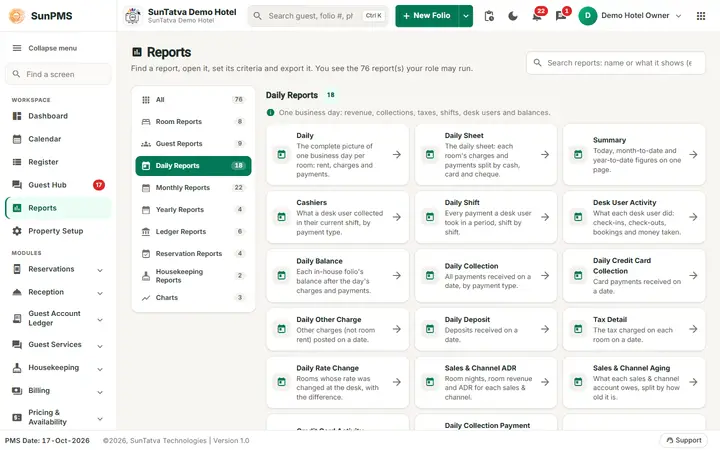
Browse the reports
The full catalogue lists every report with its columns and filters.
Guides for reports and analytics
Every screen, field and message is explained in the Help Center.
Report Finder
Find the report that answers your question. Report names are as in the report library (Reports in the left menu).
Read the guide →Daily Reports - summaries and statistics
Nine reports for one business day: what happened, what it earned and what is owed.
Read the guide →Monthly Reports - revenue, collections and balances
Ten reports for a period, usually a month. Date reports default From Date to the 1st of the PMS month and To Date to the PMS…
Read the guide →Ledger Reports
Ledger reports show money owed or held at the end of a date, not activity.
Read the guide →Assign Report Privileges
This screen chooses which reports, charts and dashboard tiles each role may open.
Read the guide →Reports (overview)
SunPMS has about 75 reports grouped in categories: Room, Guest, Daily, Monthly, Yearly, Ledger, Reservation, Housekeeping and…
Read the guide →Report Dashboard
The Report Dashboard is a page of report cards grouped by category pills, with a Favorite Reports strip on top for the reports…
Read the guide →Charts (ADR, RevPAR, Occupancy)
Three line charts that compare one month, day by day, with the same month of the previous year.
Read the guide →See SunPMS with your own hotel in mind
Request a walkthrough and we will show the screens your team will use every day.