
Features
Hotel rate manager and availability calendar
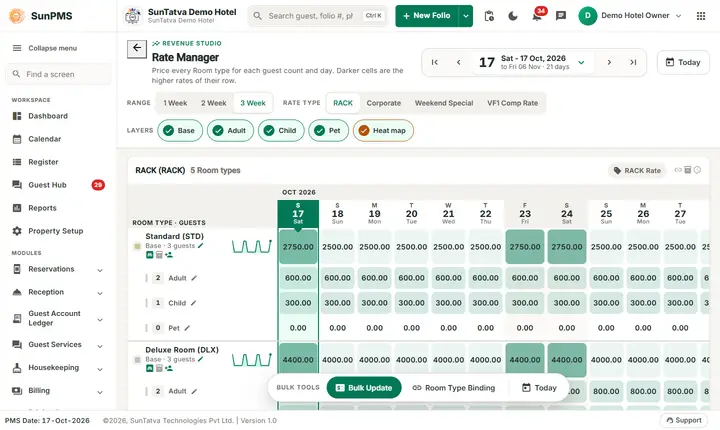
The Rate Manager shows, day by day and for each room type and rate type, the base, adult, child and pet rates. Change one cell, change many days and room types with Bulk Update, or make one room type follow another with rate binding.
What you can do
Guides for rates and availability
Every screen, field and message is explained in the Help Center.
Rate Manager
The Rate Manager is the calendar of room prices, built as a "Revenue Studio" screen.
Read the guide →Rate & Availability Summary (Flash)
This "Revenue Studio" screen answers one question: what is left to sell, at what rate and how full is each room type, night by…
Read the guide →Restrictions
Restrictions control which stays can be booked on each date, per room type and rate type.
Read the guide →Rate Type
A rate type is a named price list for rooms, for example RACK, Corporate, Weekend or Hourly.
Read the guide →Exchange Rate
Lets guests pay in a foreign currency. You define each currency and its rate against your base currency.
Read the guide →Rate Type Binding
Rate Type Binding lets a rate type follow the base (RACK) rate automatically, for example "Corporate = base rate minus 10%".
Read the guide →Tax
The Tax master (hub card Tax, page title Tax Master) is the list of tax names the hotel charges: GST, State Tax, City Tax…
Read the guide →Tax Configuration
Tax Configuration gives each tax name a rate and the date from which it applies.
Read the guide →Occupancy & Revenue Summary
A forward-looking "Revenue Studio" screen that answers "this year against the same days last year": room revenue, rooms sold…
Read the guide →Restriction rule pages
Besides the combined board on the Restriction screen (Restrictions), each of the five restrictions has its own page.
Read the guide →Frequently asked questions
Why can't I edit a cell?
It shows a lock (bound rate) or you lack "Access to configure rate"; the side panel says which.
What do the darker cells mean?
Within one row, the darker the cell the higher the rate; the panel shows the lowest and highest of the row. Switch Heat map off for plain cells.
I changed a rate but the OTA still shows the old one.
The push is queued; wait a few minutes or use the CRS bulk rate update.
Is the rate for a past date editable?
The calendar starts at the allowed minimum date; past dates cannot be chosen.
Why does CRS Inventory differ from Available?
CRS inventory counts only room types marked CRS-enabled, and also counts unposted reservations (Unposted Reservation).
I cannot find Edit rate in the panel.
The rate type is bound to another one (lock icon), or you lack Access to configure rate.
See SunPMS with your own hotel in mind
Request a walkthrough and we will show the screens your team will use every day.