
Licences
On this page
Shows the property's plan, how many rooms it may use, and the add-on modules that are active, and lets the owner send a request to buy, upgrade or renew a licence. Many settings screens depend on a licence; if a card is missing or a message says "
Before you start
- Licences belong to the property. Activation is done by SunTatva (the request creates a support ticket); the screen does not charge anything.
- A new owner's first group is a free 30-day trial; the Licences screen then shows the plan with activation type Trial and its expiry date. See Free trial and data removal.
- Documents, images and attachments kept with the property are charged per 100 MB of storage (the Document storage add-on, shown with an asterisk next to the plan prices on suntatva.com). SunPMS plans: Starter (8 rooms), Base (20 rooms; includes Team Chat and Undo / Redo), Standard (50 rooms; adds the Guest Interface, Housekeeping Mobile and the SunHardware Integration at no extra charge) and Pro (100 rooms; adds the CRS / OTA Channel Manager, Payment Gateway, Door Lock, STR Report, FAS accounting, Cross-app Chat and the SunPOS, SunParking and SunSpa integrations). Each plan lists exactly what it includes on this screen. SMS and WhatsApp, Additional Rooms and Document storage are always separate.
- SunHardware needs no licence of its own while you hold a paid licence or a running trial in SunPMS, SunPOS or SunParking.
- Only the property owner can send requests. Others see: "Only the property owner can buy licences."
Screen layout
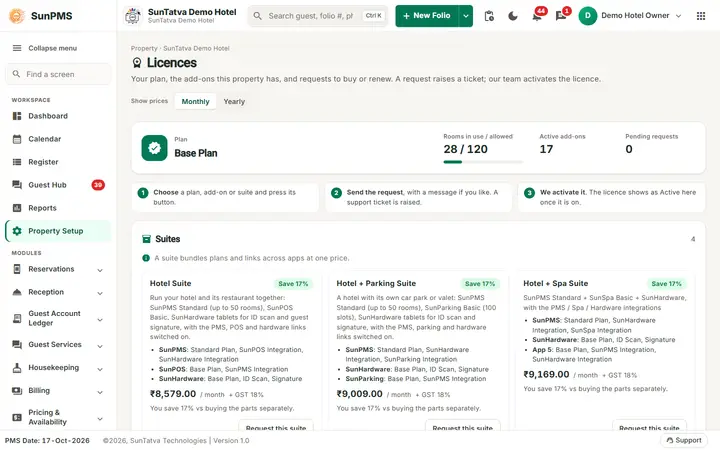
The Licences screen of the demo hotel (plans and prices change).
The header shows "Property ·
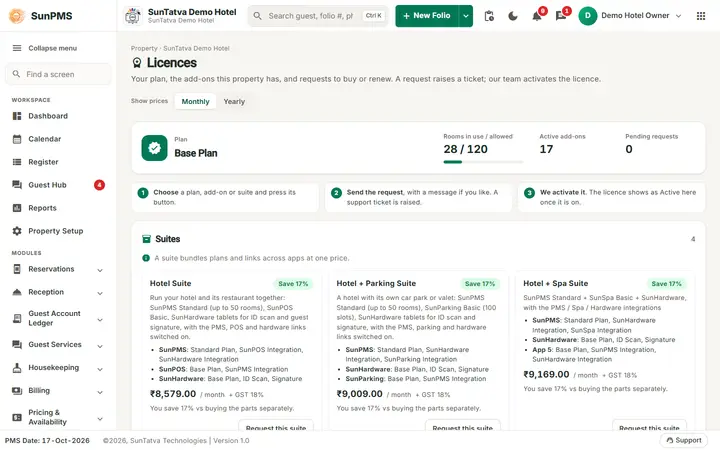
Plan card (top): Plan (name), Rooms in use / allowed (for example 1 / 8; "no limit" when unlimited) with a usage bar that turns red when the limit is reached, Active add-ons (count) and, when requests exist, Pending requests.
How buying works (owner only): three numbered steps, Choose a plan, add-on or suite and press its button; Send the request, with a message if you like (a support ticket is raised); We activate it (the licence shows as Active once it is on).
Show prices (Monthly / Yearly buttons in the header): shown when prices exist for both cycles. It switches every price on the screen; a card that has no price for the chosen cycle keeps its own cycle.
Suites (one card each, above the plans): ready-made bundles of plans, add-ons and app links priced as one, for example Hotel Suite, Hotel + Parking Suite, Restaurant Suite and All-in-One (the list is kept by SunTatva and can change). Only suites that include this app are listed. A card shows the suite name, its description, the items it includes grouped by app (for example SunPMS: Standard Plan, SunPOS Integration), the price for the property's country with the tax line, and Save N% with "You save N% vs buying the parts separately." when every part is priced for that country and cycle and the suite costs less (otherwise no saving is shown). Button Request this suite (owner only) opens the message box; "Requested - awaiting activation (ticket)" replaces it while a request is open.
Plans (one card each, e.g. Starter Plan, Base Plan): name, status, description, included rooms ("8 rooms", "Unlimited"), dates and price. Button Upgrade or Renew.
Add-ons (cards, with the filter chips All / Active / Not active; "No add-ons match." and Show all add-ons when a filter finds nothing): Additional Rooms (per room / month), CRS / OTA Channel Manager, Payment Gateway, WhatsApp, SMS, Guest Interface, Door Lock, SunPOS Integration, SunHardware Integration, SunParking Integration, Team Chat, Cross-app Chat, STR Report, RLH, FAS Accounting, Undo / Redo Transactions (the list can grow). Each card shows:
- Status: Not active, Active, Expired, Suspended, Starts later, "Current plan", or "Expires in N days" / "Expires today" (within 30 days of expiry).
- For active ones: activation type (Trial, Subscription, Lifetime, Complimentary), start and expiry ("no expiry"), and for quantity add-ons the number held.
- Price: the amount in the currency of the property's country with the billing cycle ("/ month", "/ year", "/ one-time"; per unit for quantity add-ons), and a tax line under it: "+ GST 18%" when the tax is added on top, "incl. VAT 20%" when it is already inside the price; no tax line when the price carries no tax. Price on request is shown when SunTatva has not set a price for that country. Prices are managed by SunTatva and can change; this manual does not quote them.
- "Included in your plan" when the plan in force already contains the module (no separate licence needed).
- Button Buy, Buy more, Renew or Upgrade; or "Requested - awaiting activation" when a request is open.
Request sent box (after a request): the ticket number and Quoted price, for example "
Requests table (when any): Date, Licence (a suite shows "(suite)"; × quantity), Quoted price, Ticket, Status (Pending, Activated, Declined, Cancelled) with the admin note, and Cancel while Pending.
How to request a licence
- Open Property Setup in the left menu and click the Licences card (group Property Setup) as the owner.
- On the card click Buy (or Upgrade / Renew). For per-unit add-ons enter the quantity (for example rooms).
- Optionally type a message in Message to our team (optional).
- Click Send request. Result: "Request sent (ticket...). Our team will contact you to activate it." The card shows "Requested - awaiting activation".
- To request a whole suite instead, click Request this suite on its card, optionally type the message and click Send request; the Request sent box shows the quoted price. A suite that is already requested cannot be requested twice ("
was already requested (ticket...). Our team will contact you."). - To withdraw, click Cancel in the Requests table.
What happens behind the scenes
- Room limit = plan rooms + Additional Rooms. With no active plan the default plan applies (Starter Plan, 8 rooms, in the standard catalog; the Base Plan includes 20 rooms).
- The web app hides what is not licensed: Property Setup cards (Guest Portal Setting needs Guest Interface (check-in or services & chat); Hardware Setting needs SunHardware Integration (included in the Standard and Pro plans); Housekeeping Mobile (
#/hk) needs the Housekeeping Mobile licence (included in the Standard and Pro plans, an add-on for Starter and Base); Parking Setting needs SunParking Integration; WhatsApp Setting needs WhatsApp; Payment Gateway Integration needs Payment Gateway; Door Lock Integration needs Door Lock) and features such as the room-service link (SunPOS Integration). - The API also checks: for example guest-portal and WhatsApp calls return "
is not licensed for this property. The property owner can buy it from Licences." Checks are cached for about five minutes. They pass only while the licence service cannot be reached (so the front desk keeps working); when the program is not set up for the licence service or the service refuses the lookup, every licensed feature is refused with "Licences could not be checked ( ), so this feature is not available." - When a licence is activated, restart nothing; reload the page (or wait a few minutes).
Messages you may see
| Message | Why | What to do |
|---|---|---|
| Licences could not be loaded. | Server error | Reload |
| Enter how many you need. | Quantity empty for a per-unit add-on | Enter a number |
| Request sent (ticket N). Our team will contact you to activate it. | Done | Wait for activation |
| The request could not be sent. | Server error | Retry |
| Only the property owner can buy licences. | You are not the owner | Ask the owner |
| X is not licensed for this property. The property owner can buy it from Licences. | Using a feature without its licence | Request it here |
| Licences could not be checked ( |
The licences of the property could not be read: the program is not set up for the SunTatva licence service, or the service refused it. Every licensed feature is refused until this is fixed. | Contact SunTatva support with the reason shown |
Tips and FAQ
- Q: A card in Property Setup has vanished. A: The matching licence expired or was never bought.
- Q: Why do I see 1 / 8 rooms? A: 1 room is in use; the plan allows 8. (A new property starts on the Starter Plan with 8 rooms. The documentation demo hotel was given the Base Plan plus 100 additional rooms as complimentary licences, so it shows 28 / 120.)