
Features
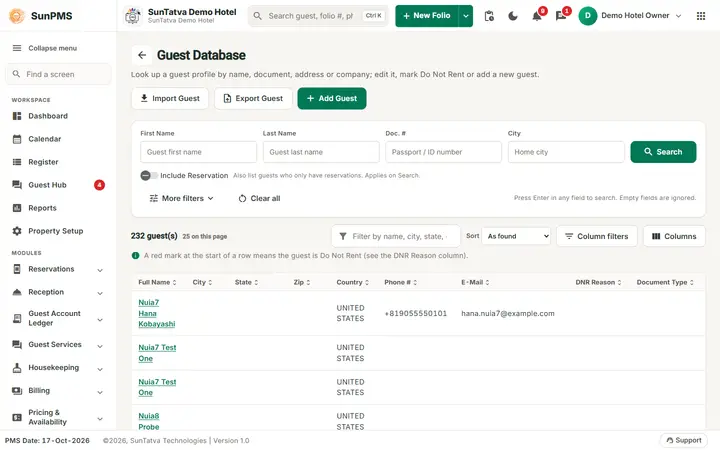
Guest database and guest ledger for hotels
Look up any guest, see the guest account ledger, record lost and found items, keep contacts and import guests from a file.
What you can do
Guides for guest database
Every screen, field and message is explained in the Help Center.
Guest Search (Guest Database)
The guest database holds every guest profile. Search it, add or edit a profile, mark a guest as DNR (Do Not Rent), merge…
Read the guide →Lost & Found
Lost & Found is the property's register of items guests say they lost (Lost Item tab) and items staff found (Found Item tab)…
Read the guide →Guest Account Ledger lists
Five ready-made lists of today's guest accounts. They all use the same layout and differ in which guests they include.
Read the guide →Guest Mandatory Data
This screen lets you decide which guest details must be filled in before a reservation can be checked in or a guest profile can…
Read the guide →Contact Database
The Contact Database is a separate address book for people who are not (yet) guests: vendors, travel agents, VIPs, corporate…
Read the guide →Import Guest
Import Guest loads many guest profiles into the guest database from an Excel (.xlsx) file.
Read the guide →Frequently asked questions
How do I bring back a cancelled booking?
Click the Cancelled chip, use the row menu > Active Reservation.
Search by phone?
Can I find a guest by passport number?
Yes, open More filters > ID document and set Doc. Type and Doc. #.
Nothing found though the guest exists.
Click Clear all; leftover filters (dates, ticked boxes) narrow the search. The stay-dates box is ticked with today's date by default.
Counts do not change during the day.
The data loads once per visit and refreshes after Night Audit; reopen the list to reload.
Is there one screen with all five lists?
The tab strip on each list switches between them; see also the Guest Ledger view.
See SunPMS with your own hotel in mind
Request a walkthrough and we will show the screens your team will use every day.