
Spa Setting
On this page
Links the hotel to its SunSpa property of the same owner, so the treatments of a stay show on the folio, the front desk can book spa treatments for guests, spa bills charged to the room reach the guest folio, and guests can use a Spa tab on their own page.
Before you start
- Licence: SunSpa Integration (
SPA_INTEGRATION). Without it the card is hidden; opening the address shows a SunSpa card marked Not licensed with the text "The spa link needs the SunSpa Integration licence - the property owner can buy it from Settings → Licences." See Licences. - A SunSpa property of the same owner must exist (create it from the SunAuth landing page: Sun Spa > create). Both groups must share an owner (main user) in SunAuth, otherwise the connection test fails.
- To bill spa treatments to the room, mark a charge as "POS charge" in Other Charges so it can be offered in Folio charge for spa bills.
Screen layout
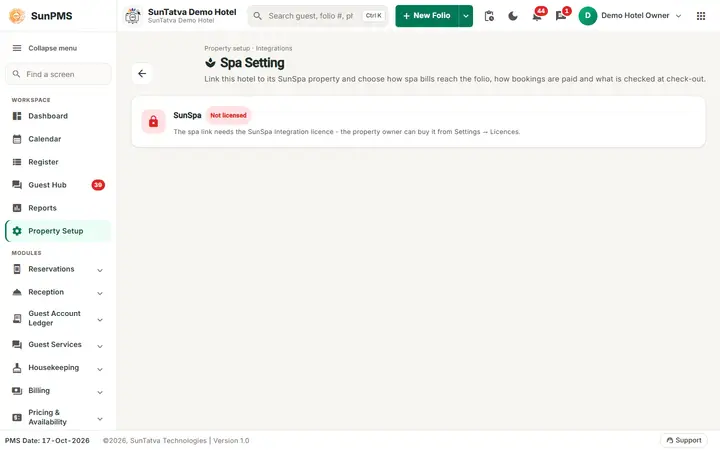
Without the SunSpa Integration licence the screen only shows the Not licensed notice.
The page header shows the title Spa Setting, the line "Property setup · Integrations", the description "Link this hotel to its SunSpa property and choose how spa bills reach the folio, how bookings are paid and what is checked at check-out." and a back arrow to the Property Setup hub.
| Part | Meaning | Rules |
|---|---|---|
| Card Hotel Spa (SunSpa) with a status chip | Connected, Not connected or Needs attention, with a sentence under it ("Connected to |
Read only |
| Link card, SunSpa property | Drop-down of the owner's SunSpa properties shown as name, city (group), or Not linked. If the owner has exactly one SunSpa property and nothing is linked, it is pre-selected. Help text: only spa properties of the same owner are listed. |
"Loading your SunSpa properties..." while it loads |
| Spa treatments can be charged to the room (switch, block Spa bills on the folio) | SunSpa posts a bill paid "to the room" to the guest folio. Re-posting a bill updates it; a refund removes it. | Default on |
| Folio charge for spa bills | Use the charge chosen in SunSpa, or one of the Other Charges marked "POS charge". | |
| Block Booking and check-out: how a new booking is paid by default | Charged to the room or Paid at the spa. | |
| Guests can book treatments on the guest portal (Spa tab) (switch) | The guest's own page shows a Spa tab for booking. The full guest options (buying, approval, moving) are in Guest Portal Setting. | Default on |
| Check-out check (switch) | Warn at check-out about open spa bills, charges not yet on the folio and treatments still to come. | Default on |
| Share the guest's remarks (switch) | Send the guest's remarks (allergies, preferences) to the spa. | Default off |
| Button Connect and test (reads Save and test when the saved property is selected, Disconnect while Not linked is chosen) | Stores the link and the options and tests the connection (SunAuth must issue a token for the linked group). | Result: a short message "Connected", "Saved" or "Disconnected". |
| Card What the link does | Read-only list of the functions below. |
How to link
- Open Property Setup in the left menu and click the Spa Setting card (group Configuration).
- Pick the SunSpa property.
- Choose the room-charge, payment, guest portal, check-out and remarks options.
- Click Connect and test. The status chip turns Connected.
What the link does
- Spa on the stay: Check-in > Spa lists the stay's treatments (time, treatment, therapist, status, amount, on the folio or not).
- Book treatment: the desk books from the free times in SunSpa; the spa sees the room and the guest profile. Move and cancel from the same list.
- Spa credit: for a stay package, SunSpa issues a gift card or voucher to the guest.
- Spa history: the guest's visits, packages, memberships and gift cards from SunSpa.
- Room charges: spa bills charged to the room are posted to the guest folio.
- Notifications: bookings, moves, cancellations, arrivals and postings show in the notification bell under Guest requests & activity > Spa.
- Guest portal: the guest's own page gets a Spa tab (book, also with a package or membership the guest owns; move; cancel; see what they own; buy packages, gift cards and memberships; fill the intake and consent form). Buying, approval and moving are set in Guest Portal Setting; guest bookings, moves, cancellations and purchases show in Guest Requests and the Guest Hub.
- Check-out: you are warned about spa bills or treatments still open (when Check-out check is on).
Messages you may see
| Message | Why | What to do |
|---|---|---|
| Connected / Saved / Disconnected | Link stored (Saved = stored but the test failed) | - |
| Could not save the spa link. | Server error | Retry |
| ... Both groups must share an owner (main user) in SunAuth. | The connection test failed because the two groups have different owners | Link a SunSpa property of the same owner |
Tips and FAQ
- Q: The Spa Setting card is missing. A: The property has no SunSpa Integration licence (see Licences).
- Q: Guests see no Spa tab. A: No SunSpa property is linked, or Guests can book treatments on the guest portal (Spa tab) / Show the Spa tab in Guest Portal Setting is off.