Feature Setting
On this page
Switches optional PMS features on or off for the property, sets Express check-in/check-out, how many years ahead reservations are allowed, and a few fonts and guest messages. The page title reads Feature Setting.
Before you start
- Save writes the same property-wide settings record as the other configuration screens. Turning a feature off hides screens; it does not delete data.
Screen layout
The page header shows the title Feature Setting, the line "Property setup · Settings", a short description and a back arrow to the Property Setup hub. A yellow Unsaved changes chip appears in the header after an edit. The On this page index (Activate features, Folio screen layout, Express check-in, Stay & future reservations) jumps to a section. Every option is a switch with a hint under its label; a bar at the bottom shows "All changes saved." or "You have unsaved changes." and holds Save.
Activate Features (switches)
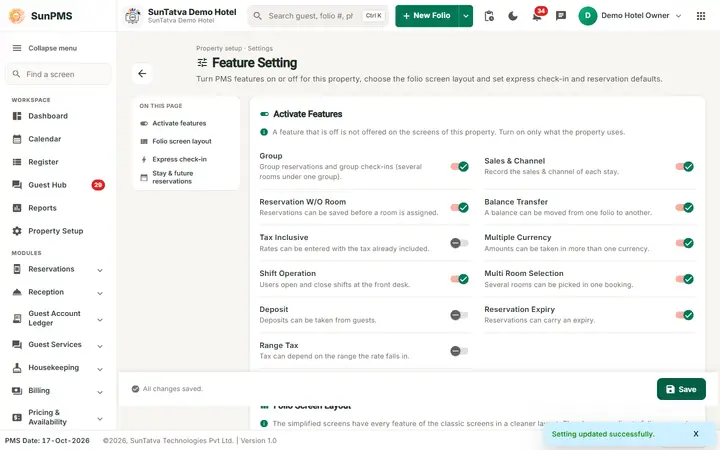
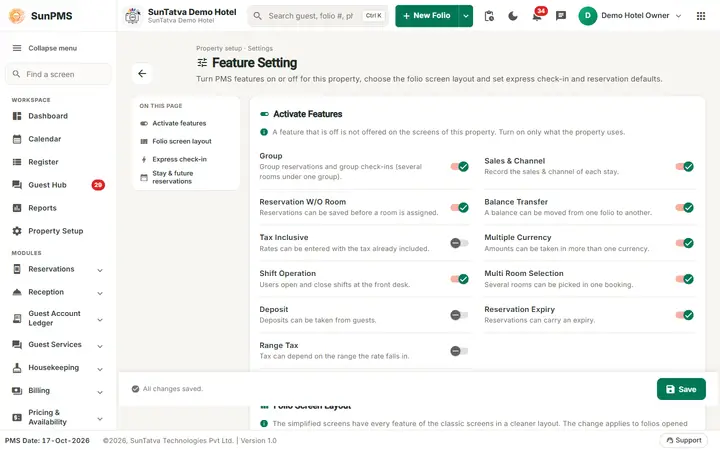
The card says: a feature that is off is not offered on the screens of this property; turn on only what the property uses.
| Switch | Setting key | Default | What it changes in the system |
|---|---|---|---|
| Group | IS_GROUP | On | When on, the sidebar shows the group reservation entry (named by Group Folio Title, default "Group Folio") and Reception shows Search Group; group screens are available. Off hides them. |
| Sales & Channel | IS_BUSINESS_SOURCE | On | When on, the Sales & Channel selector is shown on new folio (stay details) and group reservation, and invoicing against Sales & Channels works. |
| Reservation W/O Room | RESERVATION_WITHOUT_ROOM | On | When on, a reservation can be saved with no room assigned (room type only) and group members can be unassigned. When off the check-in screen insists on a room. |
| Balance Transfer | IS_BALANCE_TRANSFER | On | Enables balance transfer between folios (no further direct use found in the web app). |
| Tax Inclusive | IS_TAX_INCLUSIVE | Off | Rates are treated as tax-inclusive; used when the Rate View and rate updates compute amounts. |
| Multiple Currency | IS_MULTI_CURRENCY | On | When on, the payment screens (folio and group) let you choose a payment currency from the currency menu. |
| Shift Operation | IS_SHIFT | On | When on, every user must start a shift before working (app redirects to Shift Details until a shift is open), the header/sidebar show shift options and the shift report is available. Off removes the shift requirement. |
| Multi Room Selection | IS_MULTIPLE_ROOM | On | When on, the new folio stay details allows adding several rooms to one reservation. |
| Deposit | IS_DEPOSIT | Off | When on, the payment tab shows deposit entries (deposit type / amount). |
| Reservation Expiry | IS_RESERVATION_EXPIRE | On | Stored flag for reservation expiry (no direct use found in the web app). |
| Range Tax | IS_RANGE_TAX | Off | When on, Tax and Tax Configuration masters show range-based tax options (Per Day Tax / Per Stay Tax columns and slab fields). |
Folio Screen Layout
Chooses which screen opens for folios. Both layouts have exactly the same features, rules, privileges and messages; only the arrangement on screen differs. Default for every property: both off (classic screens).
| Switch | Setting key | Default | What it changes |
|---|---|---|---|
| Simplified Check-In / Reservation Screen | IS_CHECKIN_V2 | Off | When on, every folio (new folio, reservation, in-house, checked-out) opens in the simplified folio screen. Off = the classic folio screen. |
| Simplified Group Check-In / Reservation Screen | IS_GROUP_CHECKIN_V2 | Off | When on, the group folio opens in the simplified group screen. Off = the classic group screen. |
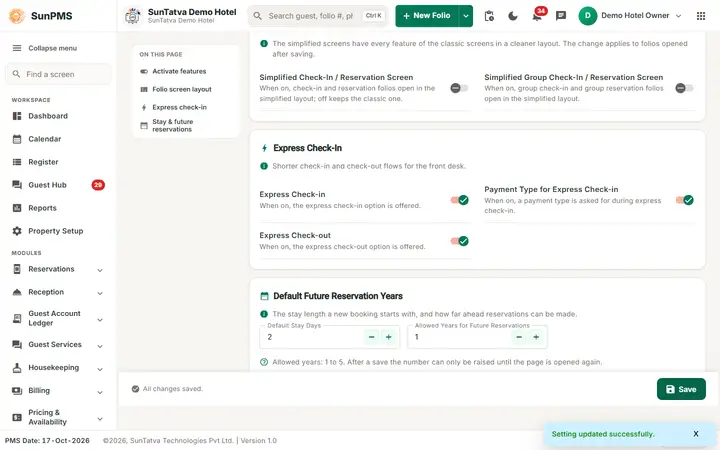
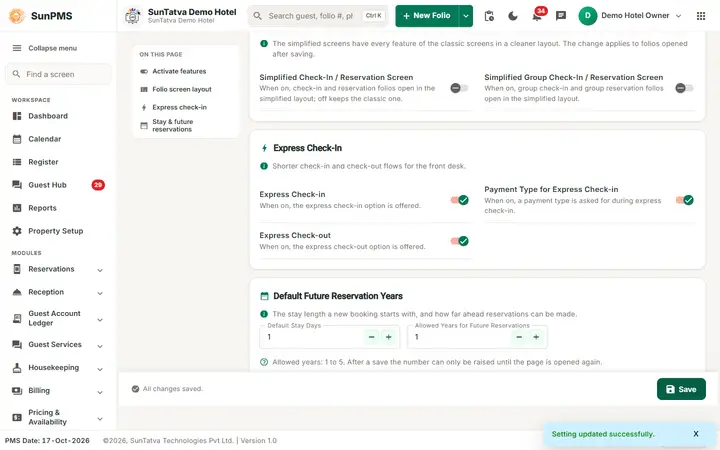
The card shows the line "The simplified screens have every feature of the classic screens in a cleaner layout. The change applies to folios opened after saving."
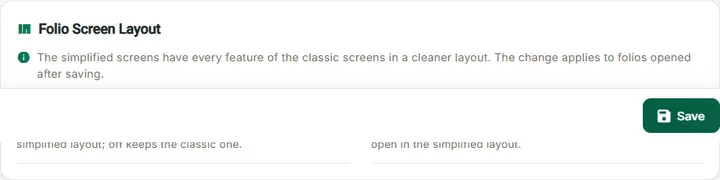
The choice applies to the next folio you open after Save (a folio that is already open keeps its layout until you close it). It is a property setting: every user of the property sees the same layout. The address of the screen (#/checkin, #/group-checkin) does not change, so links, bookmarks, the Register, Tape Chart and search results open the chosen layout. Search Group (#/edit-group) follows the group setting. The simplified folio has 7 sections (Stay, Guests, Documents, Charges, Payments, Remarks, History); the simplified group screen has 8 sections (Group details, Stay & rate, Rooms & members, Charges, Payments, Documents, Remarks, Check in / out). Step by step: Switch to the simplified folio screens.
Express Check-In
| Switch | Meaning |
|---|---|
| Express Check-in | Allows one-click check-in from the Register without opening the full folio. |
| Payment Type for Express Check-in | Ask for a payment type in express check-in. |
| Express Check-out | Allows one-click check-out. |
| (Stored keys EXPRESS_CHECKIN, EXPRESS_CHECKIN_PAYMENT_TYPE, EXPRESS_CHECKOUT, all default On.) |
Default Future Reservation Years (index entry "Stay & future reservations")
| Field | Meaning | Rules |
|---|---|---|
| Default Stay Days (labelled "Auto No-show After Days" before 2026-10-18; the real no-show setting is in Rental Setting) | The number of nights prefilled on a new folio (default_stay_days, default 1). | 0 or more |
| Allowed Years for Future Reservations | How many years ahead a reservation can be made. | 1 to 5, default 1. Once saved, the value can only be raised: the - button is disabled until you reload (to avoid losing future inventory). Saving a changed value tells the server to extend availability. |
Others
Note (checked in the code): the Feature Setting screen shows only the switches, Express Check-In and the two number boxes. The font and guest message fields below are stored in the same record but are not shown on this screen in the current build.
Text and number fields: Font Size List View, Font Size Room View, Report Font Size, Report Font Style, Font Style Room View, Font Style List View (max 500 characters; default Segoe UI, sizes 16/16/12) and five guest messages: Guest Message At Checkin, Guest Message At Checkin Update, Guest Message At Reservation, Guest Message At Reservation Update, Guest Message At Checkout (max 500 characters each). The guest messages are shown as a pop-up reminder to the front desk when that action is performed. Fonts are applied to Register (list view). The Room View font fields are kept for the property record only; the Room View screen was removed on 2026-10-19.
The swipe-card-reader and signature-pad display amount keys also live in this record but are not on this page (see Display Setting / Credit Card Setting).
How to change and save
- Open Property Setup in the left menu and click the Feature Setting card (group Configuration).
- Turn switches on or off and adjust the two numbers. The header shows Unsaved changes.
- Click Save in the bottom bar. Result: "Setting updated successfully." Some menu changes (for example hiding Group) appear after the next page reload or re-login.
Messages you may see
| Message | Why | What to do |
|---|---|---|
| Setting updated successfully. | Saved | - |
| Please enter State Label. / Please enter Zip Label. | State/Zip title (Localization) empty | Fill them in Localization Setting |
Tips and FAQ
- Q: How do I get the simpler folio screen? A: Turn on Simplified Check-In / Reservation Screen (and/or Simplified Group Check-In / Reservation Screen) under Folio Screen Layout and click Save. Turn it off to go back to the classic screen; no data changes.
- Q: Group menu disappeared. A:Group is off here.
- Q: Users are forced to start a shift. A:Shift Operation is on; turn it off to remove the requirement.
- Q: I cannot reduce Allowed Years. A: By design after saving; contact support to lower it.
Screenshots