Credit Card Setting
On this page
Turns online card processing on or off, chooses the payment gateway ("Tokenized Service"), stores its credentials and sets operational rules such as authorising a card at check-in and what happens to authorisations at night audit.
Before you start
- You need credentials from your gateway provider. Credentials are secrets: enter them only here, never e-mail them.
- Gateway fields are locked until you switch on Change Credential and confirm with your own sign-in password.
- Your user needs the privilege Access To Configure Property (see Privilege Reference); SunTatva staff signed in through SunAdmin pass this check too.
- Payment types of category Card must be marked as card-processing in the Payment Type master for online processing to be offered.
Screen layout
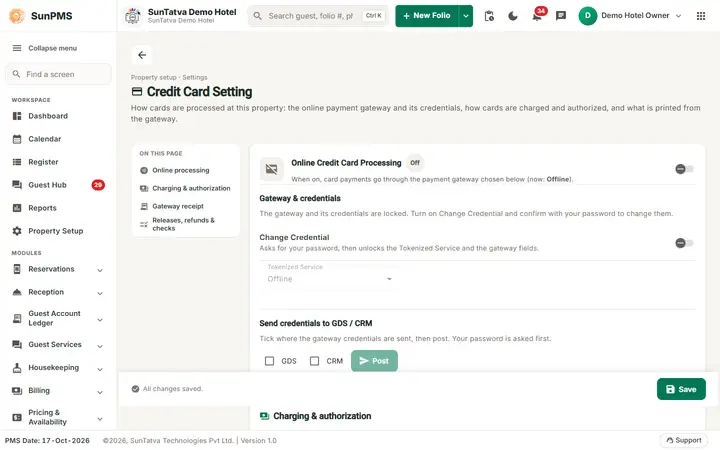
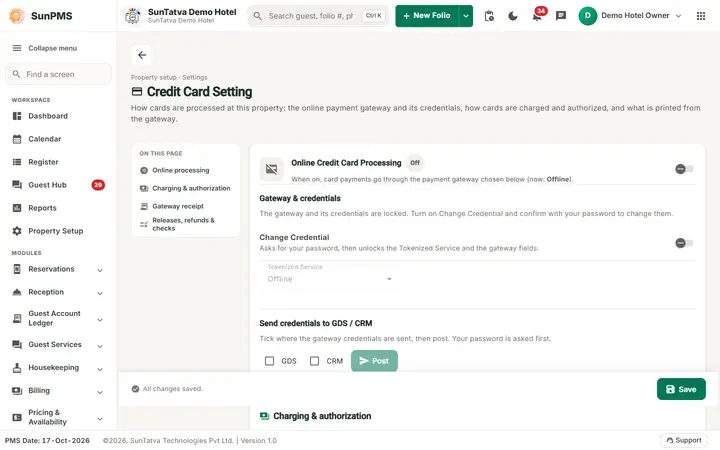
The page header shows the title Credit Card Setting, the line "Property setup · Settings", a description and a back arrow to the Property Setup hub. The On this page index jumps to Online processing, Charging & authorization, Gateway receipt and Releases, refunds & checks. The bottom bar shows "All changes saved." / "You have unsaved changes." and holds Save.
Online Credit Card Processing
The card header shows an On / Off chip and the sentence "When on, card payments go through the payment gateway chosen below (now:
| Field | Key | Meaning |
|---|---|---|
| Online Credit Card Processing (toggle) | IS_CREDITCARD_PROCESSING (default Off) | Master switch. When off, cards are recorded as offline payments. When on, the gateway settings below show. The server reads it (and PG_ID) at check-in/self check-in to decide whether a card payment is processed online. |
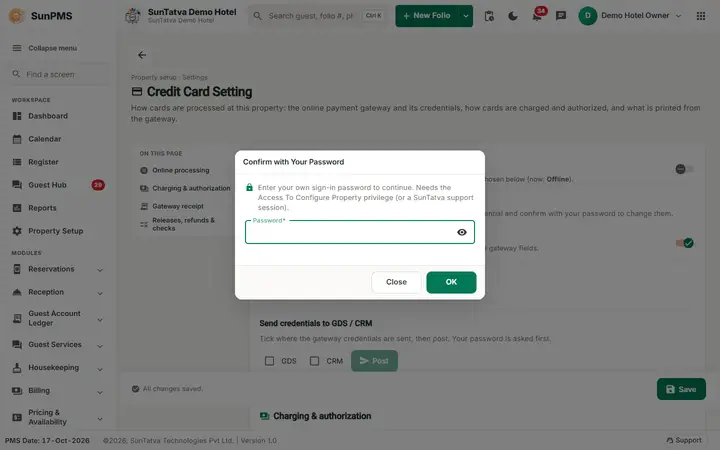
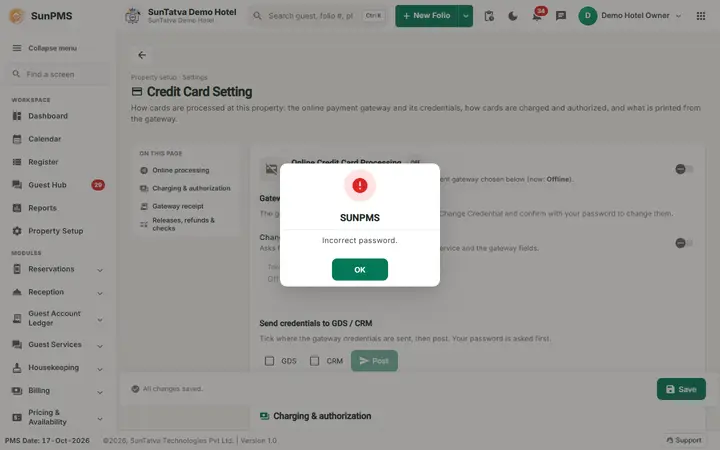
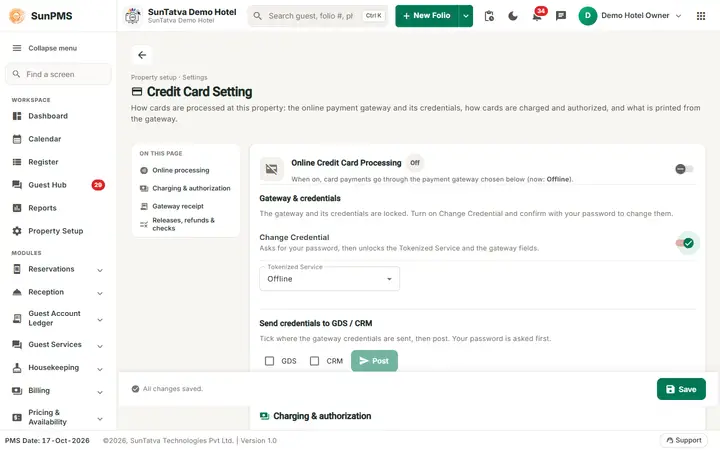
| Change Credential (toggle) | - | Unlocks the gateway fields. Switching it on opens a dialog Confirm with Your Password; enter the password you sign in to SunPMS with (the field is masked) and click OK. There is no shared or fixed password. A wrong password shows Incorrect password. and the fields stay locked. This check is not a sign-in: a wrong password here does not count as a failed sign-in and cannot lock your account. After 5 wrong passwords the confirmation pauses for 15 minutes. |
| Tokenized Service | PG_ID | Drop-down of gateways: Offline, SunTatvaS4T (Shift4), Zeamster, SlimCDT, OfflineWithPCI, Shift4_API (only these are offered). Enabled only after Change Credential is on. Choosing one loads its saved credentials. |
| PG API KEY | SUN_PG_API_KEY | Read only. Key linking this property to the SunPG token vault. |
| GDS / CRM tick boxes + Post button (card Send credentials to GDS / CRM: tick where the credentials are sent, then post) | - | Posts the credentials to the GDS and/or CRM (button reads Post to GDS, Post to CRM, Post to GDS & CRM). The password confirmation applies here too. Needs the property to have a CRM client id, otherwise "Please Set ClientID". Success message: "Credential posted successfully." |
Gateway block (title " Setting")
| Gateway | Fields |
|---|---|
| SunTatvaS4T and Shift4_API | Service URL, Auth Token, Client GUID, Access Token (with Get Access Token button that generates it from the first three). SunTatvaS4T also shows a Batch Reconciliation switch ("when on, enter the reconciliation settings below") with Serial Number, User Name, Password, Export ID Batch Summary, Export ID Batch Details. |
| Zeamster | User ID, User API Key, Developer Id, Location ID |
| SlimCDT | Client Id, Site ID, Price ID, Password, Key, VPN Username, VPN Password, VPN Client Token (+ Get VPN Client Token button, shown when username and password are filled) |
| OfflineWithPCI | CVV switch (is_cvv; shown in the last card, "Offline with PCI only: when on, the card's CVV is asked for") |
Operational Settings
They are spread over three cards: Charging & authorization (Default Credit Card Charge Method, Authorize Guest Credit Card at Check In with Charges and Apply Charges As), Gateway receipt (Display Gateway Receipt Data with its On Folio / At Transaction drop-down) and Releases, refunds & checks (Release Checked-Out Guest Authorizations on Night Audit, Refund Credit Card Payment at Undo Time, Validate CC Information, Show CVV).
| Field | Key | Default | Effect |
|---|---|---|---|
| Default Credit Card Charge Method | DEFAULT_CREDITCARD_CHARGE_METHOD | Sale | Sale charges at once; Authorization to Sale authorises first and completes later. |
| Display Gateway Receipt Data + drop-down | DISPLAY_CREDITCARD_GATEWAY_RECEIPT_DATA / _ON | Off | Shows the gateway receipt data On Folio or At Transaction. |
| Authorize Guest Credit Card at Check In for Total Charges + with Charges and Apply Charges As (% or =) | IS_AUTHORIZE_GUEST_CREDITCARD_AT_CHECKIN, AUTHORIZE_..._AMOUNT, _AMOUNT_TYPE | Off | At check-in the card on file is authorised for total charges plus this percentage or fixed amount. |
| Release Checked-Out Guest Authorizations on Night Audit | AUTO_RELEASE_CHECKOUT_GUEST_AUTHORIZED_AMOUNT_AT_NIGHT_AUDIT | Off | Night audit releases leftover authorisations of checked-out guests. |
| Refund Credit Card Payment at Undo Time | REFUND_CREDITCARD_AMOUNT_AT_UNDO | Off | Undoing a check-in/check-out refunds the card payment. |
| Validate CC Information | VALICATE_CREDITCARD_DETAIL | On | Validates card numbers on entry. |
| Show CVV (Only one time display CVV code) | IS_SHOW_CVV | Off | Shows the stored CVV once on the guest document card screen. |
How to change gateway credentials
- Open Property Setup in the left menu and click the Credit Card Setting card (group Configuration).
- Switch on Online Credit Card Processing.
- Switch on Change Credential; the dialog Confirm with Your Password opens ("Enter your own sign-in password to continue. Needs the Access To Configure Property privilege (or a SunTatva support session)"). Enter your own sign-in password (the eye icon shows or hides it; Enter confirms) and click OK. Close cancels and the fields stay locked.
- Choose Tokenized Service and fill the gateway fields (use Get Access Token for Shift4).
- Set the operational options and click Save in the bottom bar. Result: "Setting updated successfully." Credentials are sent to the server only when Change Credential was on.
Messages you may see
| Message | Why | What to do |
|---|---|---|
| Setting updated successfully. | Saved | - |
| Please enter your password. | OK clicked with the password field empty | Type your sign-in password |
| You do not have the privilege to change this setting (Access To Configure Property). | Your user lacks the privilege | Ask an administrator to grant Access To Configure Property in Roles and Privileges |
| Your password could not be checked. Please try again. | The sign-in service could not be reached | Try again in a moment |
| Incorrect password. | The password is not the signed-in user's own password | Type your own password again. It does not count as a failed sign-in and cannot lock your account |
| Too many wrong passwords. Try again in N minute(s). | 5 wrong passwords within 15 minutes in Confirm with Your Password (any protected setting) | Wait the minutes shown; your sign-in is not affected. A correct password resets the count |
| Your account is locked. Please contact your administrator. | The user is locked (by wrong sign-ins or by an administrator) | Ask the administrator to unlock the user |
| Please enter Shift4 Service URL / Auth Token / Client GUID | Missing field before Get Access Token | Fill them |
| Shift4 Access Token Generated. | Token created | Save |
| Please enter SlimCDT VPN Username / Password | Missing before Get VPN Client Token | Fill them |
| Slim VPM Client Token Generated. | Token created | Save |
| Credential posted successfully. | Post to GDS/CRM done | - |
| Please Set ClientID | Property has no CRM client id | Contact support |
What happens behind the scenes
Tips and FAQ
- Q: Why is the gateway drop-down grey? A: Change Credential is off.
- Q: Which password do I type in Confirm with Your Password? A: Your own SunPMS sign-in password, not a code from support.
- Q: Can a typo here lock my account? A: No. A wrong password is not counted as a failed sign-in. After 5 wrong passwords the confirmation only pauses for 15 minutes.
- Q: Cards are not processed online. A: Online Credit Card Processing is off, Tokenized Service is Offline, or the payment type is not a card-processing type.
Screenshots