
Payment Gateway (SunPG) and Card Payments
On this page
SunPMS never stores a full card number. Cards are handled by SunPG, the platform's payment-gateway service and token vault. SunPG turns a card into a token (a reference), and SunPMS keeps only that token plus the last four digits. Charging, authorising, refunding and voiding are then done by SunPG against the payment processor your hotel uses.
The pieces
| Piece | What it does |
|---|---|
| SunPG token vault | Shows the secure card-entry page, stores the token, runs Auth, Sale, Force, Refund, Void and batch close with the processor. |
| Processor (gateway) | The company that moves the money. Supported choices in the device list: SlimCD, Offline, Processed, SunTatva S4T, Authorize.Net, BluePay, Zeamster, SunTatva ZT, SlimCDT, Offline with PCI, Shift4 API and SunTatva Pay S. Which ones you can use depends on your agreement. |
| Card terminal (device) | A card machine at the desk, registered in Payment Gateway Integration. |
| Payment Type | In Property Setup > Payment Type, types with the card category are the ones that go through the gateway. |
| Credit Card Setting | Card types and processing rules; see Credit Card Setting. |
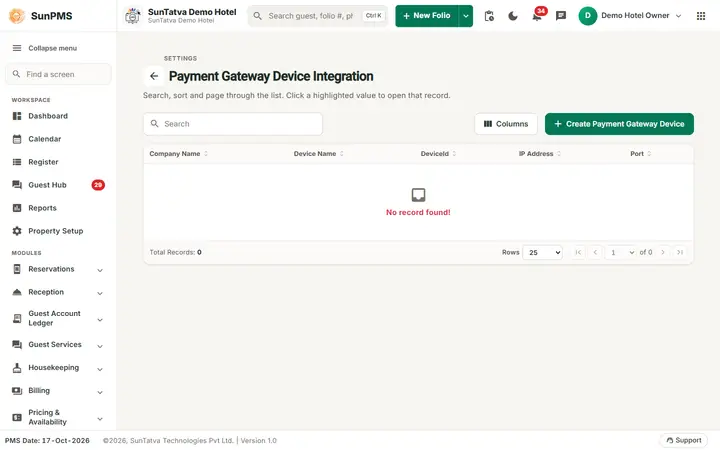
Settings screen: Payment Gateway Device Integration
This is a settings page, described in full in Payment Gateway Integration. In short: the grid lists terminals (Create Payment Gateway Device adds one). In the dialog you choose Payment Gateway Name, Device Name, Device ID / Sr no. and, for most gateways, IP Address and port. For SlimCDT you choose a terminal type instead. On save: Device Configuration successfully done; on delete: Device Deleted successfully.
How a card is taken in the PMS
- On the reservation, open the guest document or payment area and add a Credit Card document: the secure SunPG form opens and returns a token.
- The reservation's primary guest now has a card document with a token.
- For a payment, choose a card payment type. The PMS sends the amount and the token to SunPG, which returns an approval (auth code) or a decline.
- The result is saved with the payment: card last four digits, auth code, authorisation status (Authorized for a hold, UnAuthorized meaning a sale payment).
Authorise, sale and release
- Authorized payment (hold): reserves the amount on the card but does not take it. See Reservation Authorization.
- Sale payment: takes the money at once (shown as a normal payment).
- Release authorization: cancels an unused hold after check-out. See Release Authorization.
- Authorized to sale: at check-out a hold can be converted into the final payment from the folio.
What happens behind the scenes
- Each hotel has its own gateway client settings in SunPG, found by API key; the gateway settings JSON never leaves SunPG.
- SunPG stores tokens and transaction records, so refunds and voids use the original transaction reference (
pgTranID). - Online check-in cards entered by guests go through the same tokenisation; the number never reaches the PMS.
- Hotels connected to a CRS can receive virtual cards from OTAs; if a card is invalid, the desk can report it back to the OTA from the authorization screen.
Tips and FAQ
- Q: Where do I add a card machine? A: Property Setup > Integrations > Payment Gateway Integration.
- Q: Does SunPMS keep the card number? A: No, only the token and last four digits.
- Q: A payment says declined. A: The processor declined it. Ask the guest for another card; check the gateway status with support if every card fails.
- Q: Is the same gateway used by SunPOS? A: Yes, SunPOS card payments use SunPG too, with its own merchant identity.