
Credit Card Reservation Authorization (integration view)
On this page
A bulk screen to charge or authorise the cards on file for many arriving reservations at once. It is typical for prepaid OTA bookings with virtual cards, or hotels that take one night's deposit before arrival. Two older addresses open the same function: the Reservation Authorization tab of Audit > Credit Card Authorization.
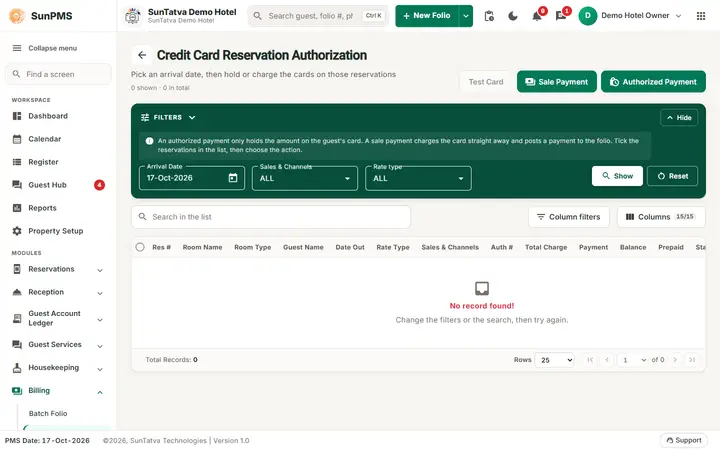
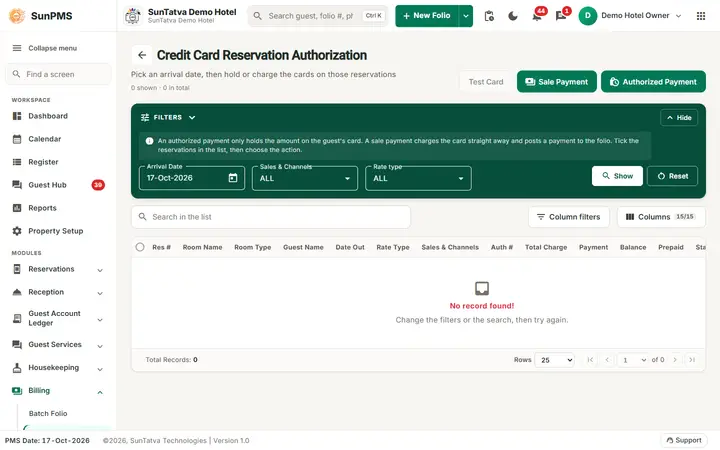
The Reservation Authorization tab: set the arrival date, press Show, tick the reservations and choose Sale Payment or Authorized Payment.
Before you start
- The reservation's primary guest has a credit card document with a token (card tokenised through the payment gateway, see Payment Gateway).
- A payment type with the card category exists.
- A shift is open for the user (the shift id is stored on the payment).
- The base currency exchange rate exists for today.
Screen layout
This screen uses the standard search-first list layout: a dark Filters band on top, then a full-width table with Search in the list, a column filter button, Columns, sortable headings and a paging bar (rows become cards on phones). The common parts are explained in Search-first list screens; the fields and columns specific to this screen are listed below. Title Credit Card Reservation Authorization. Filter panel:
| Filter | Meaning | Rules |
|---|---|---|
| Arrival Date | Arrival day to list | Window: from the chosen date up to two weeks ahead. |
| Sales & Channels | Sales & Channels filter | |
| Rate type | Rate type filter | |
| Find / Show and Reset | Load or clear |
Top buttons: Test Card (disabled), Sale Payment, Authorized Payment. On the tabbed page the choice Charge For also appears: Full Day (the balance of the whole stay, charges plus tax minus payments), One Night (the first night's rate) or Custom (type an amount; the box is enabled only for Custom).
Columns: Res #, Room Name, Room Type, Guest Name, Date Out, Rate Type, Sales & Channels, Auth #, Total Charge, Payment, Balance, Prepaid, Status (Success in green, otherwise red; Running during processing), Credit Card (document number), Report To OTA (for CRS reservations: a link, or Reported). Row action icons: charge card, no card. Records count at the bottom.
How to charge or authorise
- Open Billing > Credit Card Reservation Authorization.
- Pick Arrival Date and filters; the list loads.
- Tick the reservations (header box ticks the page).
- Click Sale Payment to take the money, or Authorized Payment to hold it.
- Confirm the question, which depends on Charge For: Selected
(s) will be charged for balance amount / will be charged for amount of one night stay. / will be charged for amount. - The screen processes each selected reservation in turn; Status shows Running, then Success or fail. The Auth # column fills with the approval code.
- At the end: Process completed successfully. (this appears even if some rows failed, so check each row's Status).
Result for each success: a card payment is added to the reservation: authorised status Authorized for a hold, or UnAuthorized for a sale; Auth # saved.
How to report an invalid card to the OTA
For a CRS reservation whose card failed, click the text in Report To OTA. Message: Credit card reported to OTA successfully. and the text changes to Reported.
What happens behind the scenes
For each row the PMS loads the reservation, builds a card payment with the guest's token, and saves it, which calls SunPG. Failure causes include: no token on the guest, the processor declining, or an expired card. Test Card is currently switched off.
Messages you may see
| Message (exact text) | Why | What to do |
|---|---|---|
| Please select atleast one or more |
Nothing ticked | Tick rows. |
| Invalid Amount | Custom amount is empty or 0 | Enter an amount. |
| Credit card reported to OTA successfully. | OTA notified | - |
| Process completed successfully. | Run finished | Check Status per row. |
| (server error text) | List or lookup failed | Retry. |
Tips and FAQ
- Q: A row says fail. A: The guest has no card token, or the processor declined. Open the reservation and check the card document.
- Q: What is the difference between Sale and Authorized? A: Sale collects now; Authorized holds the amount until you release it (release) or convert it at check-out.
- Q: Why does Test Card not work? A: The button is disabled in this version.