
Credit Card Release Authorization (integration view)
On this page
Lists card holds (authorised payments) of guests who checked out on a day so you can release the unused ones. Releasing tells the processor to drop the hold, so the guest's available credit returns quickly.
Before you start
- Holds exist: payments made with Authorized Payment or taken as an authorisation at check-in (Reservation Authorization).
- A shift is open (the deletion is stamped with your shift).
Screen layout
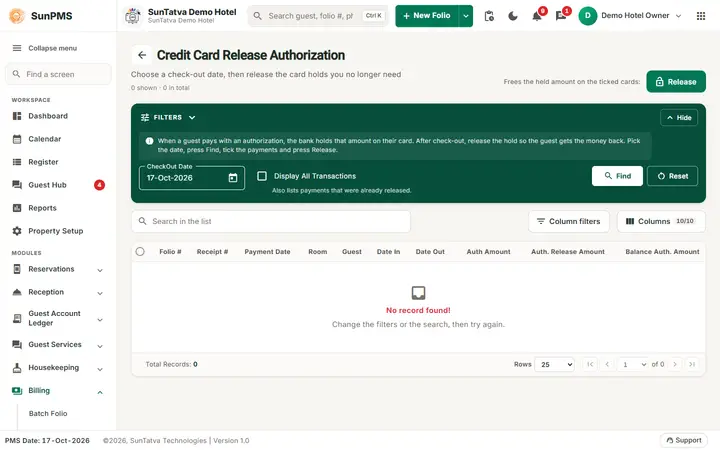
This screen uses the standard search-first list layout: a dark Filters band on top, then a full-width table with Search in the list, a column filter button, Columns, sortable headings and a paging bar (rows become cards on phones). The common parts are explained in Search-first list screens; the fields and columns specific to this screen are listed below. Filter panel:
| Filter | Meaning | Rules |
|---|---|---|
| CheckOut Date | Day guests checked out | Not later than the allowed maximum (today's PMS date). |
| Dispay All Transactions (sic) | Show all authorisations including ones already released | Unticked: only open ones. |
| Find / Reset | Load / restore |
Top button: Release.
Columns: row check box, Folio #, Receipt #, Payment Date, Room, Guest, Date In, Date Out, Auth Amount, Auth. Release Amount, Balance Auth. Amount. The count of records is shown at the bottom. The older tabbed page also has the check box Show All Transactions, Release and Close buttons.
How to release holds
- Open Billing > Credit Card Release Authorization.
- Set CheckOut Date, click Find.
- Tick the folios (or the header box).
- Click Release. Result: Process completed successfully. The list reloads. The released holds drop off (or show with a release amount when Dispay All Transactions is ticked).
What happens behind the scenes
For each ticked row the PMS reloads the folio and marks the authorisation payment as deleted (action "D") with the original gateway transaction id. SunPG then voids the hold with the processor. The deletion is stamped with today's PMS date, current time and your shift.
Messages you may see
| Message (exact text) | Why | What to do |
|---|---|---|
| Please select atleast one or more |
Release clicked with nothing ticked | Tick at least one row. |
| Process completed successfully. | The loop finished | Reload and check the amounts; a failed row remains in the list. |
| (server error text) | List failed | Retry. |
Tips and FAQ
- Q: Should I release before or after check-out? A: The list shows guests who have already checked out on the chosen date. Before check-out, delete or convert the hold on the folio.
- Q: The hold is still on the guest's card. A: Processors can take days to show a release; check the status with the guest's bank if more than five working days.
- Q: Does Release refund money? A: No. It cancels a hold, nothing was collected.