
Ledger Summary Report
On this page
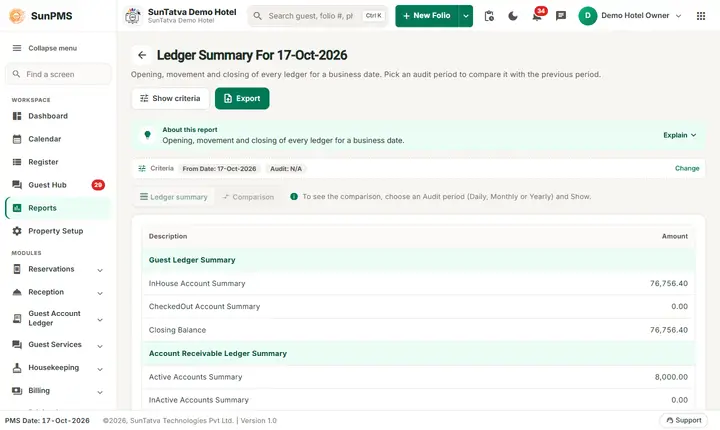
The Ledger Summary Report puts all the ledgers of the hotel on one page: the closing balance of the guest ledger, the account receivable ledger, the advance deposit ledger, the deposit ledger and the group ledger as of a date. With the Audit option it also compares two dates and proves that the change in the ledgers equals the revenue and collections of the period.
Purpose
- See every ledger balance on one page.
- Prove the night audit: previous closing balance + revenue + collection = new closing balance.
- Give the owner the numbers behind the audit report.
Who uses it
The night auditor, accountants, the general manager and owners.
About this report on screen
Every report page has an About this report bar under its header (button Explain / Hide). It explains the report in plain words:
- Summary: Opening, movement and closing of every ledger for a business date.
- What this report shows: For the chosen date: each ledger (guest, advance deposit, in-house deposit, receivable, group...) with opening balance, charges, payments and closing balance, plus the revenue and collection behind it.
- How to read it:
- Closing = opening + charges - payments. The Difference must be zero; if not, a posting needs checking.
- Pick an audit period to compare it with the previous period.
Before you start
- You need the privilege Ledger_Report_LedgerSummary.
- Run it after the night audit of the date. It is an "as of" report.
- The report is heavy: after Show it can take around 15 seconds on the demo hotel. Wait until the LOADING screen disappears.
Step by step
- Click Reports in the left menu (or press Ctrl+K and type the report name). The report library opens at
#/reports. - Choose the category Ledger Reports (or type in the search box) and click the card Summary ("Ledger overview and balances"). You can also open
#/ledger-summary/ledger-summarydirectly. - The report opens and runs once with its default criteria, so you already see data. Under Report criteria set From Date, Audit as you need (in a date calendar, Working Date jumps to the current business date).
- Click Show to run it again with the new criteria. The line under Results tells how many rows are shown.
- With Audit N/A you see one table. With an audit option use the buttons Previous and Next at the top to switch between the summary table and the audit table.
- Read the result as a Table or as Cards (switch at the top right). Columns shows or hides columns and lets you drag them into another order; click a column title to sort. Hide criteria / Show criteria folds the criteria away; on a tablet or phone it folds by itself after Show and leaves a one-line summary.
- Click Export and choose PDF, Excel or Email (PDF). The button is always in the header but stays disabled until the report has rows.
Filters
| Filter | Meaning | Rules and default |
|---|---|---|
| From Date | The as-of date. | Default PMS date. |
| Audit | N/A: summary only. Daily: compare with yesterday. Monthly: compare with the last day of the previous month. Yearly: compare with 31 December of the previous year. | Default N/A. |
Columns
Table 1 has two columns, Description and Amount, grouped by ledger:
| Group | Lines |
|---|---|
| Guest Ledger Summary | InHouse Account Summary, CheckedOut Account Summary, Closing Balance (equals the Grand Total of the Guest Ledger). |
| Account Receivable Ledger Summary | Active Accounts Summary, InActive Accounts Summary, Closing Balance (Account Receivable). |
| Advance Deposit Summary | Reserved Guest Accounts Summary, Group Accounts Summary, Closing Balance (Advance Deposit Ledger; credits are negative). |
| Deposit Ledger Summary | InHouse Deposit Summary, CheckedOut Deposit Summary, Reserved Deposit Summary, Closing Balance (Inhouse Deposit Ledger). |
| Group Ledger Summary | Unallocate Group Payment Summary, Closing Balance (Group Ledger). |
Table 2 (Audit Daily, Monthly or Yearly) has the columns: the previous date, the chosen date and Difference Amount, for Guest Ledger, Account Receivable Ledger, Advance Deposit, Group Payment and Inhouse Deposit, with a Total of the differences; then Revenue And Collection with Today Revenue As Of (Rent, each tax such as City Tax, State Tax, GST 12%, Other Charges, Sales Tax, Miscellaneous Income/Expense) and Total Revenue, and Today Collection As Of (one line per payment category, with a breakdown such as "GL: 23207.60 | AD: -4000.00" in front: GL guest ledger, AR account receivable, AD advance deposit, Misc miscellaneous) and Total Collection, then Grand Total Of Revenue and Collection.
Totals and grouping
Every group has a Closing Balance. In table 2 the Total of the differences must equal the Grand Total Of Revenue and Collection. Collections are negative because payments reduce what guests owe.
How to read an example
Dashboard version, From Date 17-Oct-2026. Audit N/A:
| Description | Amount |
|---|---|
| InHouse Account Summary | 72,178.40 |
| Closing Balance (Guest Ledger) | 72,178.40 |
| Reserved Guest Accounts Summary (Advance Deposit) | -17,500.00 |
| Closing Balance (Deposit, Group, Receivable) | 0.00 |
Audit Daily (16-Oct-2026 compared with 17-Oct-2026):
| Line | 16-Oct | 17-Oct | Difference |
|---|---|---|---|
| Guest Ledger | 13,050.00 | 72,178.40 | 59,128.40 |
| Advance Deposit | -21,500.00 | -17,500.00 | 4,000.00 |
| Total | 63,128.40 |
Revenue of the day: Rent 73,785.71, GST 12% 6,550.29, Other Charges 2,000.00 = Total Revenue 82,336.00. Collection: Cash -19,207.60 (guest ledger part 23,207.60 and advance deposit part -4,000.00). Grand Total Of Revenue and Collection = 82,336.00 - 19,207.60 = 63,128.40, which is exactly the Total of the differences: the audit balances. The numbers move while the day is open and other agents post charges.
Common questions it answers
- What is the hotel's total receivable from guests and companies tonight?
- Does the audit balance (difference total = revenue + collection)?
- How much advance money is held for future guests?
Export, print and e-mail
- The Excel file is named after the title, for example Ledger Summary For 17-Oct-2026.xlsx.
Troubleshooting
- The screen only says No record found! Click Show again; the figures take up to about 15 seconds to load. If you are on an old bookmark
#/report/ledger-summary, open Reports > Ledger Reports > Summary instead. - Only Previous and Next buttons are visible. The data is still loading; wait for the loader.
- Table 2 is empty. Select Daily, Monthly or Yearly in Audit and click Show; with N/A there is only table 1.
- The audit does not balance. Check that the night audit of the date was done and that nothing was posted on past dates after the audit. Compare each ledger with its own report for the same date.
- Closing balance differs from a ledger report. Use the same As-of date.
Messages you may see
| Message | Why | What to do |
|---|---|---|
| No record found! | No data yet or an old bookmark. | Click Show, or open the card again. |
| Email sent successfully. | Mail request accepted. | Check the inbox. |
Related reports
Guest Ledger, Account Receivable, Advance Deposit Ledger, Inhouse Deposit Ledger, Group Ledger, Ledger reports overview.