
Account Receivable Ledger Report
On this page
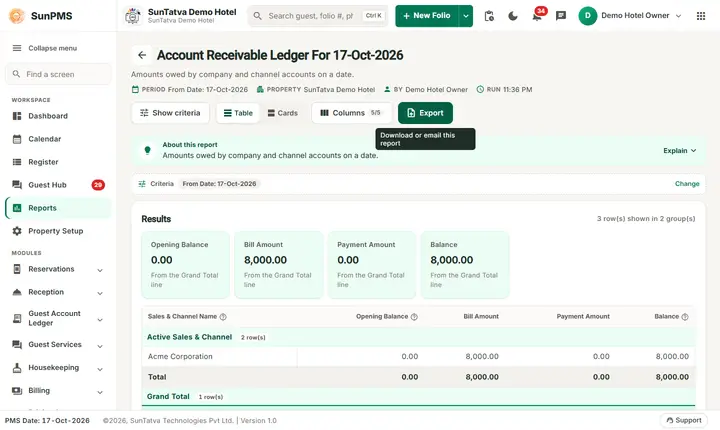
The Account Receivable Ledger lists the amounts that companies, travel agents and other Sales & Channels owe the hotel as of a date: opening balance, amount billed to them (guest bills transferred to direct billing), payments received from them and the balance. It is the "city ledger" of the hotel.
Purpose
- Know which company or agent owes how much.
- Prepare invoices and payment reminders for credit customers.
- Support the audit: the receivable ledger total is part of the Ledger Summary.
Who uses it
Accountants, credit controllers, owners and the night auditor.
About this report on screen
Every report page has an About this report bar under its header (button Explain / Hide). It explains the report in plain words:
- Summary: Amounts owed by company and channel accounts on a date.
- What this report shows: Each account with an open balance on the chosen date: bills, payments and the balance.
- How to read it:
- These are amounts billed to an account (direct billing), not to the guest.
Columns explained (the same text shows on the help icon next to a column title):
| Column | Meaning |
|---|---|
| Sales & Channel Name | Where the booking came from: direct, a booking site, a travel agent, a company... |
| Opening Balance | The balance at the start of the date. |
| Balance | What is still owed: charges minus payments. Above zero = the guest or account owes money. |
Before you start
- You need the privilege Ledger_Report_AccountReceivableLedger.
- A Sales & Channel (agent, company) must exist in the master Sales & Channels and guest bills must have been settled by direct billing to it. Payments received from the source are recorded on the Sales & Channel payment screen.
- Opening balances of old customers are entered on the Sales & Channel master (Opening Balance Credit).
- The date is an "as of" date: only amounts on or before it are counted, and only Sales & Channels created on or before that date.
Step by step
- Click Reports in the left menu (or press Ctrl+K and type the report name). The report library opens at
#/reports. - Choose the category Ledger Reports (or type in the search box) and click the card Account Receivable ("Outstanding receivables"). You can also open
#/report/account-receivable-ledgerdirectly. - The report opens and runs once with its default criteria, so you already see data. Under Report criteria set From Date as you need (in a date calendar, Working Date jumps to the current business date).
- Click Show to run it again with the new criteria. The line under Results tells how many rows are shown.
- Read the blocks Active Sales & Channel and In-Active Sales & Channel.
- Read the result as a Table or as Cards (switch at the top right). Columns shows or hides columns and lets you drag them into another order; click a column title to sort. Hide criteria / Show criteria folds the criteria away; on a tablet or phone it folds by itself after Show and leaves a one-line summary.
- Click Export and choose PDF, Excel or Email (PDF). The button is always in the header but stays disabled until the report has rows.
Filters
| Filter | Meaning | Rules and default |
|---|---|---|
| From Date | The as-of date. | Default PMS date; no To Date. |
Columns
| Column | Meaning and calculation |
|---|---|
| Sales & Channel Name | Agent or company. |
| Opening Balance | The opening balance entered on the Sales & Channel master (amount owed before SunPMS was used). |
| Bill Amount | Total of guest payments settled by direct billing to this source up to the date (reversed bills are subtracted). |
| Payment Amount | Total payments received from the source up to the date. |
| Balance | Opening Balance + Bill Amount - Payment Amount. Only sources with a balance above zero are listed. |
Totals and grouping
Two groups: Active Sales & Channel and In-Active Sales & Channel (sources that were deactivated but still owe money). Each group is closed by a Total line when it has lines; Grand Total at the bottom adds all.
How to read an example
On the demo hotel on 17-Oct-2026 the report shows one Active Sales & Channel, Acme Corporation, and the Grand Total:
| Sales & Channel Name | Opening Balance | Bill Amount | Payment Amount | Balance |
|---|---|---|---|---|
| Active Sales & Channel | ||||
| Acme Corporation | 0.00 | 8,000.00 | 0.00 | 8,000.00 |
| Total | 0.00 | 8,000.00 | 0.00 | 8,000.00 |
| Grand Total | ||||
| Grand Total | 0.00 | 8,000.00 | 0.00 | 8,000.00 |
Read it as: guest bills of 8,000.00 were transferred to Acme Corporation by direct billing and nothing has been paid yet, so the balance is 8,000.00. When the company pays 4,000.00 later, its line shows Bill Amount 8,000.00, Payment Amount 4,000.00 and Balance 4,000.00 (plus any opening balance).
Common questions it answers
- Which companies owe us money today?
- How much did we bill a company this month and how much did it pay?
- Which deactivated agents still have an unpaid balance?
Export, print and e-mail
- Excel downloads Account Receivable Ledger For 17-Oct-2026.xlsx.
- Email (PDF) shows Email sent successfully.
- PDF: Since 19-Oct-2026 the PDF also opens on a property without an uploaded logo.
Troubleshooting
- Only Grand Total 0.00 is shown. No Sales & Channel has a positive balance on the date (the case before any bill is direct billed). Check that bills are settled with a Sales & Channel payment type, and that you chose a date after the billing.
- A company that owes money is missing. The balance is zero or negative (overpaid), or the company master was created after the as-of date.
- The figure does not match the Ledger Summary. The summary shows Active and InActive accounts separately; compare with the same date.
- Opening balance missing. Enter it on the Sales & Channel master.
- A payment from a company is not reducing the balance. It must be recorded as a payment of the Sales & Channel, not as a normal guest payment.
Messages you may see
| Message | Why | What to do |
|---|---|---|
| No record found! | No data for the date. | Check the date. |
| Email sent successfully. | Mail request accepted. | Check the inbox. |
Related reports
Ledger Summary, Guest Ledger, Sales & Channel Aging and summaries, Ledger reports overview.