
Group Ledger Report
On this page
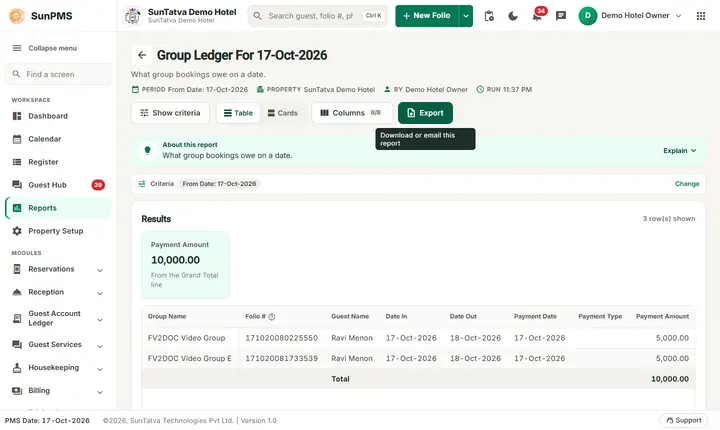
The Group Ledger Report lists the payments taken for a group that have not yet been allocated to the folios of the group members, as of a date. When a group (a wedding party, a tour) pays a lump sum on the group folio, the money sits in the group ledger until the desk moves it to the rooms. The report shows what is still waiting.
Purpose
- Find group money that has been received but not yet applied to member folios.
- Make sure nothing is left on a group folio when the group leaves.
- Support the audit: the total is the "Unallocate Group Payment" of the Ledger Summary.
Who uses it
Group sales staff, the front desk handling the group check-out, and accountants / night auditors.
About this report on screen
Every report page has an About this report bar under its header (button Explain / Hide). It explains the report in plain words:
- Summary: What group bookings owe on a date.
- What this report shows: Each group with open folios on the chosen date: charges, payments and balance.
- How to read it:
- Group heading = the group name.
Columns explained (the same text shows on the help icon next to a column title):
| Column | Meaning |
|---|---|
| Folio # | The stay's folio number. |
Before you start
- You need the privilege Ledger_Report_GroupLedger.
- Groups are created with Group Reservation / Group Check-In. The report uses payments entered on the group (see Group reservation).
- It lists groups whose arrival date is on or before the as-of date; payments for groups that arrive later are in the Advance Deposit Ledger.
Step by step
- Click Reports in the left menu (or press Ctrl+K and type the report name). The report library opens at
#/reports. - Choose the category Ledger Reports (or type in the search box) and click the card Group Ledger ("Group reservations ledger"). You can also open
#/report/group-ledgerdirectly. - The report opens and runs once with its default criteria, so you already see data. Under Report criteria set From Date as you need (in a date calendar, Working Date jumps to the current business date).
- Click Show to run it again with the new criteria. The line under Results tells how many rows are shown.
- Read the lines and the Total at the bottom.
- Read the result as a Table or as Cards (switch at the top right). Columns shows or hides columns and lets you drag them into another order; click a column title to sort. Hide criteria / Show criteria folds the criteria away; on a tablet or phone it folds by itself after Show and leaves a one-line summary.
- Click Export and choose PDF, Excel or Email (PDF). The button is always in the header but stays disabled until the report has rows.
Filters
| Filter | Meaning | Rules and default |
|---|---|---|
| From Date | The as-of date. | Default PMS date; no To Date. |
Columns
| Column | Meaning and calculation |
|---|---|
| Group Name | Name of the group. |
| Folio # | Group folio number. |
| Guest Name | The contact guest of the group. |
| Date In | Group arrival date. |
| Date Out | Group departure date. |
| Payment Date | Date the group payment was received. |
| Payment Type | Cash, card, bank, etc. |
| Payment Amount | The part of the payment that is not yet allocated: group payment minus the amounts already moved to member folios, minus refunds. Deposits are excluded. Lines with zero are not shown. |
Totals and grouping
No grouping. The last line Total adds the payment amounts.
How to read an example
On the demo hotel on 17-Oct-2026 no group payment is waiting: the table has no lines and the Total is 0.00. If a group paid 20,000.00 at the group folio and 12,000.00 were allocated to the member rooms, the report would show one line with Payment Amount 8,000.00: the money still held for the group.
Common questions it answers
- Does any group still have money that is not applied to rooms?
- Which payment of the group is still unallocated, from which date and by which payment type?
Export, print and e-mail
- Excel downloads Group Ledger For 17-Oct-2026.xlsx.
- Email (PDF) shows Email sent successfully.
- PDF: Since 19-Oct-2026 the PDF also opens on a property without an uploaded logo.
Troubleshooting
- Empty although the group paid. The payment was allocated to the members, or the group arrives after the as-of date (then it is in the Advance Deposit Ledger), or the payment is a deposit.
- A group shows a small amount. Part of a payment is still unallocated; allocate it or refund it at group check-out.
- The total differs from the Ledger Summary. Use the same date.
Messages you may see
| Message | Why | What to do |
|---|---|---|
| No record found! | Nothing unallocated on the date. | Check the date. |
| Email sent successfully. | Mail request accepted. | Check the inbox. |
Related reports
Advance Deposit Ledger, Guest Ledger, Ledger Summary, Ledger reports overview.