
Advance Deposit Ledger Report
On this page
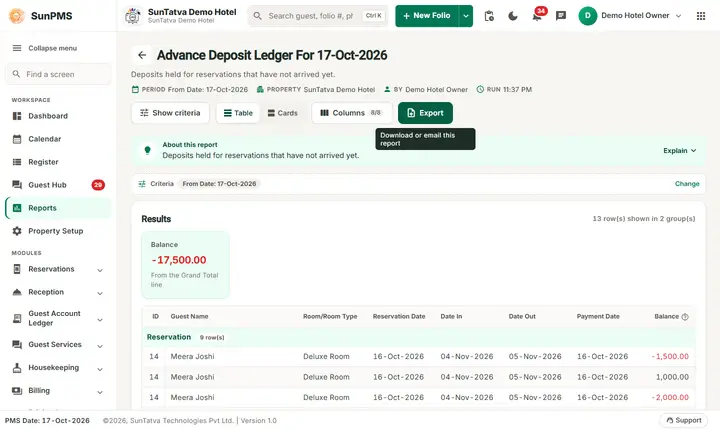
The Advance Deposit Ledger lists the advance payments the hotel holds for guests who have not arrived yet (reservations), as of a date. Each line is a payment, a refund or a cancellation movement of a reservation, and the balance column shows the money that is still held. It is a liability: money received but not yet earned.
Purpose
- Know how much advance money the hotel is holding for future guests.
- Check the deposit of one reservation line by line (payments, refunds).
- Support the audit: the total is the "Advance Deposit Summary" of the Ledger Summary.
Who uses it
The night auditor and accountants (liability account), the reservation manager (who has paid an advance) and owners.
About this report on screen
Every report page has an About this report bar under its header (button Explain / Hide). It explains the report in plain words:
- Summary: Deposits held for reservations that have not arrived yet.
- What this report shows: Each reservation with a deposit on the chosen date: deposit date, amount and the guest.
- How to read it:
- The deposit moves to the in-house deposit ledger when the guest checks in.
Columns explained (the same text shows on the help icon next to a column title):
| Column | Meaning |
|---|---|
| Balance | What is still owed: charges minus payments. Above zero = the guest or account owes money. |
Before you start
- You need the privilege Ledger_Report_AdavanceDepositLedger.
- Advance payments must have been recorded on the reservation (payment on the reservation or folio before check-in).
- The date is an as-of date. A reservation drops off the ledger when its deposits net to zero (for example the guest has checked in and the advance moved to the folio, or it was fully refunded).
Step by step
- Click Reports in the left menu (or press Ctrl+K and type the report name). The report library opens at
#/reports. - Choose the category Ledger Reports (or type in the search box) and click the card Advance Deposit Ledger ("Advance payments report"). You can also open
#/report/advance-deposit-ledgerdirectly. - The report opens and runs once with its default criteria, so you already see data. Under Report criteria set From Date as you need (in a date calendar, Working Date jumps to the current business date).
- Click Show to run it again with the new criteria. The line under Results tells how many rows are shown.
- Read the Reservation block, then the Group block if there are unallocated group advances, then the totals.
- Read the result as a Table or as Cards (switch at the top right). Columns shows or hides columns and lets you drag them into another order; click a column title to sort. Hide criteria / Show criteria folds the criteria away; on a tablet or phone it folds by itself after Show and leaves a one-line summary.
- Click Export and choose PDF, Excel or Email (PDF). The button is always in the header but stays disabled until the report has rows.
Filters
| Filter | Meaning | Rules and default |
|---|---|---|
| From Date | The as-of date. | Default PMS date; no To Date. |
Columns
| Column | Meaning and calculation |
|---|---|
| ID | Reservation number (blank for group advances). |
| Guest Name | Guest of the reservation. A leading * marks a cancelled reservation, ** marks an advance paid at check-in. |
| Room/Room Type | The assigned room, or the room type when no room is assigned yet. |
| Reservation Date | The date the reservation was made. |
| Date In | Planned arrival date. |
| Date Out | Planned departure date. |
| Payment Date | Date of the payment movement. |
| Balance | The amount held, shown with the minus sign: money received is negative (a credit balance, for example -2,000.00); a refund is positive (1,000.00). |
Totals and grouping
Groups: Reservation and Group (payments of a group that are not yet allocated to a member). Total and Grand Total add the Balance column. Below the Grand Total two legend lines explain the symbols: * = Cancelled Reservation and ** = CheckIn Advance Payment (their 0.00 in the Balance column is only a layout filler). A reservation whose lines net to zero is removed from the list.
How to read an example
As of 17-Oct-2026 on the demo hotel:
| ID | Guest Name | Room/Room Type | Date In | Date Out | Payment Date | Balance |
|---|---|---|---|---|---|---|
| 2 | Rahul Mehta | Standard | 16-Oct-2026 | 18-Oct-2026 | 16-Oct-2026 | -2,000.00 |
| 14 | Meera Joshi | Deluxe Room | 04-Nov-2026 | 05-Nov-2026 | 16-Oct-2026 | -1,000.00 |
| 14 | Meera Joshi | Deluxe Room | 04-Nov-2026 | 05-Nov-2026 | 16-Oct-2026 | -2,000.00 |
| 14 | Meera Joshi | Deluxe Room | 04-Nov-2026 | 05-Nov-2026 | 16-Oct-2026 | 1,000.00 |
| 14 | Meera Joshi | Deluxe Room | 04-Nov-2026 | 05-Nov-2026 | 16-Oct-2026 | -1,500.00 |
| Grand Total | -19,500.00 |
Read it as: six reservations hold advance money in total, 19,500.00 (shown as -19,500.00, a credit). Reservation 14 (Meera Joshi, November) has four movements on 16-Oct: 1,000.00 and 2,000.00 received, 1,000.00 refunded (the positive line) and 1,500.00 received again, so the net advance held for her is 3,500.00. Divya Chauhan's Executive Suite reservation holds 4,000.00 and Fatima Mansoori's Family Room 5,000.00.
Common questions it answers
- How much advance money do we hold today?
- Which reservations have paid an advance, and when?
- Was a refunded advance posted correctly (the positive line)?
- How much do we have to return if all reservations cancel?
Export, print and e-mail
- Excel downloads Advance Deposit Ledger For 17-Oct-2026.xlsx.
- Email (PDF) shows Email sent successfully.
- PDF: Since 19-Oct-2026 the PDF also opens on a property without an uploaded logo.
Troubleshooting
- A reservation that paid an advance is missing. Its movements net to zero, or the reservation is already checked in (then its deposit is on the folio; see Inhouse Deposit Ledger), or the payment date is after the as-of date.
- The balance is negative; is that wrong? No. The money is owed to the guest (liability), so it is shown as a credit. Read it as an amount held.
- A cancelled reservation still shows. It has a
*in front of the name: the advance is still held and must be refunded or kept according to the cancellation policy. - The total does not match the Ledger Summary. The summary has the same figure under "Advance Deposit Summary / Reserved Guest Accounts" for the same date.
Messages you may see
| Message | Why | What to do |
|---|---|---|
| No record found! | No advance is held on the date. | Check the date. |
| Email sent successfully. | Mail request accepted. | Check the inbox. |
Related reports
Ledger Summary, Inhouse Deposit Ledger, Group Ledger, Arrival (the Payments column), Ledger reports overview.