
No-Show/Cancel Revenue Report
On this page
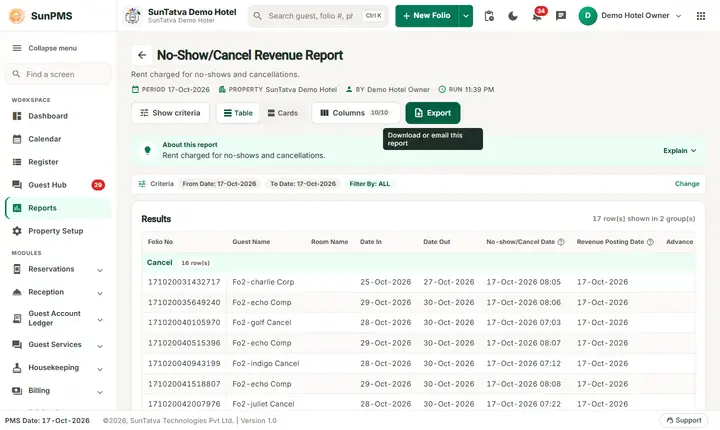
The No-Show/Cancel Revenue Report lists the revenue the hotel kept from reservations that did not arrive (No-Show) or were cancelled, after it was posted with Noshow/Cancel Revenue Posting (menu Audit): the advance deposit that was held, the rental revenue and the tax that were recognised from it.
Purpose
- Show how much money was kept from no-shows and cancellations and when it was posted.
- Reconcile the advance deposits that disappeared from the Advance Deposit Ledger with revenue.
- Give the tax figure for the retained amount.
Who uses it
Accountants and the night auditor (revenue and tax), the front office manager (policy follow-up) and owners.
About this report on screen
Every report page has an About this report bar under its header (button Explain / Hide). It explains the report in plain words:
- Summary: Rent charged for no-shows and cancellations.
- What this report shows: Each no-show or cancelled reservation in the period with the advance deposit, the rent charged as a fee and the date it was posted.
- How to read it:
- A no-show is a guest who neither arrived nor cancelled.
- Filter By: All, only cancellations or only no-shows.
Columns explained (the same text shows on the help icon next to a column title):
| Column | Meaning |
|---|---|
| No-show/Cancel Date | The date the reservation became a no-show or was cancelled. |
| Revenue Posting Date | The business date the fee was posted. |
| Advance Deposit | Money received before the guest arrived. |
| Rental Revenue | Rent charged as the no-show / cancellation fee. |
Before you start
- You need the privilege Reservation_Report_NoShowCancelRevenue.
- A reservation appears only after its revenue has been posted (menu Audit > Noshow/Cancel Revenue Posting, see No-show / cancel revenue posting). A no-show that was not posted has no line here.
- The dates filter the cancel date or the no-show date of the reservation.
Step by step
- Click Reports in the left menu (or press Ctrl+K and type the report name). The report library opens at
#/reports. - Choose the category Reservation Reports (or type in the search box) and click the card No-Show/Cancel Revenue ("Revenue impact from no-shows and cancellations"). You can also open
#/report/noshow-cancel-revenuedirectly. - The report opens and runs once with its default criteria, so you already see data. Under Report criteria set From Date, To Date, Filter By as you need (in a date calendar, Working Date jumps to the current business date).
- Click Show to run it again with the new criteria. The line under Results tells how many rows are shown.
- Choose Filter By: ALL, Cancel or No-Show.
- Read the result as a Table or as Cards (switch at the top right). Columns shows or hides columns and lets you drag them into another order; click a column title to sort. Hide criteria / Show criteria folds the criteria away; on a tablet or phone it folds by itself after Show and leaves a one-line summary.
- Click Export and choose PDF, Excel or Email (PDF). The button is always in the header but stays disabled until the report has rows.
Filters
| Filter | Meaning | Rules and default |
|---|---|---|
| From Date | First cancel or no-show date. | Default PMS date. |
| To Date | Last cancel or no-show date. | Default PMS date; not before From Date. |
| Filter By | ALL (cancelled and no-show), Cancel (cancel date in range) or No-Show (no-show date in range). | Default ALL. |
Columns
| Column | Meaning and calculation |
|---|---|
| Folio No | Folio number of the reservation. |
| Guest Name | Primary guest. |
| Room Name | Room if one was assigned (blank for most reservations). |
| Date In / Date Out | Planned arrival and departure. |
| No-show/Cancel Date | Date and time the reservation was marked no-show or cancelled. |
| Revenue Posting Date | The business date the revenue was posted. |
| Advance Deposit | Rent plus tax of the posting, that is the amount recognised (normally the retained advance). |
| Rental Revenue | The part that is room revenue, before tax. |
| Occupancy Tax | The tax part (heading follows OCCUPANCY_TAX_TITLE). |
Totals and grouping
Groups Cancel and No-Show. The Total line adds Advance Deposit, Rental Revenue and Occupancy Tax of all lines. The Total line only exists when there is at least one row; lines with a zero amount are dropped.
How to read an example
16-Oct-2026 to 19-Oct-2026, ALL, on the demo hotel (PMS date 17-Oct-2026):
| Folio No | Guest | Date In | Date Out | No-show Date | Revenue Posting Date | Advance Deposit | Rental Revenue | Occupancy Tax |
|---|---|---|---|---|---|---|---|---|
| 161020113004459 | Rahul Mehta | 16-Oct-2026 | 18-Oct-2026 | 16-Oct-2026 13:12 | 17-Oct-2026 | 2,000.00 | 2,000.00 | 0.00 |
| 161020115821535 | Rahul Mehta | 16-Oct-2026 | 18-Oct-2026 | 16-Oct-2026 13:31 | 17-Oct-2026 | 2,000.00 | 1,785.71 | 214.29 |
| Total | 4,000.00 | 3,785.71 | 214.29 |
Read it as: two reservations of Rahul Mehta did not arrive on 16-Oct. The hotel kept their 2,000.00 advances and posted them as revenue on 17-Oct. In the second line the 2,000.00 is split into 1,785.71 room revenue and 214.29 tax (the 12% tax is inside the amount); the first line has no tax. With Filter By = Cancel the demo shows No record found! because no cancelled reservation has been posted.
Common questions it answers
- How much money did we keep from no-shows this month?
- Which no-show or cancelled reservations were posted, and on what date?
- How much tax is included in the retained deposits?
Export, print and e-mail
- Excel downloads No-Show_Cancel Revenue Report.xlsx (the slash is replaced by an underscore in the file name). The date line in the file header shows the From Date and the To Date you chose.
- Email (PDF) shows Email sent successfully.
- PDF: Since 19-Oct-2026 the PDF also opens on a property without an uploaded logo.
Troubleshooting
- A no-show reservation is missing. Its revenue was not posted yet; post it in Noshow/Cancel Revenue Posting. Unposted no-shows are listed in Reservation Detail (when that report works) and in CRS Rate Plan.
- Cancel shows nothing. Only posted cancellations are listed.
- The rent does not equal the Advance Deposit. The advance includes the tax: Advance Deposit = Rental Revenue + Occupancy Tax of the posting.
- The total differs from Revenue By Room Type. That report adds the posted no-show/cancel rent to the room type revenue of the dates concerned.
Messages you may see
| Message | Why | What to do |
|---|---|---|
| No record found! | No posted no-show or cancel revenue in the range. | Widen the dates or post the revenue. |
| Email sent successfully. | Mail request accepted. | Check the inbox. |
Related reports
Reservation Detail, CRS Rate Plan, Advance Deposit Ledger, Revenue By Room Type, Reservation reports overview.