
Guest Stay Summary Report
On this page
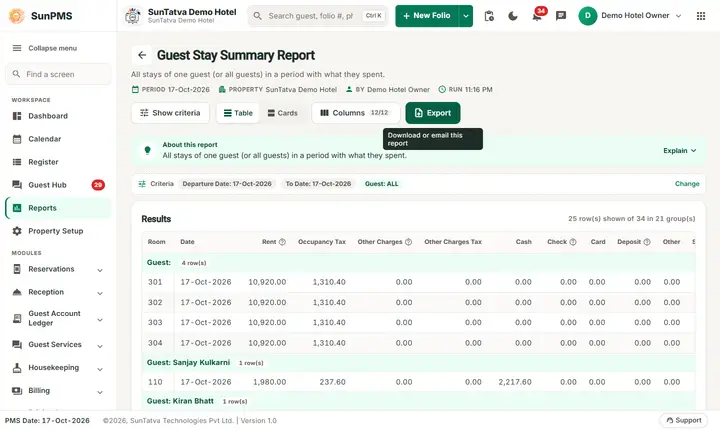
The Guest Stay Summary Report shows, guest by guest, the stays that start in a date range: room, arrival date, the rent, tax and other charges of the stay and how the guest paid (cash, check, card, deposit, other, Sales & Channel). Choose one guest to get his or her stay history.
Purpose
- See the stay history of one guest: rooms, dates, rent and payments.
- Check how a guest paid for a stay.
- List the checked-in stays of a period with their money summary.
Who uses it
Front office managers (repeat guests, complaints), sales staff (guest value), accountants (stay settlement).
About this report on screen
Every report page has an About this report bar under its header (button Explain / Hide). It explains the report in plain words:
- Summary: All stays of one guest (or all guests) in a period with what they spent.
- What this report shows: For the chosen guest: each stay with room type, source, sales & channel, nights, room and POS amounts, GST, payments by type and the amount still due.
- How to read it:
- Start typing a name in Guest name and pick the guest from the list.
- "New/Old" tells whether it was the guest's first stay or a returning guest.
Columns explained (the same text shows on the help icon next to a column title):
| Column | Meaning |
|---|---|
| Rent | Room rent (without other charges). |
| Other Charges | Charges other than room rent (food, laundry, extra bed...). |
| Deposit | Money taken in advance; it is used against the bill. |
| Sales & Channel | Where the booking came from: direct, a booking site, a travel agent, a company... |
Before you start
- You need the privilege Guest_Report_GuestStaySummaryReport.
- A stay needs a named primary or shared guest; group members without names are grouped under the heading "Guest:" with no name.
- The list of guest names for the filter is loaded when the report opens.
Step by step
- Click Reports in the left menu (or press Ctrl+K and type the report name). The report library opens at
#/reports. - Choose the category Guest Reports (or type in the search box) and click the card Guest Stay Summary ("Stay history overview"). You can also open
#/report/guest-stay-summarydirectly. - The report opens and runs once with its default criteria, so you already see data. Under Report criteria set From Date, To Date, Guest name (no label, shows ALL) as you need (in a date calendar, Working Date jumps to the current business date).
- Click Show to run it again with the new criteria. The line under Results tells how many rows are shown.
- In the third field (shows ALL) type part of a guest name and pick the guest from the list, or leave ALL.
- Scroll down. Every line has a grey heading Guest:
. - Read the result as a Table or as Cards (switch at the top right). Columns shows or hides columns and lets you drag them into another order; click a column title to sort. Hide criteria / Show criteria folds the criteria away; on a tablet or phone it folds by itself after Show and leaves a one-line summary.
- Click Export and choose PDF, Excel or Email (PDF). The button is always in the header but stays disabled until the report has rows.
Filters
| Filter | Meaning | Rules and default |
|---|---|---|
| From Date | First arrival date to include. | Default PMS date. |
| To Date | Last arrival date. | Default PMS date; not before From Date. |
| Guest name (no label, shows ALL) | Type to search the guest master; pick one guest. | Default ALL. Picking a guest limits the report to that guest's stays. |
Columns
| Column | Meaning and calculation |
|---|---|
| (heading line) Guest: |
The guest of the line (heading uses your GUEST_TITLE word). |
| Room | Room of the stay (heading follows ROOM_TITLE). |
| Date | Arrival date of the stay. |
| Rent | Total rent of the whole stay (all nights), before tax. |
| Occupancy Tax | Total tax on the rent (heading follows OCCUPANCY_TAX_TITLE). |
| Other Charges | Total other charges of the stay. |
| Other Charges Tax | Total tax on other charges. |
| Cash / Check / Card | Payments of the stay in the date range whose payment type belongs to the category Cash, Bank (shown as Check) or Card. Authorized-only amounts are not counted. |
| Deposit | Deposits received (not applied to a charge). |
| Other | Payments of the category Others. |
| Sales & Channel | Amount charged to a Sales & Channel (direct billing). |
Totals and grouping
Every stay-guest has its own heading Guest:
How to read an example
Filter 16-Oct-2026 to 19-Oct-2026, ALL, on the demo hotel (after the fix of 19-Oct-2026; only checked-in stays):
| Guest | Room | Date | Rent | Occupancy Tax | Other Charges | Cash |
|---|---|---|---|---|---|---|
| Priya Nair | 201 | 16-Oct-2026 | 4,000.00 | 0.00 | 2,210.00 | 5,710.00 |
| Hana Kobayashi | 204 | 16-Oct-2026 | 16,000.00 | 0.00 | 5,150.00 | 5,000.00 |
| Kiran Bhatt | 101 | 17-Oct-2026 | 2,750.00 | 330.00 | 0.00 | 3,080.00 |
| Total: | 165,620.00 | 8,600.00 |
Read it as: Hana Kobayashi arrived on 16-Oct in room 204, her whole 4-night stay has 16,000.00 rent and 5,150.00 other charges, and she has paid 5,000.00 in cash so far. Kiran Bhatt has paid exactly rent plus 330.00 tax. There are 23 checked-in stays and the Total line adds only those: rent 165,620.00 (it also contains stays created later for testing, so it is higher than the 130,470.00 of the Guest Classification example) and other charges 8,600.00; the tax and cash totals are left out because they change as demo data changes. Figures are from the demo hotel on 19-Oct-2026 and change as demo data changes.
Common questions it answers
- What did guest X spend and how did they pay (choose the guest)?
- How many times did guest X stay in the period?
- Which stays were paid by card, by cash, or billed to a company?
Export, print and e-mail
- Excel downloads Guest Stay Summary Report.xlsx with all lines. The date line in the file header shows the From Date and the To Date you chose.
- Email (PDF) shows Email sent successfully.
- PDF: Since 19-Oct-2026 the PDF also opens on a property without an uploaded logo.
Troubleshooting
- The totals are higher than the Revenue By Room Type rent. The rent here is the rent of the whole stay for stays that arrived in the range; Revenue By Room Type counts the nights that fall in the range.
- A stay shows only the primary guest. Choose the guest in the filter to see stays where he or she is a shared guest.
- Cash column does not equal the folio payments. Only payments dated inside the chosen range are counted for the payment columns, while Rent is the total of the stay.
- The guest I typed is not offered. The list is the guest master; check the spelling or create the guest on a reservation first.
- A guest with several stays shows several blocks. That is the stay history.
Messages you may see
| Message | Why | What to do |
|---|---|---|
| No record found! | No stay in the range or for that guest. | Widen the dates or set ALL. |
| Email sent successfully. | Mail request accepted. | Check the inbox. |
Related reports
Guest List, Guest Classification, Most Stayed Guest (ranking of all guests by stays), Room History, Guest Reports overview.