
Guest List Report
On this page
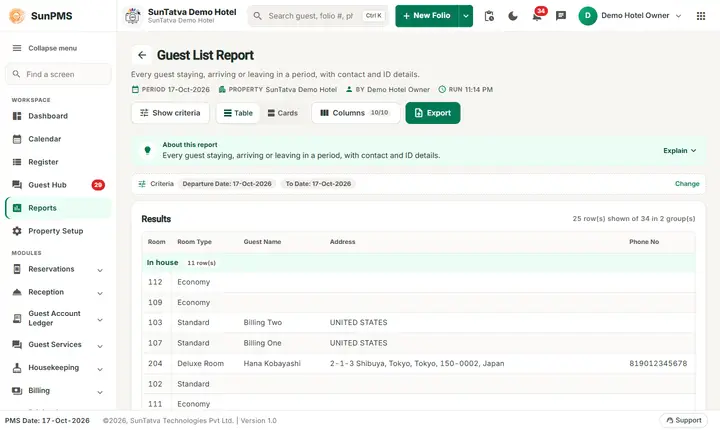
The Guest List Report lists the guests of all stays that touch the dates you choose: who is In house and who has Checked Out, with room, room type, address, phone, e-mail, birth date, nationality, identity document and credit card reference. It is the standard "who is in the hotel" list.
Purpose
- Know exactly who is in the hotel at any time (fire drill, emergency, security check).
- Give the authorities the guest register with ID details.
- Collect the contact data of the guests of a period (phone, e-mail).
Who uses it
Front desk managers, security staff and the person who files the police or immigration forms. Owners use it to check data quality (how many guests have no phone, ID or e-mail).
About this report on screen
Every report page has an About this report bar under its header (button Explain / Hide). It explains the report in plain words:
- Summary: Every guest staying, arriving or leaving in a period, with contact and ID details.
- What this report shows: Guests whose stay falls between From Date and To Date with folio status, room, contact details, nationality, ID, charges, payments and balance.
- How to read it:
- The list is shown page by page; use the pager under the table.
- Display Shared Guest also lists the other guests registered in the same room.
- Good to know:
- Excel and PDF always contain every row, not only the current page.
Before you start
- You need the privilege Guest_Report_GuestList.
- Only checked-in stays are listed (in house and checked out). Reservations that have not checked in are not.
- The detail columns come from the guest profile. If the desk never typed an address, phone or ID, the cells stay empty.
Step by step
- Click Reports in the left menu (or press Ctrl+K and type the report name). The report library opens at
#/reports. - Choose the category Guest Reports (or type in the search box) and click the card Guest List ("All in-house guests"). You can also open
#/report/guest-listdirectly. - The report opens and runs once with its default criteria, so you already see data. Under Report criteria set From Date, To Date, Display Shared Guest as you need (in a date calendar, Working Date jumps to the current business date).
- Click Show to run it again with the new criteria. The line under Results tells how many rows are shown.
- Optional: switch Display Shared Guest on to list every guest of the room, not only the primary guest.
- Use the paging bar at the bottom: Total Records, Rows (25, 50, 100), page arrows and page drop-down.
- Click a column heading to sort. Hide columns you do not want to print under Columns.
- Read the result as a Table or as Cards (switch at the top right). Columns shows or hides columns and lets you drag them into another order; click a column title to sort. Hide criteria / Show criteria folds the criteria away; on a tablet or phone it folds by itself after Show and leaves a one-line summary.
- Click Export and choose PDF, Excel or Email (PDF). The button is always in the header but stays disabled until the report has rows.
Filters
| Filter | Meaning | Rules and default |
|---|---|---|
| From Date | Start of the period. | Default PMS date. |
| To Date | End of the period. | Default PMS date; not before From Date. |
| Display Shared Guest | Off (default): one line per stay, for the primary guest. On: one line for each guest of the stay (companions too). | Default off. |
A stay is listed when its check-in date or check-out date falls in the range, or when it started before the end of the range and ends after it.
Columns
| Column | Meaning |
|---|---|
| Room | Room number of the stay (heading follows ROOM_TITLE). |
| Room Type | Room type name. |
| Guest Name | First and last name (heading follows GUEST_TITLE). |
| Address | Address of the guest's primary contact type: street, city, state, zip, country (only the parts that exist). |
| Phone No | First available of home phone, business phone, other phone, mobile. |
| First available of home, business and other e-mail. | |
| Birth Date | Date of birth. |
| Nationality | Nationality from the guest profile. |
| ID Detail | Document name and number of the primary identity document, for example "Passport - X1234567". When the setting DISPLAY_MASKED_DOCUMENT_DETAIL is on, the middle of the number is replaced by x characters. |
| CC Detail | "CREDIT CARD - " followed by the card reference stored as a document. |
Totals and grouping
Grouped under the headings In house (not yet checked out) and Check Out. At the bottom Total Records counts the guest lines of all pages. No amounts, no totals.
How to read an example
Filter 16-Oct-2026 to 19-Oct-2026 on the demo hotel: Total Records: 23, one page.
In the In house block room 204, Economy rooms and the Family rooms 301 to 304 appear. Hana Kobayashi (room 204, Deluxe Room) has address "2-1-3 Shibuya, Tokyo, Tokyo, 150-0002, Japan", phone 819012345678 and e-mail name@example.com, but no birth date, nationality or ID detail: those fields are empty in her profile. Rooms 109, 111 and 301 to 304 have no guest name at all because their stays have no named primary guest. The Check Out block lists guests such as Rajiv Bhatia (room 110), Neha Arora (room 104) and Priya Nair (room 201) with their phone numbers.
Switching Display Shared Guest on and clicking Show again keeps Total Records: 23 in the demo, because no stay has a second guest recorded; on a hotel with companions the total grows by one line for each companion.
Common questions it answers
- Who is in room 204 right now, and how do I call them?
- How many guests are in the hotel (count the In house lines)?
- Which in-house guests have no ID document recorded?
- Which guests checked out in the last three days?
Export, print and e-mail
- Excel downloads Guest List Report.xlsx. The file contains all guests of the report, not only the page on screen.
- Email (PDF) shows Email sent successfully.
- PDF: Since 19-Oct-2026 the PDF also opens on a property without an uploaded logo. Use Excel or Email (PDF).
- Privacy: the file contains ID and card references. Store and send it carefully.
Troubleshooting
- A guest I expect is missing. The stay is still a reservation (not checked in) or lies outside the range. Check Arrival for reservations.
- Only one guest per room although two stayed. Switch Display Shared Guest on.
- Lines without a guest name. The stay has no named primary guest. Name the guest on the folio.
- Address, phone or e-mail empty. The profile has no value in any of the contact types.
- The ID shows xxxx in the middle. The masking setting DISPLAY_MASKED_DOCUMENT_DETAIL is on, for data protection.
- Total Records is larger than the rows I see. Records are paged; use the page arrows or increase Rows.
Messages you may see
| Message | Why | What to do |
|---|---|---|
| No record found! | No checked-in stay in the range. | Widen the dates. |
| Email sent successfully. | Mail request accepted. | Check the inbox. |
Related reports
Arrival, Departure, Remaining Guest Checkout, Guest Stay Summary, Guest Reports overview.