
Remaining Guest Checkout Report
On this page
The Remaining Guest Checkout Report lists the guests who are due to leave on a chosen date and are still in their room (not checked out yet), with building, floor, room and the balance they still owe. It is the chase list for late check-outs.
Purpose
- Find the guests who have not yet left although their departure date is today.
- Tell housekeeping which rooms are still occupied before they start cleaning.
- Show the cashier which guests still have an amount to pay.
Who uses it
Front desk in the late morning (after the standard check-out time), housekeeping supervisors and the night auditor before the audit (a guest who stays past the audit becomes an overstay).
About this report on screen
Every report page has an About this report bar under its header (button Explain / Hide). It explains the report in plain words:
- Summary: Guests who were due to leave on a date but have not checked out yet.
- What this report shows: Folios with a departure on the chosen date that are still checked in, with room and balance.
- How to read it:
- Work through this list before the night audit: every guest on it must be checked out or extended.
Columns explained (the same text shows on the help icon next to a column title):
| Column | Meaning |
|---|---|
| Balance | What is still owed: charges minus payments. Above zero = the guest or account owes money. |
Before you start
- You need the privilege Guest_Report_RemainingGuestCheckout.
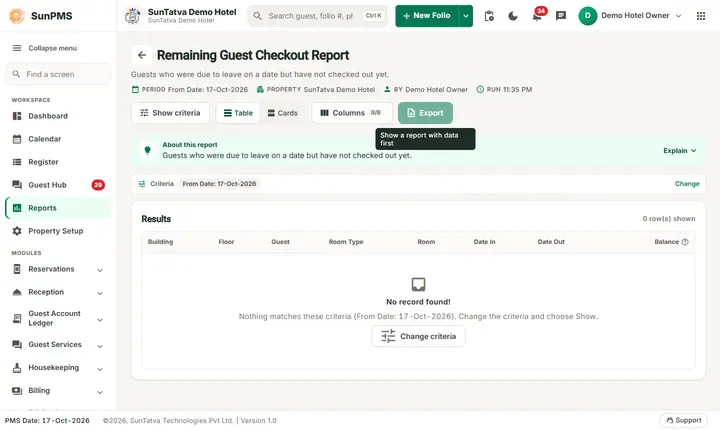
- The report uses one date (the departure date). It opens on the PMS date. On the demo hotel the PMS date is 17-Oct-2026 and nobody who is due out that day is still in house, so the first view says No record found!; choose 18-Oct-2026 to see the next day's departures.
- The stay must have a room assigned (building and floor come from the room).
Step by step
- Click Reports in the left menu (or press Ctrl+K and type the report name). The report library opens at
#/reports. - Choose the category Guest Reports (or type in the search box) and click the card Remaining Guest Checkout ("Guests pending checkout"). You can also open
#/report/remaining-guest-checkoutdirectly. - The report opens and runs once with its default criteria, so you already see data. Under Report criteria set From Date as you need (in a date calendar, Working Date jumps to the current business date).
- Click Show to run it again with the new criteria. The line under Results tells how many rows are shown.
- Sort by clicking a column heading; hide columns under Columns.
- Read the result as a Table or as Cards (switch at the top right). Columns shows or hides columns and lets you drag them into another order; click a column title to sort. Hide criteria / Show criteria folds the criteria away; on a tablet or phone it folds by itself after Show and leaves a one-line summary.
- Click Export and choose PDF, Excel or Email (PDF). The button is always in the header but stays disabled until the report has rows.
Filters
| Filter | Meaning | Rules and default |
|---|---|---|
| From Date | The departure date (Date Out) of the stays to list. |
Default PMS date. A single day, not a range. |
Columns
| Column | Meaning and calculation |
|---|---|
| Building | Building of the room. |
| Floor | Floor of the room. |
| Guest | Name of the primary guest (blank when the stay has no named guest). |
| Room Type | Room type name. |
| Room | Room number. |
| Date In | Arrival date of the stay. |
| Date Out | Departure date (the date you chose). |
| Balance | What the guest still owes: (rent + occupancy tax + other charges + other charge tax) minus (payments + discount). |
Totals and grouping
No grouping and no totals. Ordered by arrival date. Add the Balance column yourself if you need the total owed.
How to read an example
From Date 18-Oct-2026 on the demo hotel shows 7 guests, all due out on 18-Oct-2026:
| Building | Floor | Guest | Room Type | Room | Date In | Balance |
|---|---|---|---|---|---|---|
| Main | Ground Floor | Billing One | Standard | 107 | 16-Oct-2026 | 4,830.00 |
| Main | Lobby Floor | Billing Two | Standard | 103 | 16-Oct-2026 | 6,330.00 |
| East Wing | Ground Floor | Economy | 109 | 16-Oct-2026 | 4,197.60 | |
| Main | Ground Floor | Fo1-bravo Tester | Standard | 106 | 17-Oct-2026 | 3,080.00 |
Read it as: 7 rooms are still occupied by guests who must leave on 18-Oct. Together they owe 4,830.00 + 6,330.00 + 5,830.00 + 3 x 4,197.60 + 3,080.00 = 32,662.80. The cashier should settle these bills before the guests go; the three Economy rooms in East Wing have no guest name on the folio.
Common questions it answers
- Which rooms are still occupied although the guest should have left?
- Who still has to pay before leaving?
- Which rooms can housekeeping not start on yet?
Export, print and e-mail
- Excel downloads Remaining Guest Checkout Report.xlsx with the visible columns. The date line of the file shows the chosen date.
- Email (PDF) shows Email sent successfully.
- PDF: Since 19-Oct-2026 the PDF also opens on a property without an uploaded logo. Use Excel or Email (PDF).
Troubleshooting
- No record found! Nobody due out on that date is still in house, or the date is wrong. Check the PMS date.
- A guest who is overdue is missing. The report lists only the departure date you choose; a guest who stayed beyond the planned date has an old Date Out. Choose that earlier date, or use Guest Ledger for all in-house folios.
- A guest is missing although in house. The folio has no room assigned, or the departure date is different.
- The balance is not what the guest says. Open the folio; the report subtracts payments and discount from all charges, including other charges posted today.
Messages you may see
| Message | Why | What to do |
|---|---|---|
| No record found! | No guest due out that day is still in house. | Check the date. |
| Email sent successfully. | Mail request accepted. | Check the inbox. |
Related reports
Departure, Guest List, Guest Ledger, Guest Reports overview.