
Adult Child Detail Report
On this page
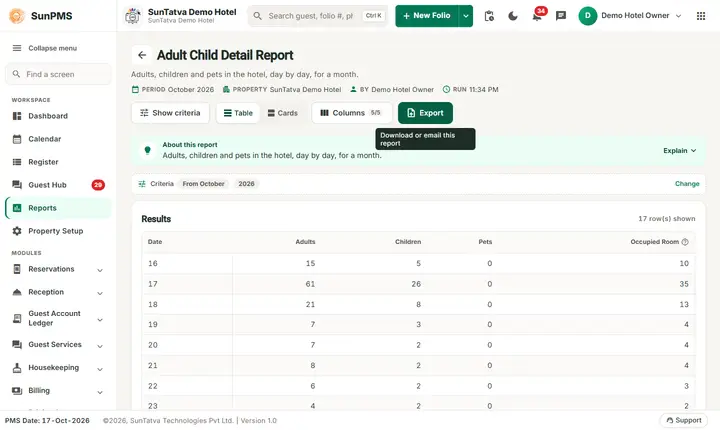
The Adult Child Detail Report counts, for each day of a month, how many adults, children and pets stay in the hotel and how many rooms are occupied. It is a headcount by day.
Purpose
- Plan breakfast, housekeeping and staffing by the number of people, not only rooms.
- Prepare tourism or local authority statistics (guests per day).
- Check average people per room.
Who uses it
Front office manager, food and beverage manager (covers), housekeeping manager and the person who files the monthly statistics.
About this report on screen
Every report page has an About this report bar under its header (button Explain / Hide). It explains the report in plain words:
- Summary: Adults, children and pets in the hotel, day by day, for a month.
- What this report shows: For each day of the chosen month and year: occupied rooms and the number of adults, children and pets staying.
- How to read it:
- Useful for breakfast planning and for statistics returns.
Columns explained (the same text shows on the help icon next to a column title):
| Column | Meaning |
|---|---|
| Occupied Room | Rooms with a guest staying that night. |
Before you start
- You need the privilege Guest_Report_AdultChildDetail.
- The numbers come from the adults, children and pets typed on each reservation or folio. If the desk did not enter them, the day shows zero or a low count.
- The report counts confirmed and unconfirmed stays, including reservations that have not arrived yet; cancelled, no-show and transferred-out stays are not counted.
Step by step
- Click Reports in the left menu (or press Ctrl+K and type the report name). The report library opens at
#/reports. - Choose the category Guest Reports (or type in the search box) and click the card Adult Child Detail ("Guest age breakdown"). You can also open
#/report/adult-child-detaildirectly. - The report opens and runs once with its default criteria, so you already see data. Under Report criteria set From Month, Year as you need (in a date calendar, Working Date jumps to the current business date).
- Click Show to run it again with the new criteria. The line under Results tells how many rows are shown.
- Read one line per day, and the line Total: at the bottom.
- Read the result as a Table or as Cards (switch at the top right). Columns shows or hides columns and lets you drag them into another order; click a column title to sort. Hide criteria / Show criteria folds the criteria away; on a tablet or phone it folds by itself after Show and leaves a one-line summary.
- Click Export and choose PDF, Excel or Email (PDF). The button is always in the header but stays disabled until the report has rows.
Filters
| Filter | Meaning | Rules and default |
|---|---|---|
| From Month | The month to report (January to December). | Default: month of the PMS date (October on the demo hotel). The whole month is reported, the report cannot span two months. |
| Year | The year. | List of the current year and the ten years before. Default: current year. |
Columns
| Column | Meaning and calculation |
|---|---|
| Date | The day of the month (only the day number, for example 17). Days without any stay are not listed. |
| Adults | Sum of the adults of all stays that have a night on that date. |
| Children | Same for children. |
| Pets | Same for pets. |
| Occupied Room | Number of stays (rooms) that have a night on that date. |
Totals and grouping
The last line Total: adds the daily numbers over the month. Because a guest who stays three nights is counted on three days, the totals are guest-nights (and room-nights), not different people.
How to read an example
October 2026 on the demo hotel:
| Date | Adults | Children | Pets | Occupied Room |
|---|---|---|---|---|
| 16 | 15 | 5 | 0 | 10 |
| 17 | 37 | 14 | 0 | 23 |
| 18 | 19 | 7 | 0 | 12 |
| ... | ||||
| 31 | 5 | 2 | 0 | 3 |
| Total: | 163 | 60 | 0 | 93 |
Read it as: on 17-Oct-2026 there were 23 rooms with a night, with 37 adults and 14 children. The month total of 93 room-nights carries 163 adult-nights and 60 child-nights. 17-Oct is high because several groups and reservations overlap that night. The later days (20-31 October) are future reservations. No pets were entered at all.
Common questions it answers
- How many people do I have to feed tomorrow?
- What is the average number of adults per room (Adults divided by Occupied Room)?
- How many children stayed in the month?
Export, print and e-mail
- Excel downloads Adult Child Detail Report.xlsx. The header line shows the month and year.
- Email (PDF) shows Email sent successfully.
- PDF: Since 19-Oct-2026 the PDF also opens on a property without an uploaded logo. Use Excel or Email (PDF).
Troubleshooting
- The numbers are higher than the in-house count. The report includes reservations that have not arrived yet and counts every night of every stay.
- Children show zero although the hotel had families. The desk left the children field at zero on the reservation.
- No record found! The month has no stay.
- A different year is missing. The year list covers the current year and ten before it.
Messages you may see
| Message | Why | What to do |
|---|---|---|
| No record found! | No stay in the month. | Choose another month. |
| Email sent successfully. | Mail request accepted. | Check the inbox. |