Daily Guest Payment
On this page
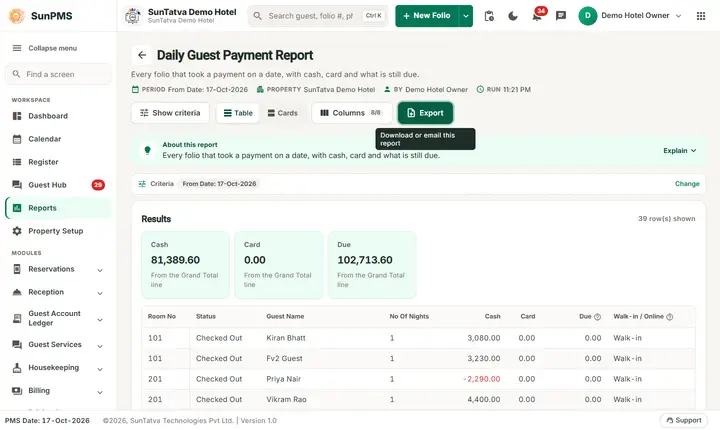
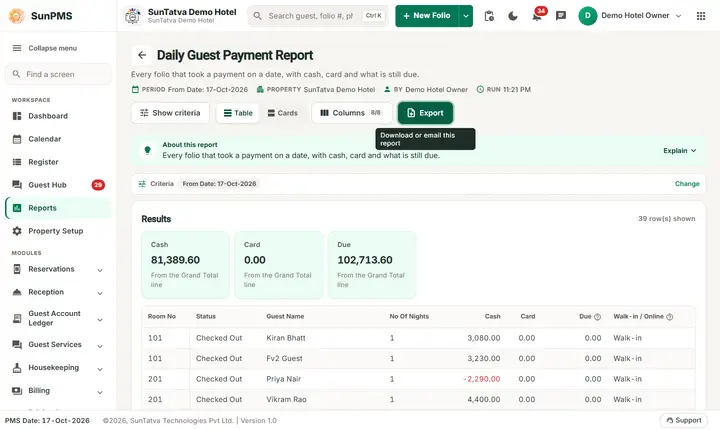
Daily Guest Payment is a customized report. For one day it lists every guest folio that received a payment on that day, with the cash and card amount of that day and the amount still due on the folio. Cashiers and accountants use it to see who paid what today and who still owes money.
Purpose
- List the payments of one day guest by guest (not by payment type).
- See, in the same line, how much each guest still owes (Due).
- Check the cash and card totals of the day against the collection reports.
Who uses it
Cashiers at the end of a shift, accountants, and front desk managers who chase open balances.
About this report on screen
Every report page has an About this report bar under its header (button Explain / Hide). It explains the report in plain words:
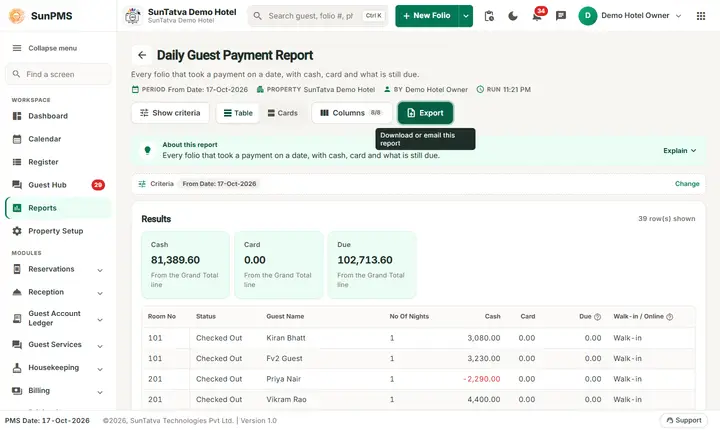
- Summary: Every folio that took a payment on a date, with cash, card and what is still due.
- What this report shows: One line per folio with a payment dated on the chosen date: room, status, primary guest (and group), nights (or hours for hourly stays), the cash and card paid that day, the amount still due on the folio and whether it is a walk-in or an online booking.
- How to read it:
- Cash and Card are the payments of that date in the Cash and Card payment categories. Other payment types (bank, cheque...) are not split out here.
- There is no Online amount column: payments collected by a sales channel are not shown as a separate amount in this report. Only their payment type decides whether they count under Cash or Card.
- Due = rent + occupancy tax + other charges + their tax - discount - all payments of the folio so far. A negative Due means the guest has paid more than the charges.
- Status is the room status that day; for a checked-out, cancelled, no-show or transferred folio that has payments it shows Checked Out, Canceled, No Show or Transfer Out.
- Walk-in / Online: Online when the booking came in from a channel (it has a channel folio number), otherwise Walk-in.
- Rows called "Total" or "Grand Total" are added by the report itself and are highlighted.
- Good to know:
- This is a customized report: it is listed under Customized Report when it is switched on for your property.
- Dates are business dates (the PMS working date), not calendar dates. A day closes with the night audit.
Columns explained (the same text shows on the help icon next to a column title):
| Column | Meaning |
|---|---|
| No Of Hours | Hours used (hourly stays). |
| Due | Amount the guest still has to pay. |
| Walk-in / Online | Whether the guest walked in or booked online. |
Before you start
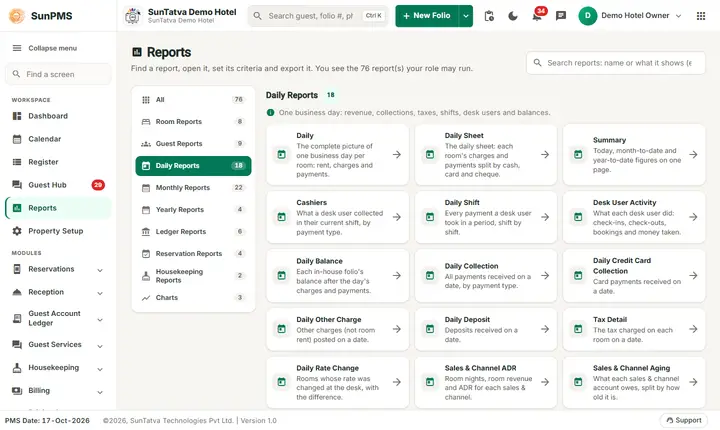
- The report is not a card in the report library. The category Daily Reports does not list it.
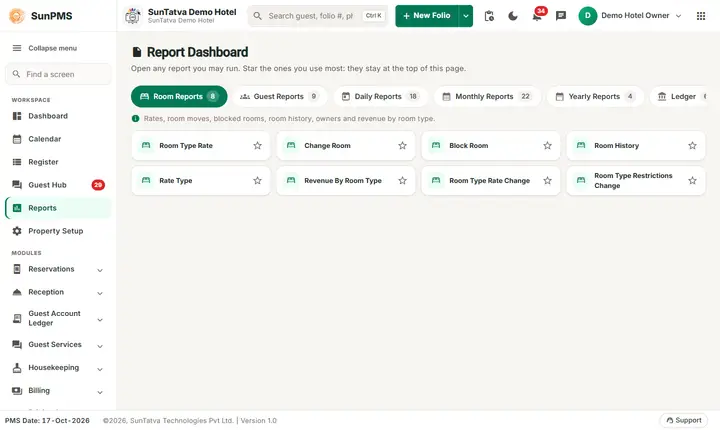
- It appears in the Report Dashboard in a category pill named Customized Report, and only when both are true: the property has the report in its list of custom reports (support adds it, it is built per property) and your role has the privilege Customize_Report_CustomizeReport. The demo hotel has no custom report list, so the pill is not shown there.
- If the report is not offered to you, you can still open it by its address
#/report/daily-guest-paymentwhen you have the privilege; without the privilege the application signs you out.
Step by step
- Open the Report Dashboard (address
#/reports/dashboard, or Ctrl+K and type its name). - Click the pill Customized Report and then Daily Guest Payment. (If your property has no such pill, open
#/report/daily-guest-payment.) - In Report criteria set From Date: the day to report. It starts on the PMS date.
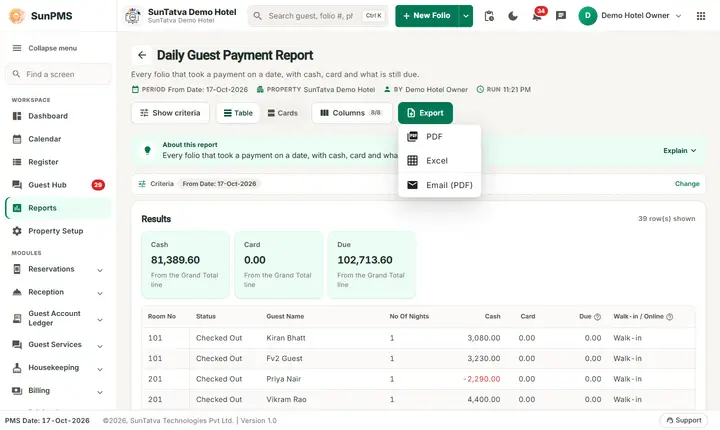
- Read the lines and the Total line at the bottom. Use Export for PDF, Excel or e-mail.
Result: one line per folio with a payment dated that day.
Filters
| Filter | Meaning | Rules and default |
|---|---|---|
| From Date | The day of the payments. The report is for this single day (the label says From Date, there is no To Date). | Default: the PMS date. |
The Columns button in the header opens a panel: untick a column to hide it, drag the grip icon to reorder. Hidden columns are also left out of PDF and Excel. If you hide every column, Export is disabled.
Columns
| Column | Meaning and how it is calculated |
|---|---|
| Room No | The room of the folio. Empty when the folio has no room (for example a cancelled reservation). |
| Status | Checked Out, Canceled, No Show or Transfer Out when the folio has that state and has payments; otherwise the room status of that day (for example O/Clean), or Reserved. |
| Guest Name | The primary guest of the folio. For group folios the group name is added in brackets; a group folio without a guest shows only (Group name). |
| No Of Nights | Nights of the stay. |
| No Of Hours | Hours of the stay. The column appears only when at least one line is an hourly stay. |
| Cash | Payments of that day whose payment type belongs to the category Cash. A refund is negative. |
| Card | Payments of that day whose payment type belongs to the category Card. |
| Due | Folio total (room rent + occupancy tax + other charges + tax - discount) minus all payments of the folio (not only of that day). Negative = the guest has paid more than the folio total. |
| Walk-in / Online | Online when the folio has an online booking (CRS) folio number, otherwise Walk-in. |
The report does not show an Online amount column. The server calculates an Online amount for payments made through a sales and channel source, but that amount is always zero in this report, so the screen hides the column and it is not in the PDF or Excel file either.
Totals and grouping
There is no grouping; lines are ordered by the room order of your property, then by folio. The last line Total (in the Room No column) adds Cash, Card and Due of all lines. The No Of Nights of the Total line is not a sum.
Payments of other types (UPI, bank transfer, cheque, gift cards and so on) are not in Cash or Card; they reduce Due only. A folio is listed when it has any payment dated that day, so a line can show 0.00 in both Cash and Card.
How to read an example
Run on the demo hotel for 17-Oct-2026 (the PMS date):
| Room No | Status | Guest Name | No Of Nights | Cash | Card | Due | Walk-in / Online |
|---|---|---|---|---|---|---|---|
| 101 | Checked Out | Kiran Bhatt | 1 | 3,080.00 | 0.00 | 0.00 | Walk-in |
| 201 | Checked Out | Priya Nair | 1 | -2,290.00 | 0.00 | 0.00 | Walk-in |
| 104 | O/Clean | Fo2-alpha Money | 3 | 2,500.00 | 0.00 | 4,360.00 | Walk-in |
| Total | 81,389.60 | 0.00 | 94,713.60 |
Read it as: 37 folios received a payment on 17-Oct-2026. Kiran Bhatt paid 3,080.00 in cash and the folio is settled (Due 0.00). Priya Nair shows -2,290.00: a cash refund of that day. The guest of room 104 paid 2,500.00 in cash today and still owes 4,360.00. The Total line says cash 81,389.60 and card 0.00 (no card payment that day), and 94,713.60 is still due on these folios. Demo figures change as the demo data changes; your own numbers will differ.
Common questions it answers
- Who paid today and how much (cash and card)?
- Which of those guests still owe money?
- Was a refund paid today?
- Do the cash and card totals match my collection report?
Troubleshooting
| What you see | Why and what to do |
|---|---|
| I cannot find Daily Guest Payment | It is a custom report: it is listed only in the Customized Report pill of the Report Dashboard, when support has added it to your property and your role has Customize_Report_CustomizeReport. Ask support. Alternatives: Daily Collection, Daily Collection Payment Type. |
| I am signed out when I open the address | Your role lacks the privilege Customize_Report_CustomizeReport. Tick it in Settings > Assign Report Privileges and sign in again. |
| There is no Online column | Not shown; see the note under Columns. |
| A folio is missing | It has no payment line dated that day (the report lists folios by payment date, not by stay date), or the payment was deleted. |
| Cash plus Card is less than the payments of the day | UPI, bank transfer and other non-cash, non-card types are not in these two columns. Use Daily Collection Payment Type. |
| Due differs from the folio screen | Due uses the folio totals and all payments; a discount or a later charge changes it. Open the folio to check. |
| Room No is empty | The folio has no room (cancelled or not yet assigned). |
Messages you may see
| Message | Why it appears | What to do |
|---|---|---|
| No record found! | No folio has a payment dated that day. | Pick another day. |
| Email sent successfully. | You chose Email (PDF). | Check the property mailbox. The message appears even if the mail server refuses the mail. |
Export, print and e-mail
- PDF opens in a new tab (allow pop-ups). Excel downloads Daily Guest Payment Report.xlsx: property name, print date, report name, Date From: 17-Oct-2026, then the visible columns and the same rows.
- Email (PDF) has the server mail the PDF to the property e-mail address.
- Export is shown only when the result has at least one row.
Related reports
- Daily Collection, Daily Collection Payment Type - all payments of a day by type.
- Report Dashboard and Housekeeping and custom reports.
Screenshots