
- Choose the accounting system in FAS Settings (below). While it is N/A, the FAS Interface menu is hidden, and if you open the address you are sent back to your last view.
- For M3: map accounts in M3 Account Integration. The "Other Charge Categories" must be flagged to post to FAS in their setup.
- Night audit for the day to post must be done.
Integrations
Hotel accounting integration: FAS and M3 export
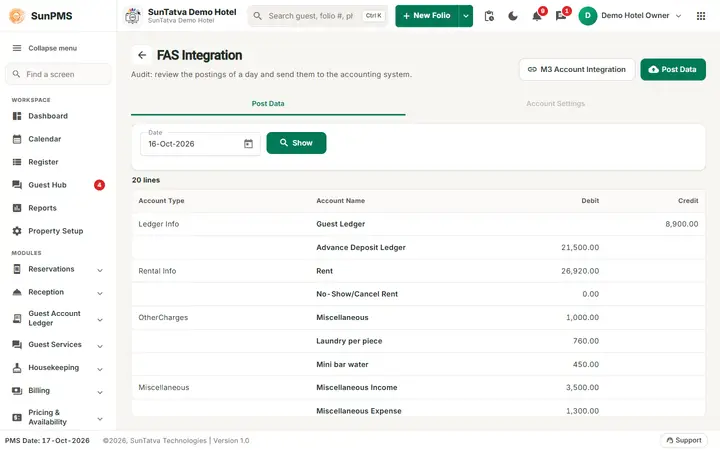
FAS is the accounting package that receives your daily hotel figures. Currently the supported choice is M3 Accounting Systems. Each day SunPMS summarises revenue, taxes, payments and ledgers into debit and credit lines and posts them to the accounting system.
What you need
Guides
FAS Integration and FAS Settings
FAS (Financial Accounting System) is the accounting package that receives your daily hotel figures.
Read the guide →M3 Account Integration
A mapping table that tells SunPMS which account code in your M3 accounting system belongs to each PMS account (rent, taxes, each…
Read the guide →FAS Settings
Connects the PMS to an external Financial Accounting System (FAS) so daily revenue and, optionally, statistical data are posted…
Read the guide →Frequently asked questions
I do not see FAS Settings.
FAS Accounting is not licensed/enabled for the property.
I cannot see FAS Interface.
FAS Name is N/A, or you lack access. Set it in FAS Settings.
Can I post the same day twice?
Posting again resends the figures; confirm with the accountant whether M3 replaces or adds.
What is the disabled Account Settings tab?
Reserved for future use (Location ID, Daily/Monthly posting).
Why is Statistics missing?
Tick Post Statistical Data To FAS in FAS Settings.
Which category is rent?
Journal item > Rent.
See SunPMS with your own hotel in mind
Request a walkthrough and we will show the screens your team will use every day.