Monthly Multi Currency Report
On this page
The Monthly Multi Currency Report lists the folio payments received in a currency other than the property (base) currency. Payments are grouped under a heading Currency Name:-
Purpose
Reconcile foreign currency cash and cards: which currency was taken, from which guest, at which rate, and what it is worth in the property currency.
Who uses it
Cashiers (foreign cash count), accountants (forex gain or loss) and managers.
About this report on screen
Every report page has an About this report bar under its header (button Explain / Hide). It explains the report in plain words:
- Summary: Payments taken in foreign currencies, with the exchange rate.
- What this report shows: Each foreign-currency payment in the period with the currency amount, the exchange rate used and the amount in the hotel's currency.
- How to read it:
- Total = currency amount x exchange rate.
- Good to know:
- From Date starts on the 1st of the current business month; change it for any other period.
Columns explained (the same text shows on the help icon next to a column title):
| Column | Meaning |
|---|---|
| Currency Amount | Amount in the foreign currency. |
| Exchange Rate | Rate used to convert the foreign currency into the hotel currency. |
Before you start
- The property must have additional currencies and rates in the Exchange Rate master, and guests must have paid on the folio in one of them. Payments in the base currency are not listed.
- The report reads folio payments (not group, deposit-only or miscellaneous payments) that carry an exchange rate that is not the base currency.
- You need the privilege Monthly_Report_MultipleCurrencyReport (Property Setup > User & Access > Assign Report Privileges). Without it the card is not shown on the Reports screen and a direct address signs you out.
Step by step
- Click Reports in the left menu (or press Ctrl+K and type the report name). The report library opens at
#/reports. - Choose the category Monthly Reports (or type in the search box) and click the card Multi Currency ("Collections by currency"). You can also open
#/report/multi-currencydirectly. - The report opens and runs once with its default criteria, so you already see data. Under Report criteria set From Date, To Date as you need (in a date calendar, Working Date jumps to the current business date).
- Click Show to run it again with the new criteria. The line under Results tells how many rows are shown.
- Read the result as a Table or as Cards (switch at the top right). Columns shows or hides columns and lets you drag them into another order; click a column title to sort. Hide criteria / Show criteria folds the criteria away; on a tablet or phone it folds by itself after Show and leaves a one-line summary.
- Click Export and choose PDF, Excel or Email (PDF). The button is always in the header but stays disabled until the report has rows.
Filters
| Filter | What it does | Default |
|---|---|---|
| From Date | First day of the period. The calendar greys out days before the property start date (16-Oct-2026 on the demo hotel); the Working Date button sets the PMS date. | First day of the PMS month |
| To Date | Last day of the period; it cannot be before From Date. A date after the PMS date is accepted (stays booked for those days then show their rent, nothing is paid yet). | PMS date |
The Columns button in the header opens a panel: untick a column to hide it, drag the grip icon to reorder. Hidden columns are also left out of PDF and Excel. If you hide every column, Export is disabled.
Columns
| Column | Meaning and how it is calculated |
|---|---|
| (group heading) | **Currency Name:- ** followed by the currency name; hidden column used for grouping. |
| Guest Name | Primary guest of the folio (the caption follows the GUEST_TITLE setting). A line "Total" closes each currency. |
| Room | Room of the folio (caption from ROOM_TITLE). |
| Date In | Check-in date of the folio. |
| Date Out | Check-out date of the folio. |
| Currency Amount | Amount received in the foreign currency. |
| Exchange Rate | Rate that was applied when the payment was taken. |
| Total | Value in the property currency (Currency Amount x Exchange Rate). |
| User Name | Desk user who created the folio. |
Totals and grouping
Grouped by currency with a Total line after each currency (sum of Currency Amount and Total), and a Grand Total at the end that adds the currency lines. The Grand Total line is always present; without foreign payments it shows 0.00.
How to read an example
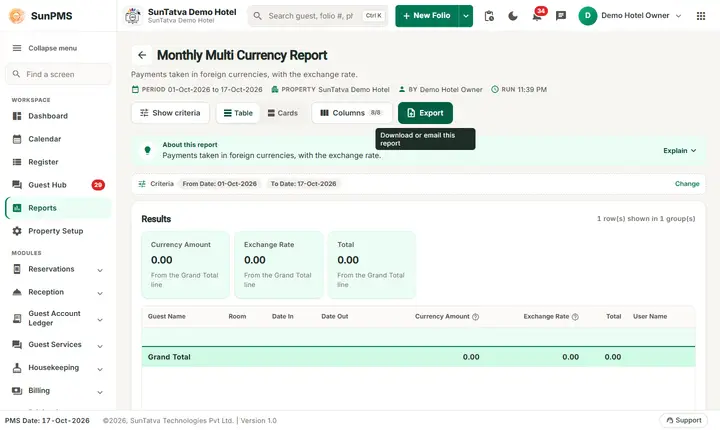
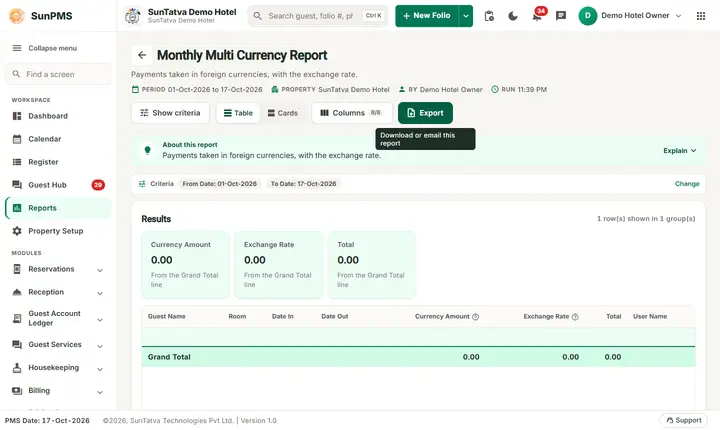
On the demo hotel, run for 16-Oct-2026 to 17-Oct-2026: the report has no payment line, only the Grand Total row with Currency Amount, Exchange Rate and Total at 0 (2 rows). No guest paid in a foreign currency in this period.
Illustration with made-up numbers: a heading Currency Name:- US Dollar, a line Guest A | 201 | 14-Oct-2026 | 17-Oct-2026 | 100.00 | 83.20 | 8,320.00 | desk user, a Total line 100.00 / 8,320.00, then Grand Total.
Common questions it answers
- Which guests paid in dollars, euros or another currency this month?
- What rate did we use for each foreign payment?
- How much foreign currency should be in the cash box?
Troubleshooting
| Problem | Cause and what to do |
|---|---|
| Only Grand Total 0.00 is shown | No folio payment in a foreign currency was posted in the range. Check the dates, and that the payment screen was used with a non-base currency. |
| A foreign payment is missing | Only folio payments with an active, non-base exchange rate and a guest room are listed; group payments and payments on folios without a room are not. |
| Totals differ from Monthly Collection | Monthly Collection counts the payment type in base currency; this report shows foreign amounts and the converted total. |
Messages you may see
| Message | Why it appears | What to do |
|---|---|---|
| No record found! | The service returned no rows for the filters. | Change the dates or filters and click Show. |
| Email sent successfully. | You chose Email (PDF). | Check the property mailbox. The message appears even if the mail server refuses the mail. |
Export, print and e-mail
- PDF is built in the browser and opens in a new tab (allow pop-ups). If the property has no uploaded logo the PDF is simply drawn without it.
- Excel downloads Monthly Multi Currency Report.xlsx: property name, print date, report name and date range, then the visible columns and the same rows.
- Email (PDF) has the server mail the PDF to the property e-mail address and shows "Email sent successfully." at once, even if delivery fails.
- The Export button is always in the report header; it is disabled (grey) until the result has at least one row.
Related reports
- Monthly Collection - payments by type in the property currency
- Monthly Report
- Monthly Reports - revenue, collections and balances (group page)
- Report finder
Screenshots