Monthly Balance Report
On this page
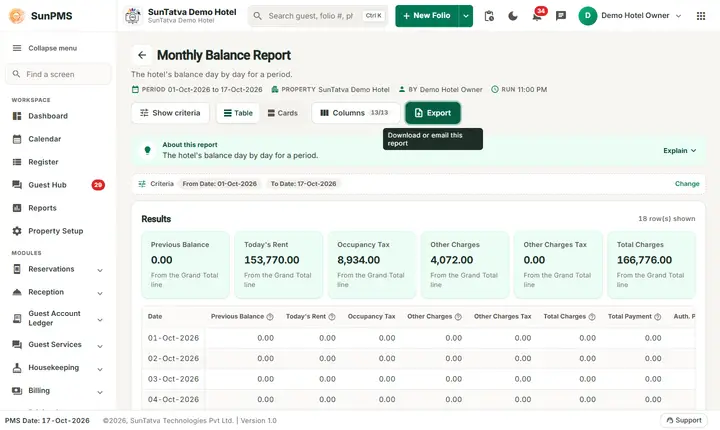
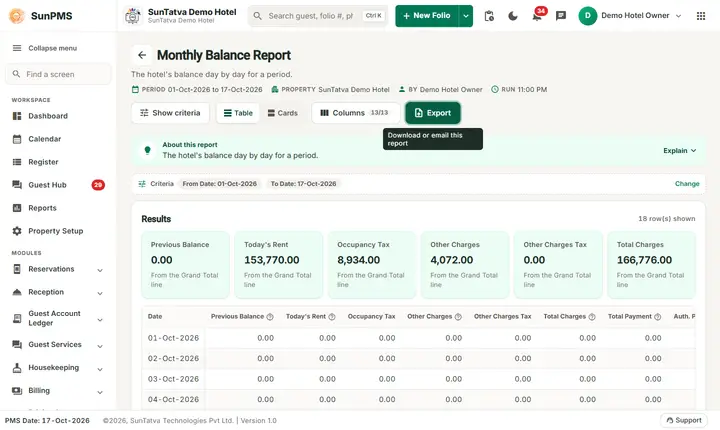
The Monthly Balance Report shows, for every day of the period, the Previous Balance carried from the day before, the day's Today's Rent, tax and other charges, the payments, discount, direct billing and Advance Deposit, and the resulting Total Balance. The Total Balance of one day becomes the Previous Balance of the next day.
Purpose
Follow the money owed by (or owed to) guests day by day: how much was charged, how much was settled and what balance remained at the end of each day.
Who uses it
Accountants and night auditors (guest ledger reconciliation), the general manager.
About this report on screen
Every report page has an About this report bar under its header (button Explain / Hide). It explains the report in plain words:
- Summary: The hotel's balance day by day for a period.
- What this report shows: For each day: previous balance, today's rent, other charges, discount, direct billing, deposits, authorisations, payments and the closing balance.
- How to read it:
- Closing balance = previous balance + charges - payments.
- Good to know:
- From Date starts on the 1st of the current business month; change it for any other period.
Columns explained (the same text shows on the help icon next to a column title):
| Column | Meaning |
|---|---|
| Previous Balance | The balance before this day's charges and payments. |
| Today's Rent | Room rent posted for this day. |
| Other Charges | Charges other than room rent (food, laundry, extra bed...). |
| Total Charges | Everything charged to the folio. |
| Total Payment | All payments received. |
| Auth. Payment | Card authorisations: a hold on the card, not yet charged. |
| Discount | Discounts given on the bill. |
| Direct Billing | Charges billed to a company or channel account instead of the guest. |
| Advance Deposit | Money received before the guest arrived. |
| Total Balance | Closing balance: previous balance + charges - payments. |
Before you start
- The first day of the range always starts with a Previous Balance of 0.00. The report does not carry in the balance of days before From Date, so choose the first day of the month for a month view.
- Charges are those of checked-in folios; advance deposits are payments on reservations.
- You need the privilege Monthly_Report_MonthlyBalance (Property Setup > User & Access > Assign Report Privileges). Without it the card is not shown on the Reports screen and a direct address signs you out.
Step by step
- Click Reports in the left menu (or press Ctrl+K and type the report name). The report library opens at
#/reports. - Choose the category Monthly Reports (or type in the search box) and click the card Monthly Balance ("Opening and closing balances"). You can also open
#/report/monthly-balancedirectly. - The report opens and runs once with its default criteria, so you already see data. Under Report criteria set From Date, To Date as you need (in a date calendar, Working Date jumps to the current business date).
- Click Show to run it again with the new criteria. The line under Results tells how many rows are shown.
- Read the result as a Table or as Cards (switch at the top right). Columns shows or hides columns and lets you drag them into another order; click a column title to sort. Hide criteria / Show criteria folds the criteria away; on a tablet or phone it folds by itself after Show and leaves a one-line summary.
- Click Export and choose PDF, Excel or Email (PDF). The button is always in the header but stays disabled until the report has rows.
Filters
| Filter | What it does | Default |
|---|---|---|
| From Date | First day of the period. The calendar greys out days before the property start date (16-Oct-2026 on the demo hotel); the Working Date button sets the PMS date. | First day of the PMS month |
| To Date | Last day of the period; it cannot be before From Date. A date after the PMS date is accepted (stays booked for those days then show their rent, nothing is paid yet). | PMS date |
The Columns button in the header opens a panel: untick a column to hide it, drag the grip icon to reorder. Hidden columns are also left out of PDF and Excel. If you hide every column, Export is disabled.
Columns
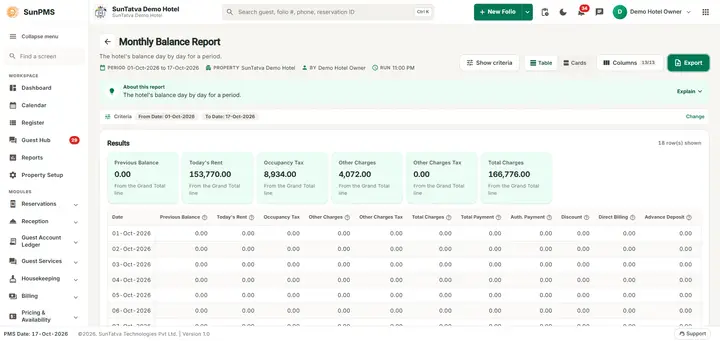
| Column | Meaning and how it is calculated |
|---|---|
| Date | The day (one row per day). |
| Previous Balance | Total Balance of the day before (0.00 on the first day of the range). |
| Today's Rent | Room rent of that day for checked-in folios. |
| Occupancy Tax | Tax on that rent (title from property settings). |
| Other Charges | Other charges posted that day. |
| Other Charges Tax | Tax on those other charges. |
| Total Charges | Today's Rent + Occupancy Tax + Other Charges + Other Charges Tax. |
| Total Payment | Cash, bank and card payments on checked-in folios received that day (completed sales). |
| Auth. Payment | Card payments of the day that are only authorised (not yet sales). |
| Discount | Discounts given that day. |
| Direct Billing | Payments billed to a Sales & Channel account that day. |
| Advance Deposit | Cash, bank and card payments received that day on reservations (advance deposits). |
| Total Balance | Previous Balance + Total Charges - (Total Payment + Auth. Payment + Discount + Direct Billing + Advance Deposit). |
Totals and grouping
No grouping. The last line Total adds the period columns (charges, payments, discount, direct billing, advance deposit). Previous Balance shows the opening balance of the first day and Total Balance the closing balance of the last day, because the daily balances are running balances and must not be added.
How to read an example
Run for 16-Oct-2026 to 17-Oct-2026:
- 16-Oct-2026: Previous Balance 0.00, Total Charges 33,280, Total Payment 19,230, Advance Deposit 21,500, Total Balance -8,450. A negative balance means more was received than charged.
- 17-Oct-2026: Previous Balance -8,450 (the balance of the 16th), Total Charges 97,784, Total Payment 22,207.60, Total Balance 67,126.40.
- Total line: Previous Balance 0.00 (that of the first day) and Total Balance 67,126.40, the closing balance of the last day; the other columns are real sums for the period. Figures are from the demo hotel on 19-Oct-2026 and change as demo data changes.
Common questions it answers
- What was the guest balance at the end of each day?
- How much were advance deposits on each day?
- How much was charged and how much was settled in the month?
Troubleshooting
| Problem | Cause and what to do |
|---|---|
| Previous Balance on the first day is 0.00 | By design: the report starts from zero at From Date and does not read earlier days. Start at the first day the property used the PMS or accept that earlier balances are not included. |
| Balance is negative | More money was received (advance deposits or payments) than charged so far. |
Messages you may see
| Message | Why it appears | What to do |
|---|---|---|
| No record found! | The service returned no rows for the filters. | Change the dates or filters and click Show. |
| Email sent successfully. | You chose Email (PDF). | Check the property mailbox. The message appears even if the mail server refuses the mail. |
Export, print and e-mail
- PDF is built in the browser and opens in a new tab (allow pop-ups). If the property has no uploaded logo the PDF is simply drawn without it.
- Excel downloads Monthly Balance Report.xlsx: property name, print date, report name and date range, then the visible columns and the same rows.
- Email (PDF) has the server mail the PDF to the property e-mail address and shows "Email sent successfully." at once, even if delivery fails.
- The Export button is always in the report header; it is disabled (grey) until the result has at least one row.
Related reports
- Monthly Balance Due - checked-out guests with an unpaid balance
- Monthly Report
- Ledger reports (group page)
- Monthly Reports - revenue, collections and balances (group page)
- Report finder
Screenshots