
- The hotel property has the licence POS_INTEGRATION (owner: Property Setup > Licences). Without it, SunPMS refuses the posting.
- The restaurant and the hotel belong to the same owner in SunAuth.
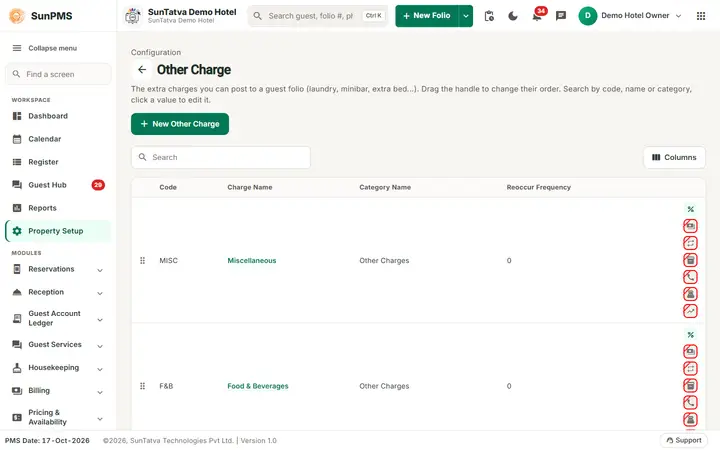
- In SunPMS, create an Other Charge (for example "Restaurant") and tick POS Charge. This is the charge head the restaurant bill posts under (see Other Charges).
- In SunPOS, open Settings > PMS Integration and choose the hotel group, the hotel property and the POS Charge to use (these are stored as
PMS.GroupPropertyID,PMS.PropertyID,PMS.ChargeID). - A restaurant is a property in SunPOS (not an "outlet"); the hotel is a different property in SunPMS.
Integrations
Hotel POS integration: charge a restaurant bill to the room
A SunPOS restaurant or bar can be linked to your hotel. When a guest chooses to charge to the room, SunPOS finds the in-house guest in SunPMS and posts the amount to the guest folio. Posting again or refunding updates the same entry, so it is never duplicated.
What you need
Guides
Frequently asked questions
Why is a list of properties empty when linking?
The other property does not exist for this owner. Create it on the landing page.
Which integrations need a licence?
SunPOS, SunHardware, SunParking, WhatsApp, Guest Portal; see the table.
Who sees the Integrations menu?
Users whose role allows property settings.
The restaurant bill is missing from the folio.
Check the licence, the PMS Integration link in SunPOS, that the charge head is a POS Charge, and that the guest is in-house on that room.
Why does the folio show no tax on it?
The restaurant bill already includes tax; posting it again would tax twice.
Can a guest who already checked out be charged?
No, only in-house guests are found.
See SunPMS with your own hotel in mind
Request a walkthrough and we will show the screens your team will use every day.