Undo Transaction
On this page
Undo takes finished (checked-out) folios out of the live records. It is meant for folios created by mistake, for example test bookings or duplicate stays, so they no longer appear in reports. Undone folios are stored and can be brought back with Redo Transaction or removed permanently there.
Before you start
- Only checked-out, single (non-group) folios whose arrival date is inside the date range are listed.
- Not listed: folios posted by an integration, folios with a direct-bill (sales & channel) payment, and folios with a payment transferred to or from another folio.
- Guests on the Do-Not-Rent list are marked and the legend shows "DNR Guest(s)".
Screen layout
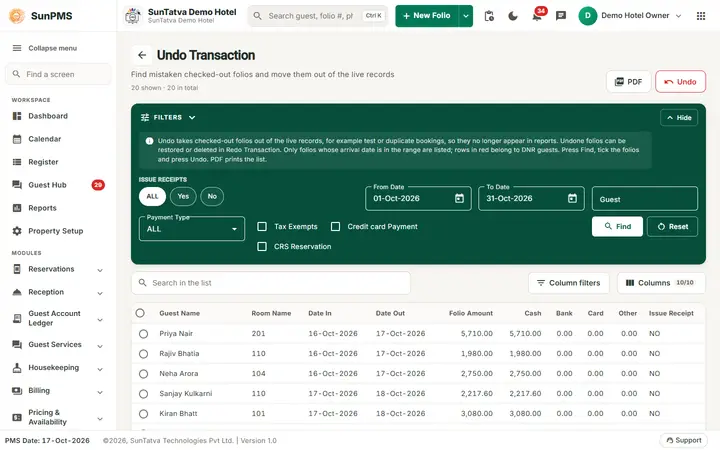
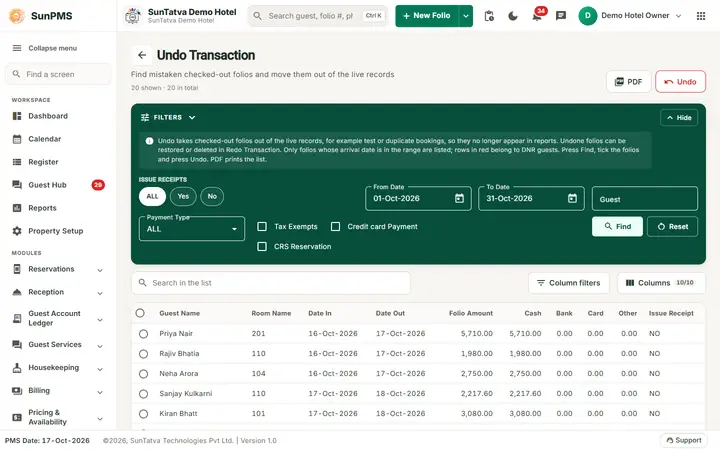
The page title is Undo Transaction with a back arrow and the line "Find mistaken checked-out folios and move them out of the live records", and a count "N shown · M in total". The buttons PDF and Undo (disabled until rows are ticked) sit at the top right. A dark Filters band holds the search filters (it collapses with Hide and returns with Show filters). Under it are a search box "Search in the list", Column filters, a Columns picker, the result table with a tick box per row, a Legend (red dot "DNR Guest(s)") and paging (Rows, first / previous / next / last page). The filter band starts with a note: "Undo takes checked-out folios out of the live records... Press Find, tick the folios and press Undo. PDF prints the list."
| Filter | Meaning |
|---|---|
| Issue Receipts | Chips ALL / Yes / No. |
| From Date / To Date (heading "Arrival dates") | Arrival date range; default first to last day of the PMS month. |
| Guest and Payment Type (heading "Guest and payment") | Part of the guest name; ALL or a payment type used on the folio. |
| Tax Exempts, Credit card Payment, CRS Reservation | Tick to limit to those folios. |
| Find / Reset | Search / restore defaults. |
Columns: Guest Name, Room Name, Date In, Date Out, Folio Amount, Cash, Bank, Card, Other, Issue Receipt (YES/NO). PDF prints the list and Undo moves the ticked folios. Totals of all and of selected folio amounts are shown.
How to undo
- Open Utility > Undo Transaction in the left menu, set the filters and click Find.
- Tick one or more rows (the header tick box selects all rows).
- Click Undo and confirm "Are you sure you want to perform Undo operation for the selected record(s)?". Result (when the secondary database is provisioned): Undo Transaction Successfully. The folios leave the list and appear in Redo Transaction with your name and the date.
What happens behind the scenes
- Each undone folio, with its guests, daily rates, taxes, discounts and payments, is moved to an archive. It no longer exists as a live folio.
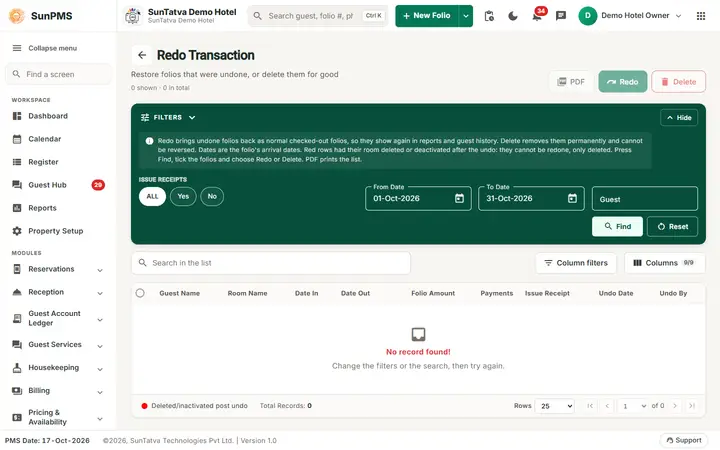
- The folio appears in Redo Transaction with the date and your name as Undo Date and Undo By, where it can be restored or deleted for good.
- Reports, the register and room history no longer include it, but the cash and card figures of earlier days are not recalculated for payments already reconciled.
Messages you may see
| Message (exact text) | Why it appears | What to do |
|---|---|---|
| Please select item(s) to Undo! | Undo clicked with no row ticked. | Tick a row first. |
| Are you sure you want to perform Undo operation for the selected record(s)? | Undo confirmation. | Yes only if the folios really must go. |
| Undo Transaction Successfully. | Done. | None. |
| (error text from the server) | Processing stops at the first failing folio; earlier ones are already undone. | Contact support with the folio number. |
Tips and FAQ
- Q: Does Undo refund the guest's card? A: No. Handle card payments first.
- Q: Where did the undone folio go? A: To Redo Transaction; it disappears from reports and room history until redone.
- Q: Why is a folio I expect not in the list? A: Only checked-out, non-group folios with no integration posting, no direct-bill payment and no transferred payment are listed, and only within the date range.
- Q: Who can undo? A: Roles with Access to undo transaction, and only when the Undo/Redo feature is on.
Known problem on the demo hotel
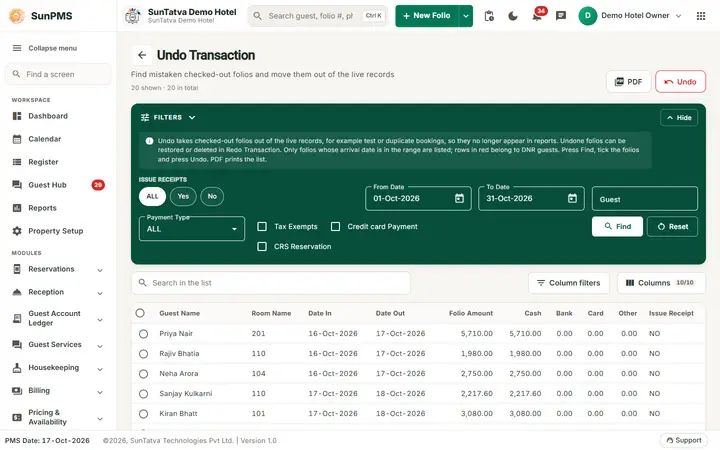
Now that checked-out folios exist, the list of the Undo Transaction screen is filled. Clicking Undo and answering Yes shows Something wrong, Please try again. and the folio stays unchanged. The reason is not the folio: Undo copies it to the secondary database, and the demo hotel has no secondary database connection stored in SunAuth (the server log says Host can't be null). Undo and Redo work only on a property whose secondary database is provisioned. For support: check databasedetail.secondaryconnectionstring of the group property in the SunAuth database.
Screenshots